7
Remote Control Guide
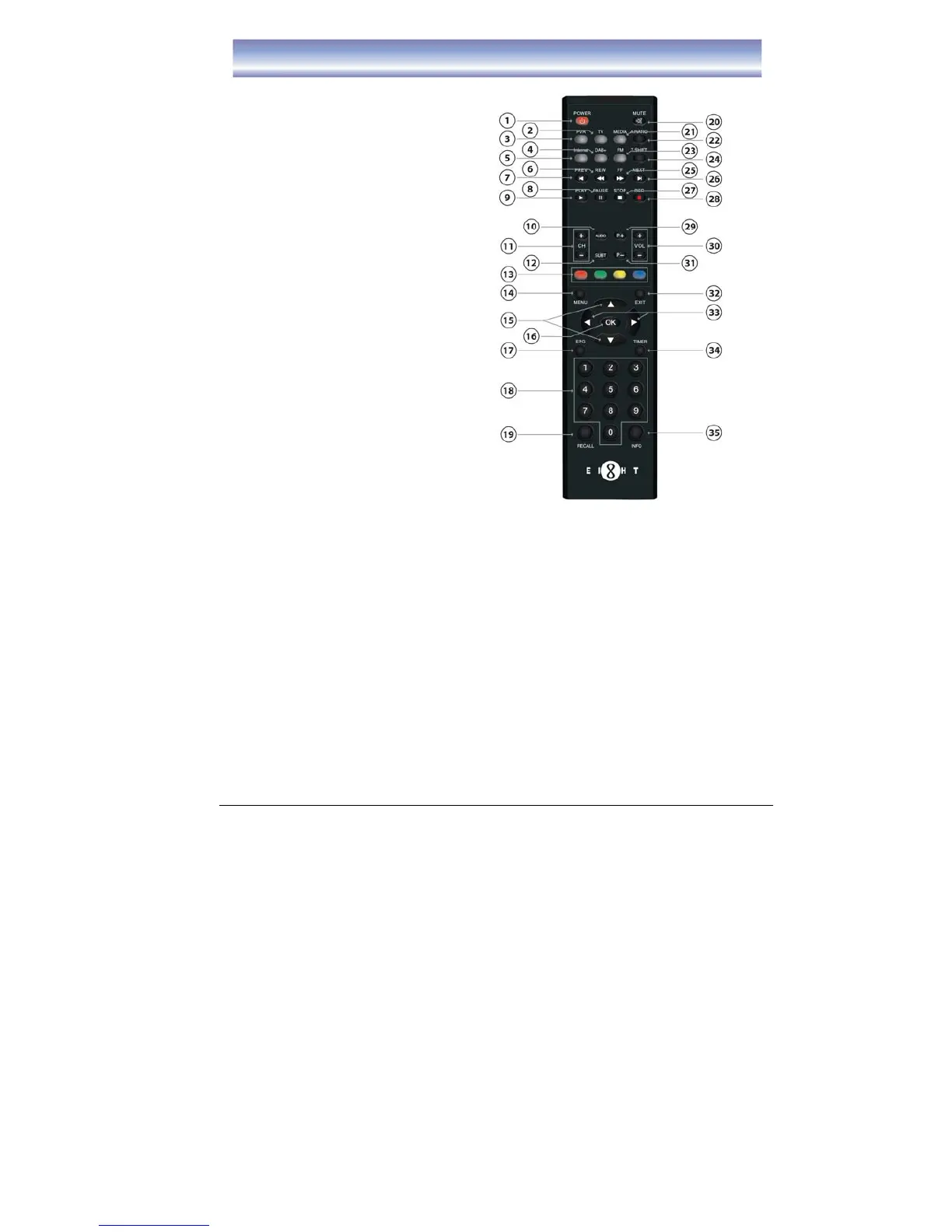
Key functions for remote control:
1. POWER: To turn unit ON/OFF.
2. TV: Shortcut key to TV function.
3. PVR: Shortcut key to PVR function.
4. DAB+: Shortcut key to DAB+
function.
5. INTERNET: Shortcut key to Internet
function.
6. REW: Rewind playing record or time
shift (support 2X, 4X, 8X, 16X, 32X,
64X).
7. PREV: Go to the start point of a
program (in time shift or PVR mode).
8. PAUSE: Pause to play or start time
shift function.
9. PLAY: Start to playing or resume
time shift.
10. AUDIO: To switch audio mode.
11. CH+/- : Change the channel.
12. SUBT: To switch ON/OFF Subtitle
function.
13. 4 COLOR KEYS: For referring usage
shown on the screen.
14. MENU: To open Main Menu.
15.
▲▼: To move up/down or switch
channel.
16. OK: To confirm the selected item.
17. EPG: Shortcut key to EPG list.
18. NUMERIC BUTTON(0-9) : For channel change by LCN or setting input.
19. RECALL: Back to previous watching channel.
20. MUTE:To mute or recover the sound of the unit.
21. MEDIA: Shortcut key to Media function.
22. A. RATIO: To change Aspect Ratio.
23. FM: Shortcut key to FM function.
24. T-SHIFT: To switch ON/OFF Time shift function (must connect external
Harddisk/USB device).
25. FF: Forward playing record or time shift (support 2X, 4X, 8X, 16X, 32X, 64X).
26. NEXT: Go to the end of the program.



 To Next Page