- 25 -
Chapter 3 Advanced Adjustment/Setting
Chapter 3 Advanced Adjustment/Setting
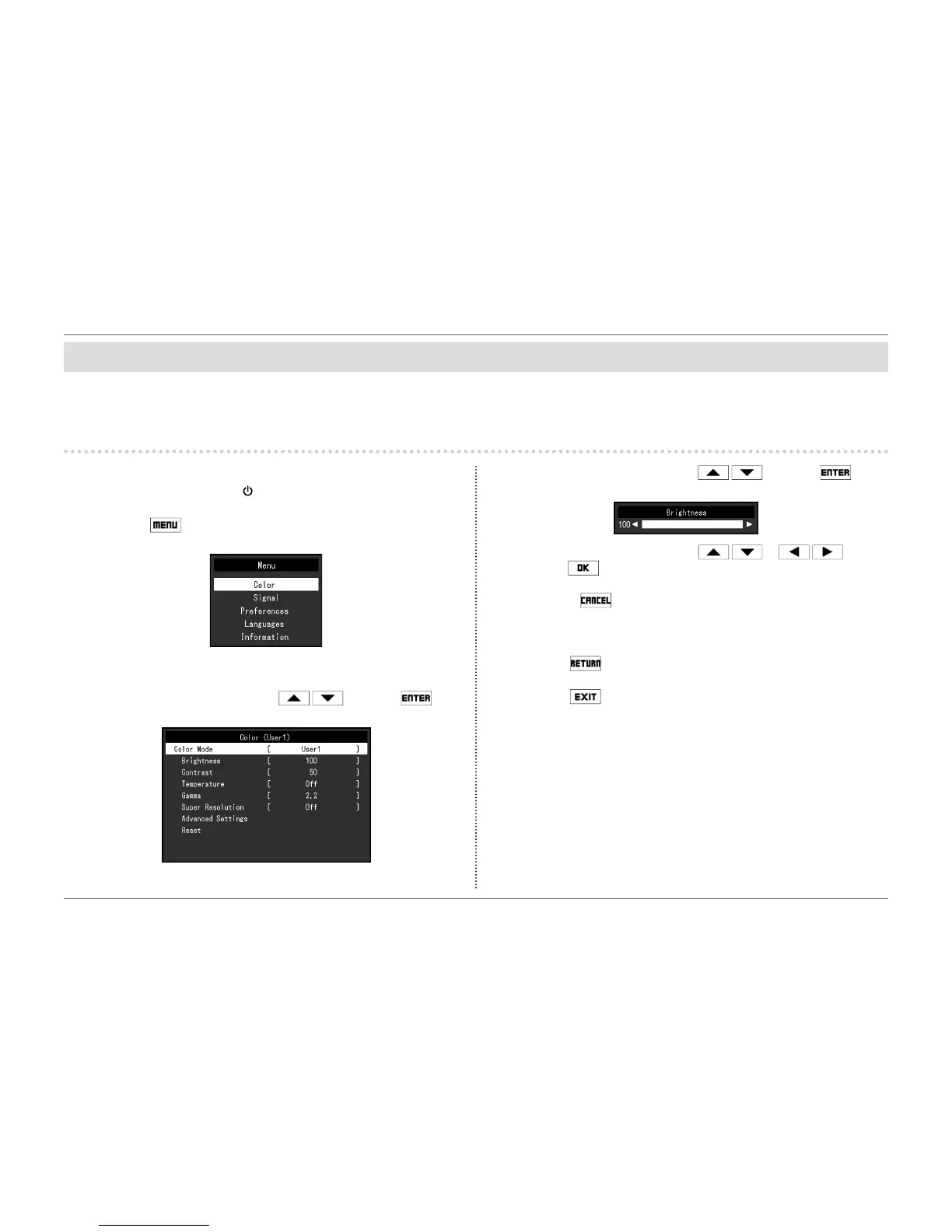
This chapter describes the advanced monitor adjustment and setting procedures using the Setting menu.
For basic functions, see “Chapter 2 Basic Adjustment/Setting” (page 13).
3-1. Basic Operation of the Setting menu
1.
Menu display
1. Press any button (except ).
The operation guide appears.
2. Select .
The Setting menu appears.
2.
Adjusting/setting
1. Select a menu to adjust/set with and select .
The Sub menu appears.
2. Select an item to adjust/set with and select .
The Adjustment/Setting menu appears.
3. Perform adjustment/setting with or and
select to accept the changes.
The Sub menu appears.
Selecting
during adjustment/setting will cancel the adjustment/setting
and restore the state prior to making changes.
3.
Exiting
1. Select .
The Setting menu appears.
2. Select .
The Setting menu quits.














 To Next Page