15
3.1 Device settings
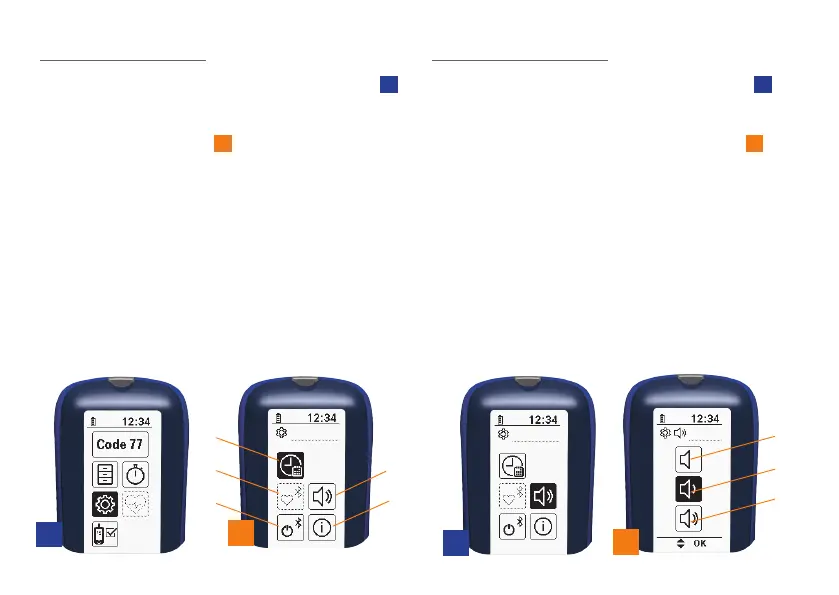
If you choose the “Device settings” symbol
1B
in the main menu and confirm your selection
by pressing the OK button, you will be taken
to the device settings
2
. The following set-
tings are available:
• Date and time settings (2A)
• Search for heart rate monitor and
connect (2B)
• Activating/deactivating the Bluetooth®
function (2C)
• Volume control for acoustic signals (2D)
• Device information (2E)
1B
2
2A
2B
2C
2D
2E
2D
3A
3B
3C
3
3.1.1 Volume control
If you choose the “Loudspeaker” symbol
2D
in
the “Device settings” menu and confirm your
selection by pressing the OK button, you will
be taken to the volume control settings
3
.
The following settings are available:
• mute (3A)
• medium volume (3B)
• loud (3C)
Set the volume using one of the two arrow
keys and confirm your selection by pressing
the OK button. Once you have confirmed your
selection, you will be taken directly back to
the “Device settings” menu.


 To Next Page