Page 32 (40)
Rev 1 2018-03-21 www.elcon.se
Go to INDEX.
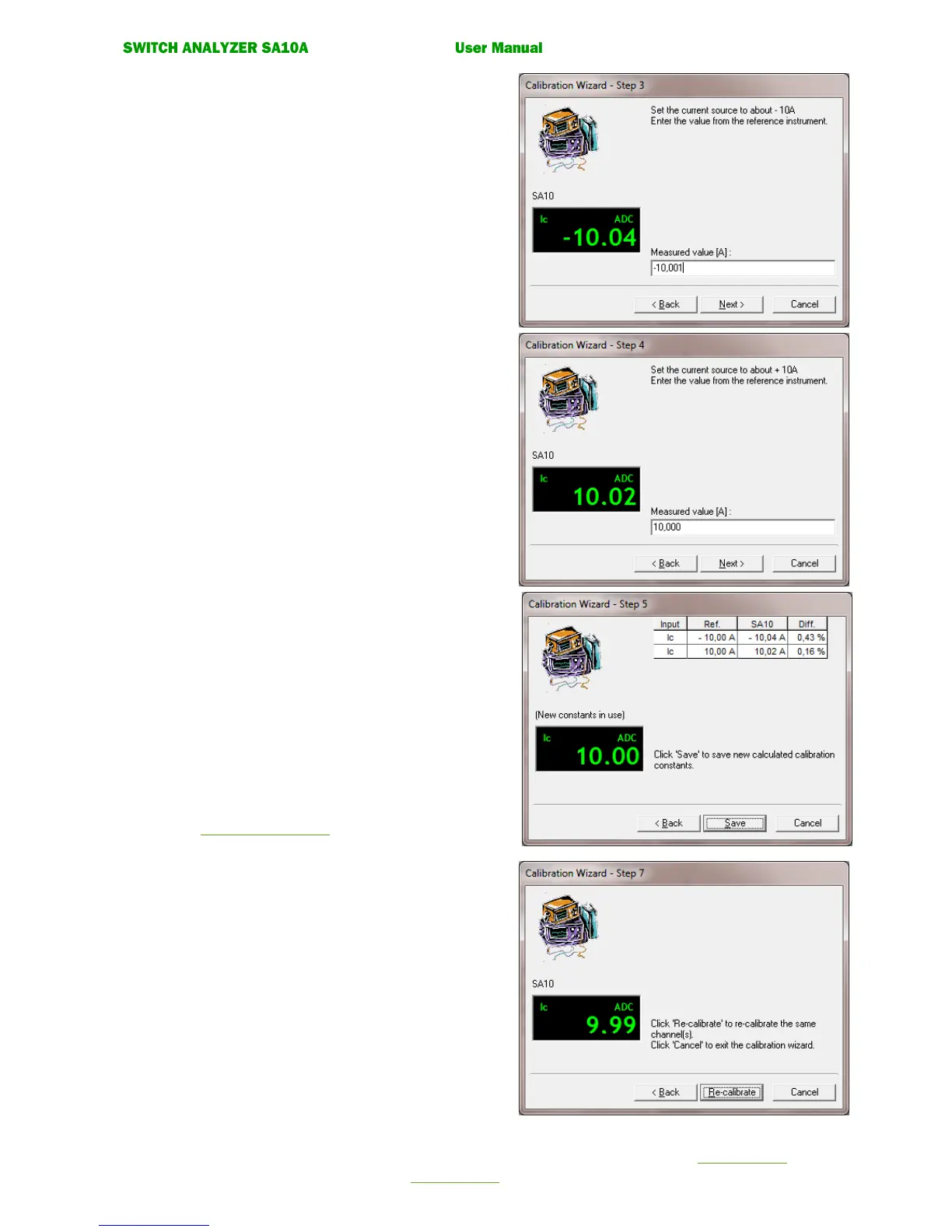
• Calibration wizard. Step 3.
Set the current source to about -10A.
Enter the value (A) from the reference instrument.
Click the command button. Next.
• Calibration wizard. Step 4.
Set the current source to about +10A.
Enter the value (Ampere) from the reference instrument in
the measured value box.
Click the command button. Next.
• Calibration wizard. Step 5.
New calibration constants are now calculated
Click button Save to save the new calculated
calibration constants.
Click button Cancel to cancel the guide without
updating the calibration constant.
• Calibration wizard. Step 6.
Enter password and calibration signature.
See 7.3.6 Enter Password.
• Calibration wizard. Step 7.
Check that the measured value compared to the
reference instrument is within the accuracy for the
input. If not Click Re-calibrate button.
If correct click Cancel button to exit Calibration Wizard.


 To Next Page