Page 33 (40)
Rev 1 2018-03-21 www.elcon.se
Go to INDEX.
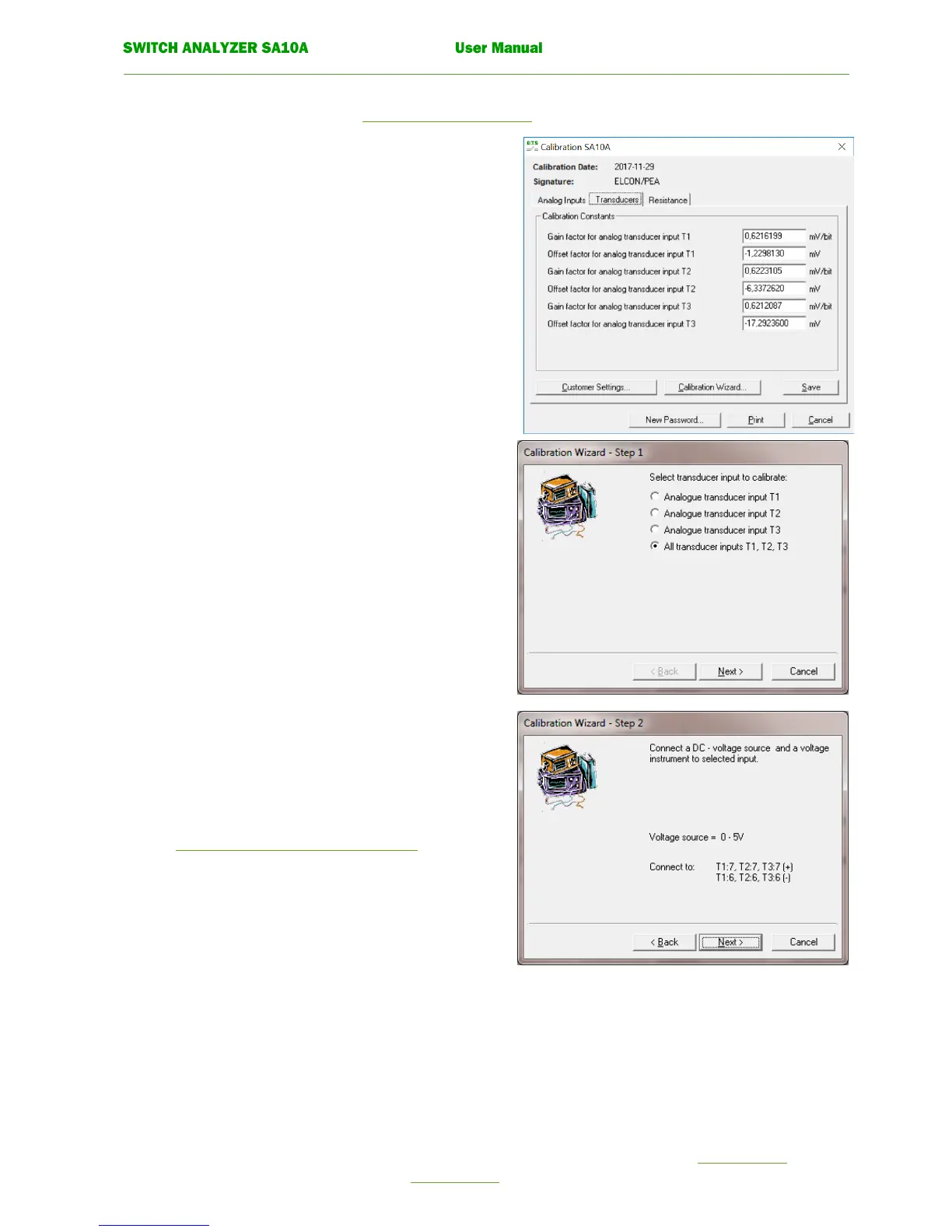
7.3.3 CALIBRATION WIZARD FOR AN ALOGUE TRANSDUCER INPUTS T1, T2, T3.
To open window Calibration SA10A see 7.3 Recalibration procedure.
Click tab Transducers in window Calibration SA10A.
Click on button Calibration wizard.
The following window is displayed.
• Calibration wizard. Step 1
Select a single transducer input or all transducer inputs
to calibrate with the option buttons.
If all transducer inputs shall be calibrate at the same
time the same voltage source must be connected to all
transducer inputs.
Click the command button. Next.
• Calibration wizard. Step 2.
Connect a stable DC-voltage source (0-5V) and a
voltage instrument to the selected input.
For more information about connections see.
7.2.3 Check transducer inputs T1, T2, T3.
Click the command button. Next.


 To Next Page