SOI/DT 2003 -01 eb 30 599 35 63-72
10.3 Cancelling alarm codes from memory / Testing the LEDs
It is good practise to cancel the alarm codes after reading the alarm code or after effecting repairs to check
whether it is repeated during the diagnostics test.
1. Access diagnostics mode (see 10.1)
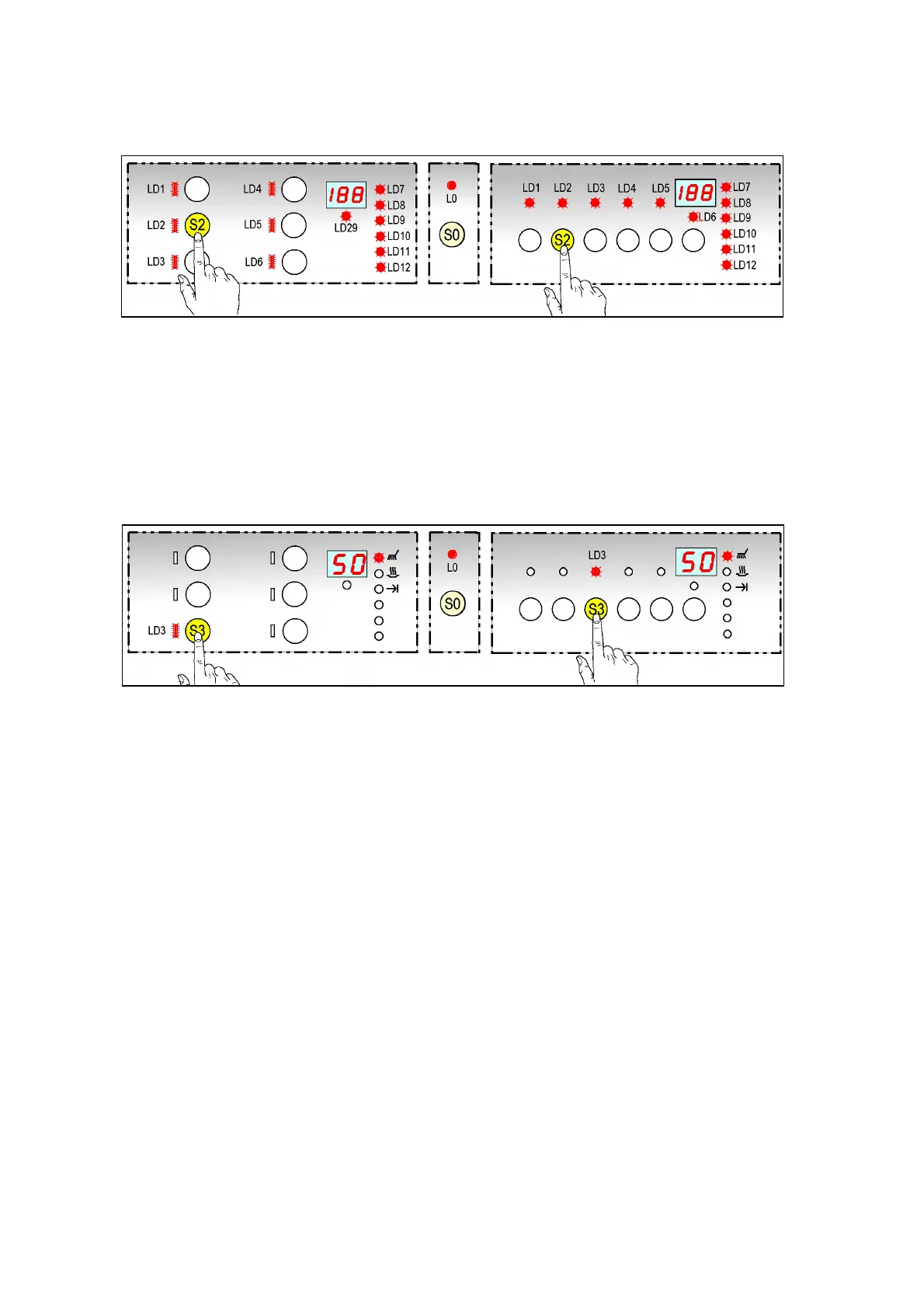
2. Press button S2 to cancel the alarms.
All the LEDs and the digits [188 ] flash for about 30 seconds.
The function terminates automatically and the machine enters pre-selection mode.
10.4 Functional testing cycle
This is an abbreviated washing programme which allows the Service Engineer to test all the functions that
comprise a traditional washing cycle; in effect, the system simulates a normal cycle.
10.4.1 Selecting the cycle
1. Access diagnostics mode (see 10.1)
2. Press button S3 to start the cycle.
The LEDs LD1, LD2 switch off while LD3 continues to flash while the LED of the current phase is
steady.
The display shows the time-to-end.
The programme the programme behaves as in a normal cycle; the PAUSE and CANCEL options are
accessible.



 To Next Page