SOI/DT 2003 - 01 eb 7 599 35 63-72
4.1.1 ON/OFF button (S0)
The ON/OFF button is featured on all models in the range, and is used to switch the appliance on and off.
Switching off does not cancel the programme being executed. The corresponding pilot lamp [L0] lights to
indicate that the appliance is powered.
4.1.2 Programme/Option buttons (S1-S6)
The functions of the various buttons depend exclusively on the software configuration of each
appliance, which can feature from 3 to 6 buttons.
Also the selection of the washing programmes changes according to the configuration of each
appliance.
The buttons S1, S2, S3 are always featured because perform special functions.
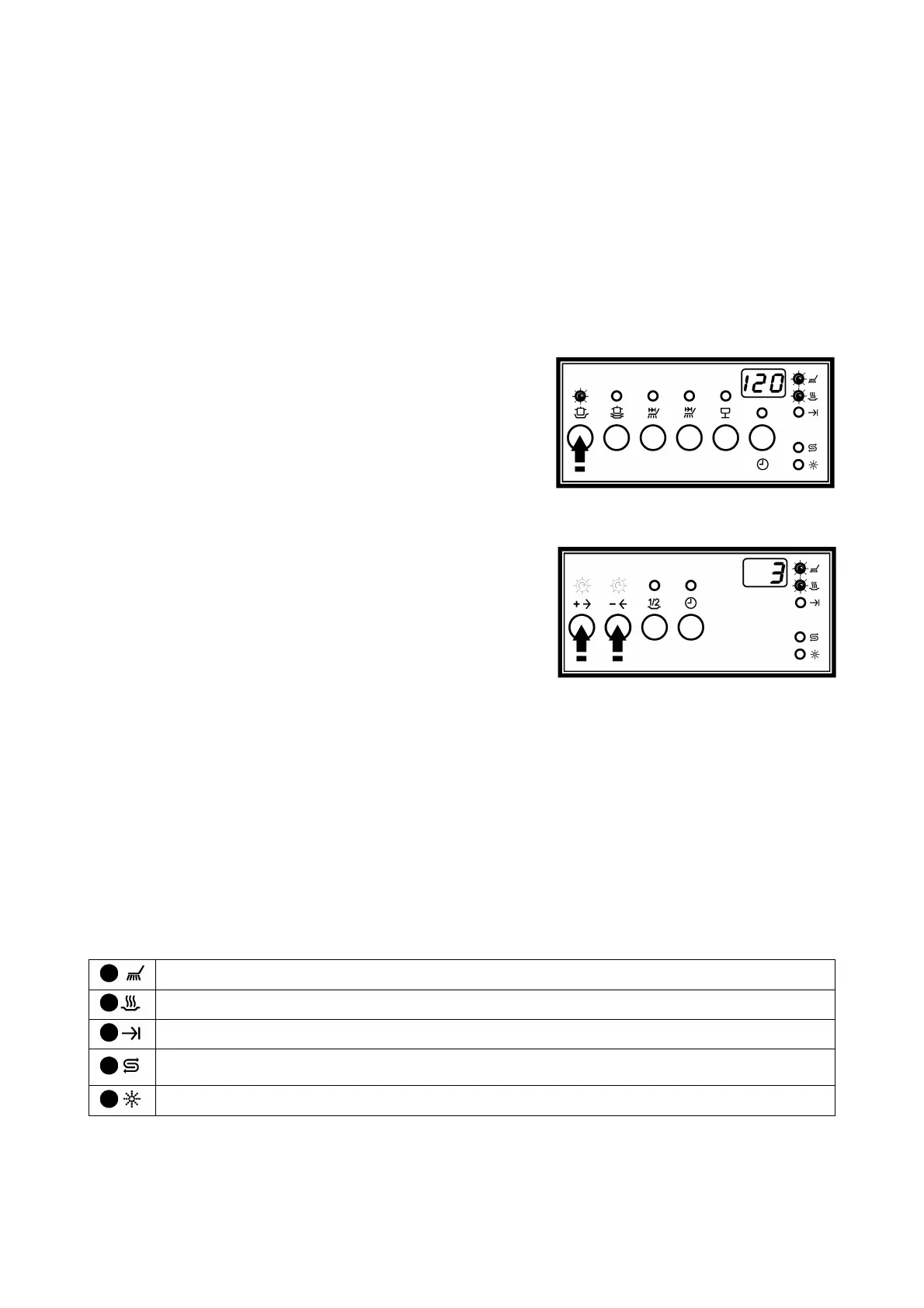
MODELS WITH DIRECT SELECTION
To each button corresponds a specific programme:
1. Close the door and switch the appliance on [S0]
2. Press a button to select a programme:
The relative LED lights.
The display shows the flashing time-to-end.
The indicator LEDs of the phase of the cycle light.
3. Within 3 seconds after the programme selection it is possible
to set the eventual option or the delayed start (if available).
4. Automatically, 3 seconds after the last pressure of a button, the cycle starts.
On the display the time-to-end lights steady and the LED of the current phase is on.
MODELS WITH SEQUENTIAL SELECTION
In these versions two buttons are used to select the programmes:
1. Close the door and switch the appliance on [S0]
The display shows [ --]
2. Press button [+] to select with an increasing order:
The LEDs relative to the programme buttons light (if featured).
The display shows the last selected flashing programme. Every time the button is pressed the following
programme is selected (increasingly): 1 2 3.....
3. Press button [- ] to select with a decreasing order:
The LEDs relative to the programme buttons light (if featured).
The display shows the last selected flashing programme. Every time the button is pressed the previous
programme is selected: 7 6 5 .....
4. Within 3 seconds after the programme selection it is possible to set the possible option or the delayed
start (if available).
5. Automatically, 3 seconds after the last pressure of a button, the cycle starts.
The digits and the LED indicating the current phase are on.
4.1.3 Indicator LEDs (LD7÷LD12)
The functionalities of the LEDs depend on the configuration software of each appliance.
Washing: lights when the washing phase is performed and during the selection (if featured).
Drying: lights when the drying phase is performed and during the selection (if featured).
End of cycle: lights when the programmes ended.
Salt: indicates that the salt reservoir is empty. If the level of regeneration is set to “1” (no
regeneration), this LED remains unlit at all times.
Rinse-aid: indicates that the rinse-aid reservoir is empty.



 To Next Page