24
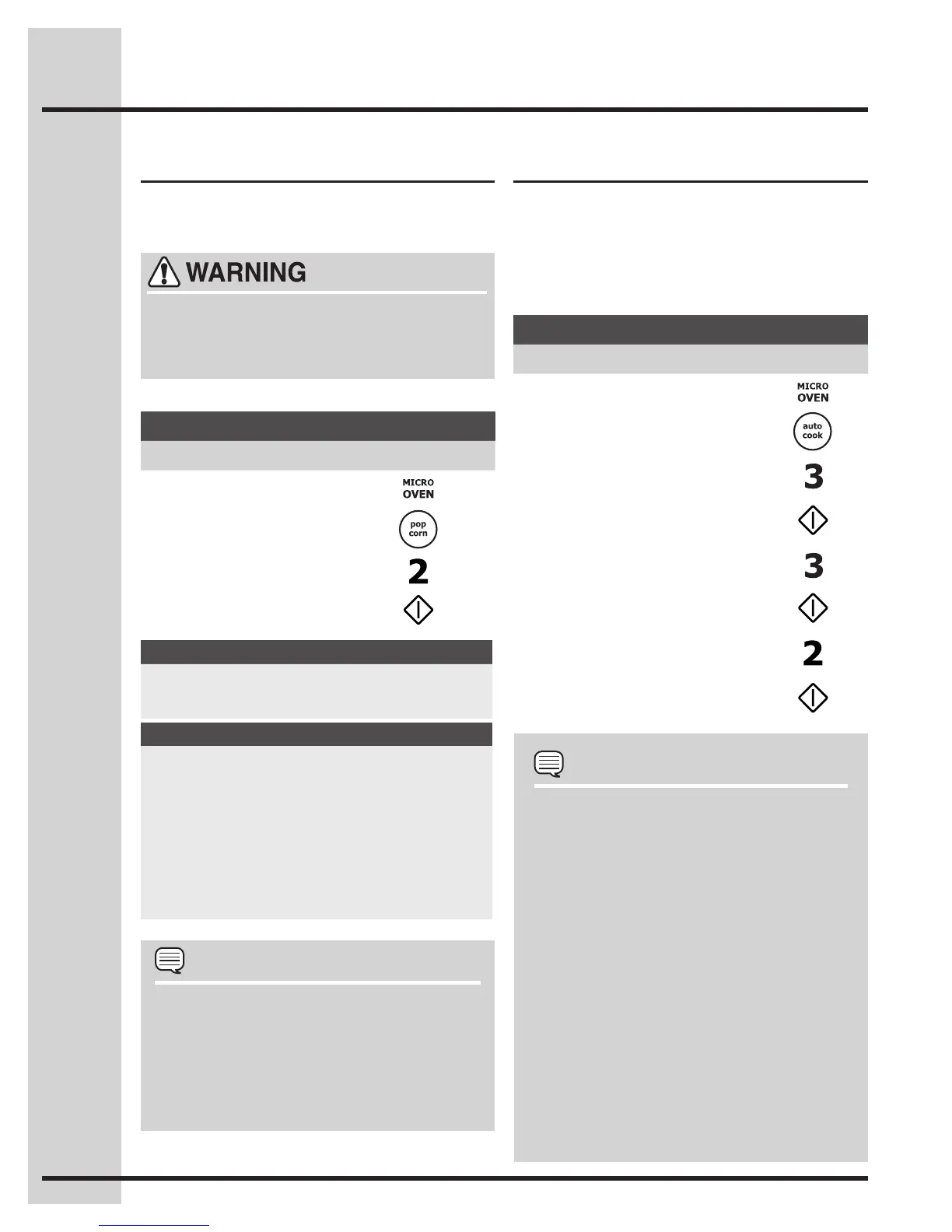
Setting Microwave Controls
Your oven has convenient pads to assist with
meal preparation. The Auto Cook settings will
automatically compute the correct cooking time
and microwave power level for foods shown in the
following charts.
• Supposeyouwanttomelt1/2cupofbutter.
Example
Step Press
1. Press MICRO OVEN
2. Press auto cook.
3. Press 3forMelt,Soften.
4. Press START toconrm.
5. Press 3forButter.
6. Press START toconrm.
7. Press 2 for 1/2 cup.
8. Press START.
NOTES
All Auto Cook settings can be programmed 1.
withMoreorlesstimeadjustment.Touch
the power level pad once or twice before
touching START pad. See More or less
adjustment.
Mostfoodhasacookinghint.Touch2. help
pad when it is lighted in the display.
Should you attempt to enter more or less 3.
than the allowed amount, an error beep
will sound.
More or less than the quantity listed in
the chart should be cooked following the
guidelines in any microwave cookbook.
The final cooking result will vary according 4.
to the food condition (e.g. initial temperature,
shape, quality). Check food for temperature
after cooking. If additional time is needed,
continue to cook manually.
Auto Cook
Popcorn
You can cook popcorn by touching a quick pad
(popcorn). You don't need to calculate cooking
time or power level.
Donotplacemicrowavepopcorndirectlyonthe
metal turntable as metal on metal may produce
sparking. Always use the popcorn/bacon tray
provided with the unit to cook popcorn.
• Supposeyouwanttopopa3.5oz.bagofpopcorn.
Example
Step Press
1. Press MICRO OVEN.
2. Press popcorn.
3. Press 2 for regular size.
4. Press START
Amount
Snack1. 1.5-1.75 oz bag
Regular 2. 3.0 - 3.5 oz bag
Procedure
Use only popcorn packaged for the microwave. Try
severalbrandstodecidewhichyoulike.Donottry
to pop unpopped kernels. Use the popcorn/bacon
tray provided with your unit to cook popcorn quickly
and efficiently. This sensor works well with most
brands of microwave popcorn. You may wish to
try several and choose your favorite. Pop only one
bag at a time. Unfold the bag and place in oven
according to directions.
NOTES
The final result will vary according to the food 1.
condition (e.g. initial temperature, shape,
quality). Check food for temperature after
heating. If additional time is needed, continue
to heat manually.
Popcorn can beprogrammed with More or2.
lesstimeadjustment.






 To Next Page