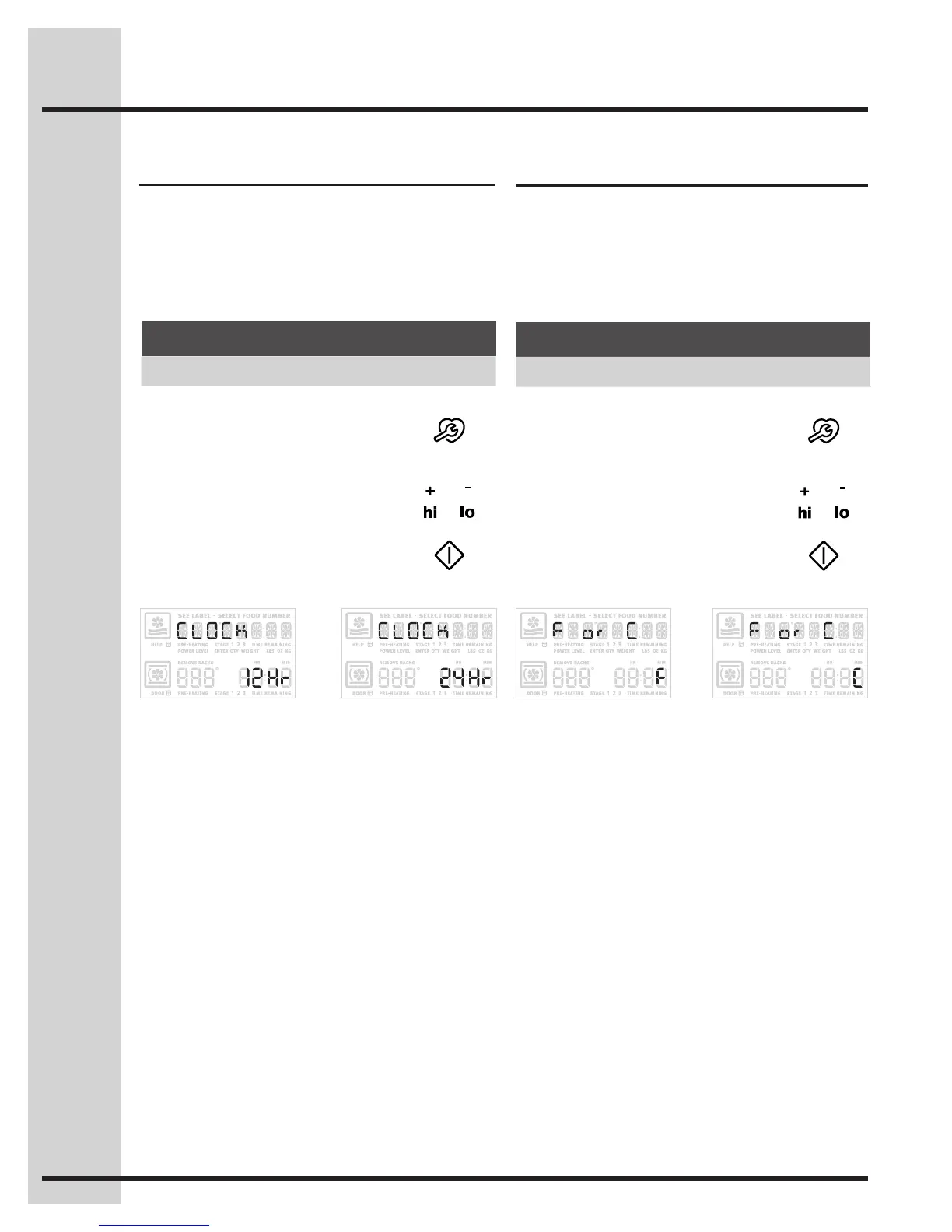
The clock display mode allows you to choose
between 12 and 24 hour mode. The factory preset
clock display mode is 12 hour.
See the example below to change the default
mode to 24 hour.
Fig. 1 Fig. 2
Setting 12 or 24 hour mode Changing between F° or C°
Your control has the ability to display and set
Fahrenheit or Celsius temperatures. The factory
preset temperature display is Fahrenheit.
See the example below to change the default
temperature display to Celsius.
Fig. 1 Fig. 2
Example
Step Press
1. Press and continue to press
USER PREF until you reach
the preset clock display
mode -Fig. 1-.
2. Use the +hi &-lo to toggle to
the 24hr option. -Fig. 2-.
or
3. Press START to accept or
press CANCEL toreject.
Example
Step Press
1. Press and continue to press
USER PREF until you reach
the Fahrenheit/Celsius mode.
-Fig. 1-
2. Use the +hi or -lo to toggle to
the C option. -Fig. 2-
or
3. Press START to accept or
press CANCELtoreject.
60
Setting Your Preferences






 To Next Page