31
Setting Microwave Controls
Auto Roast Chart
Setting/Food Amount Default Rack Procedure
Chicken1. 2.5 - 7.5 lb 2.5 lb Low
After the cycle ends, cover with foil and let stand for
5-10 minutes.
Turkey2. 6.5 - 16 lb 6.5 lb Low
Season, as desired. Place on low rack. After the cycle
ends, cover with foil and let stand 10 minutes. Internal
temperature of white meat should be 170°F and of dark
meat,180˚F.
Turkey breast3. 3 - 6 lb 3 lb Low
Season, as desired. Place on low rack. After the cycle
ends, cover with foil and let stand 10 minutes. Internal
temperatureofwhitemeatshouldbe170˚F.
Pork4. 2 - 3.5 lb 2 lb Low
Bonelessporkloinisrecommendedbecauseitcooks
evenly. Place on a low rack. After cooking, remove from
oven, cover with foil and allow to stand 5-10 minutes.
Internaltemperatureshouldbe160˚F.
NOTES
1. AutoRoastcanbeprogrammedwithMore/Less
TimeAdjustment.Seecorrespondingsection.
2. Should you attempt to enter more or less
than the allowed amount, an error beep will
sound.
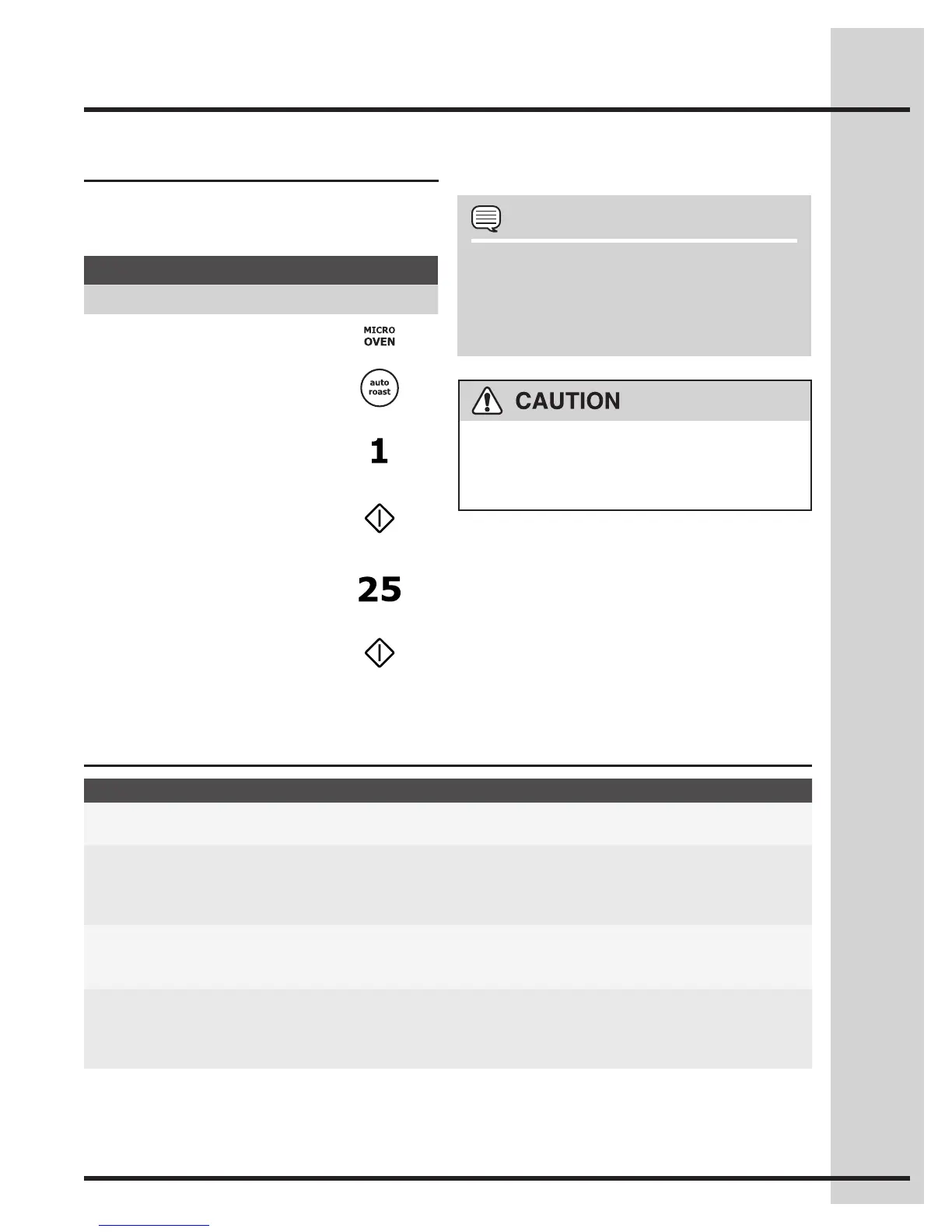
Auto Roast
auto roast automatically roasts chicken, turkey,
turkey breast or pork.
Suppose you want to roast a 2.5 pound chicken.•
Example
Step Press
1. Press MICRO OVEN.
2. Press auto roast.
3. Select desired setting.
Ex: for chicken,
touch number 1.
4. Press START.
5. Enter weight by touching the
number pads.
Ex: 2.5 lb.
6. Press START.
After Auto Roast cycle ends, a long tone will sound.
Follow the indicated message.
The oven cabinet, cavity, door, turntable, turntable
support, racks and dishes will become hot. To
PREVENTBURNS,usethickovengloveswhen
removing the food or turntable from the oven.






 To Next Page