72
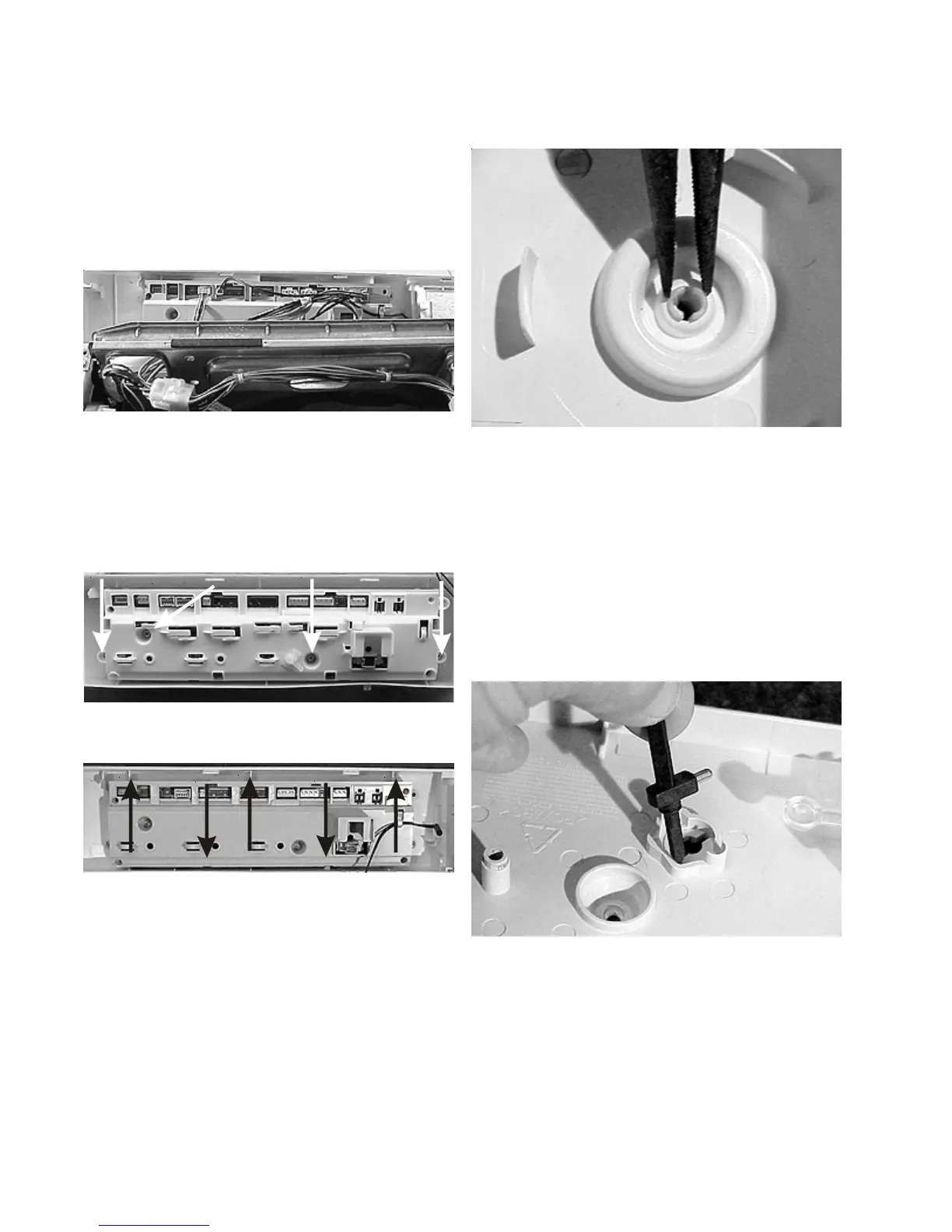
Removing the console:
1. Disconnect the washer from the electrical supply
and release the console.
2. Tag each plug with the jack number, then disconnect
the electrical harness from the electronic control,
release the wire harness rivets from the back of the
control and lift the console off .
Removing the electronic control:
1. Disconnect the washer from the electrical supply,
remove the water temperature knob and the console.
2. Lay the console on a soft flat surface and remove the
(4) screws holding the control to the console.
3. Release the locking tabs and lift the control from the
console.
Note: Be careful not to lose the button springs.
Removing the selector knob:
(Good Models)
1. Disconnect the washer from the electrical supply
and remove the electronic control.
2. Squeeze the rim of the selector knob shaft with pliers
and pull the knob out the front.
Removing the water temperature selector
shaft: (Good Models)
1. Disconnect the washer from the electrical supply,
set the water temperature selector knob to the Cold/
Cold position and remove the electronic control.
2. Lift the shaft out of the control.





 To Next Page