Setting the Clock and Print Parameters.
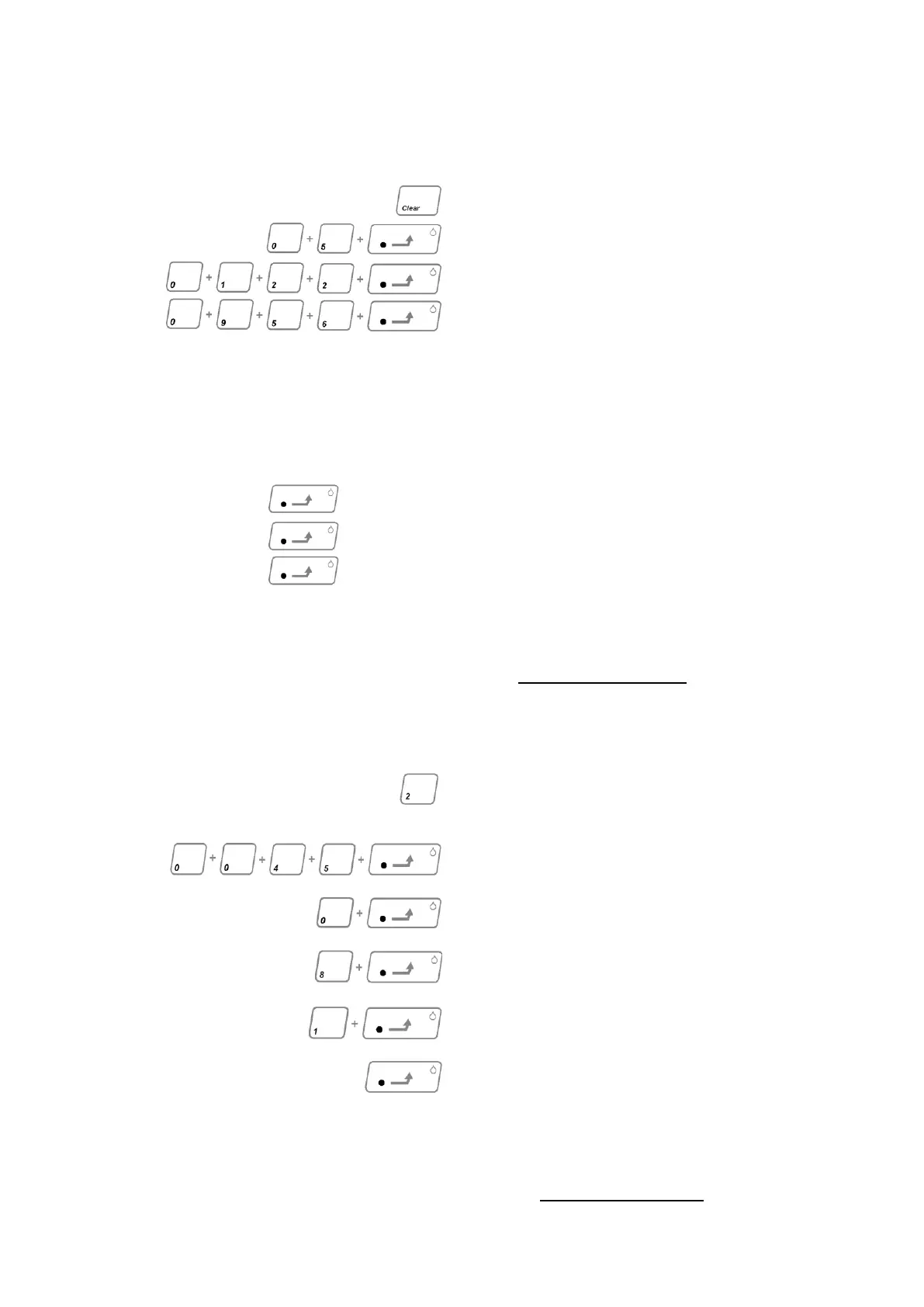
Enter the Year; Month; Day date and Time in
order as follows; (The figures for January 22
nd
2005 at 09:56 are given as an example).
Press CLEAR
Press 0; 5; (enters the year) press GOTO
Press in turn 0; 1 (enters the month)
2; 2; (enters the day) GOTO
Press in turn 0; 9; 5; 6 (enters the time)
GOTO
After following the above procedure the
display will show current parameters. Default
is 0000 for PR2000
If PR2000B or no printer is to be used ensure
the display is 000.0
Press GOTO and proceed to page 18.
If EPSON compatible printer is to be used, set
the display to 001.0. Press GOTO and
proceed to page 18.
If Serial RS232-C printer is to be used set
display o 002.0 and press GOTO.
RS232-C parameters now need to be set:
See Appendix A. (Page 28).
For Serial printer PR2000S Set the
following values.
Set the date and time as previously described.
After setting the time press key 2 to select
printer serial communication mode.
Press GOTO.
Set the Baud rate to 4800 so:
Press keys 0,0,4,8, and press GOTO.
Set the Parity to 0.
Press the 0 key. Press GOTO.
Set the data Bits to 8.
Press the 8 key. Press GOTO.
Set the Stop bit to 1.
Press the 1 key. Press GOTO.
Press GOTO to confirm data entry.
The IA will now reset and the initialisation
count down sequence will commence. The IA
is now ready for printing via the PR2000S.
For PR2000S Serial Printer Baud rate set-
up see Appendix C (Page 30).



 To Next Page