12. Switch the selector switch to the Hi position.
13. Adjust the HI knob until the display shows the actual melting point
obtained in b) above for the standard sample of Carbazole
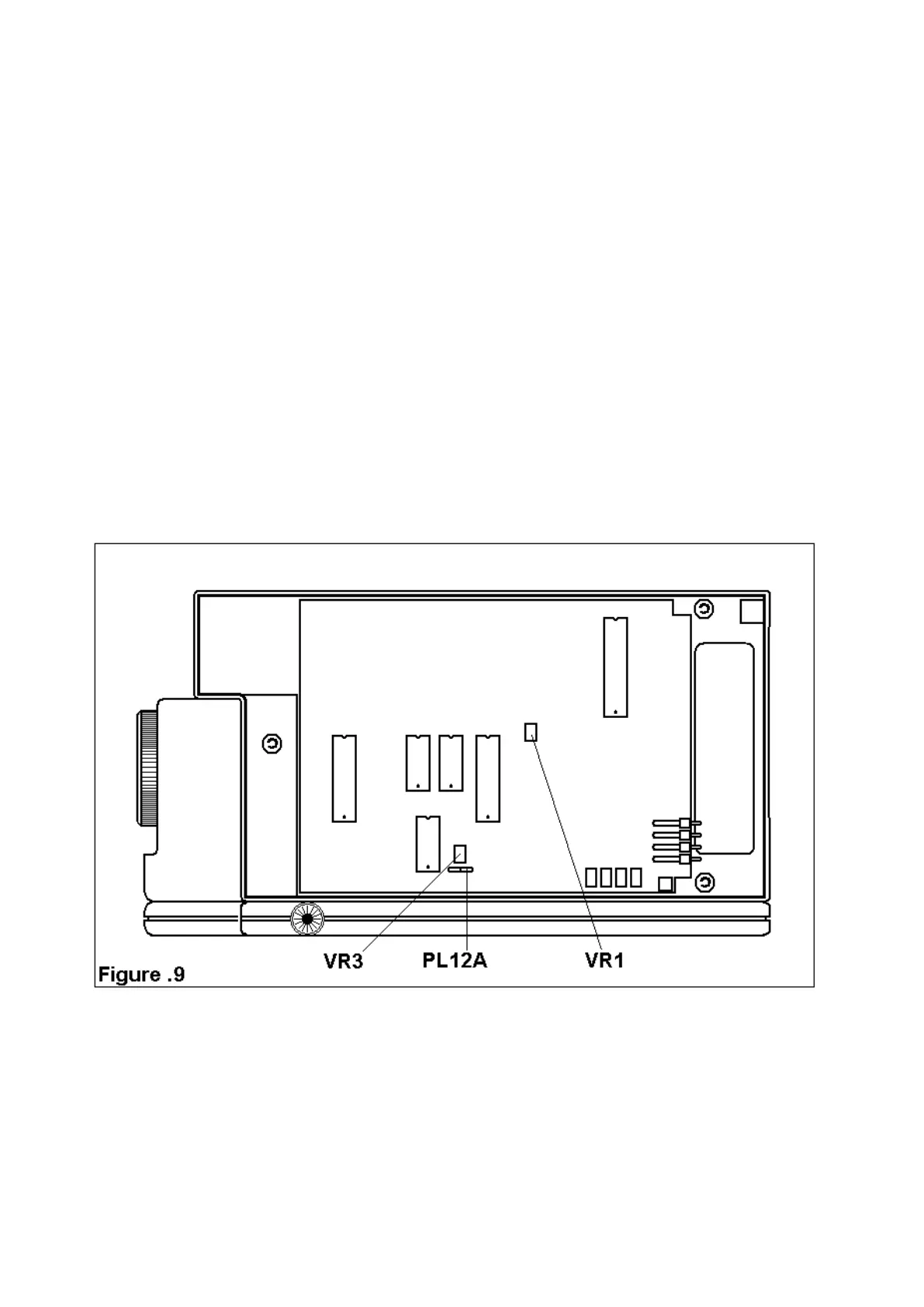
14. Adjust VR1 on the PCB with the trim tool provided untilt the display
reads the melting point o Carbazole as quoted on the Calibration
Certificate provided with the sample.
15. Switch the selector switch to LO.
16. Adjust VR3 on the PCB with eth trim tool until the display reads the
melting point of p-nitrotoluene as quoted on the Calibration
Certificate provided with the sample.
17. Repeat steps 14 to 18 until no further adjustment to VR1 and VR3
are required when the switch is changed from Hi to LO.
18. The unit is now calibrated.
19. Unplug the calibration Box PL12A and replace the connector
removed in stage 6.
20. Remove the power supply plug and replace the base. Check the
calibration again using Standard Chemicals as in b) and c) and
repeat the procedure if necessary.



 To Next Page