EasyManua.ls Logo

Elka MK55 - Page 37

Default Icon
47 pages
Print Icon
To Next Page IconTo Next Page
To Previous Page IconTo Previous Page
Loading...
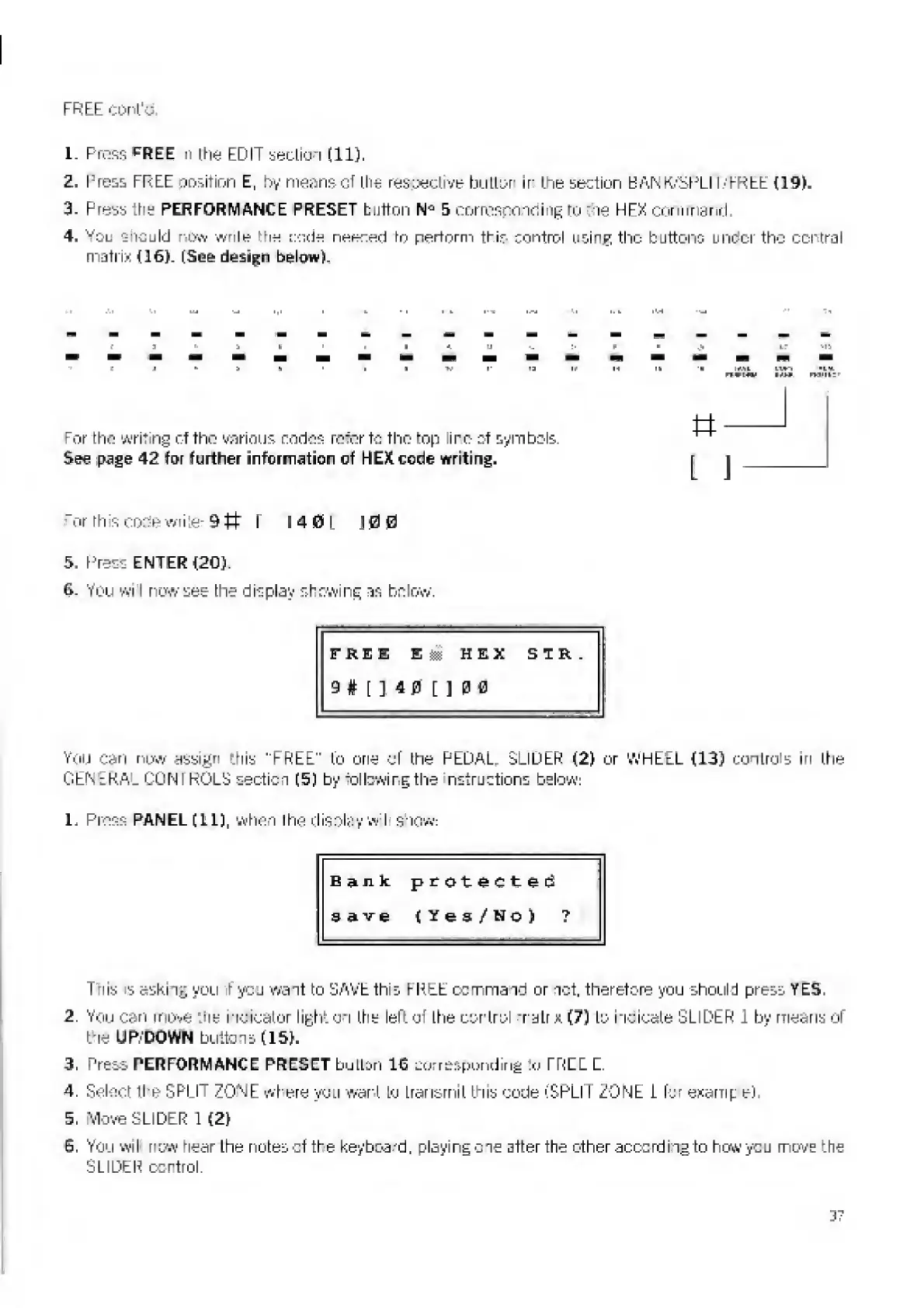
FREE
eolith
1.
Press
EE
n
the
EDIT
Section
(11),
2.
loess
FREE
position
E,
by
means
cf
the
rescedi'/e
button
ir
the
section
B
A
NK'SFLI
1HREE
{19).
3.
Press
the
PERFORMANCE
PRESET
button
5
corresponding
to
:oe
HEX
command
4.
v
Ou
should
row
write
‘:he
code
neeced
to
perform
this
contnol
using
the
buttons
uncor
the
central
matrix
(16).
(See
design
below).
e
>.
11
for
the
writing
c.f
The
various
codes
refer
to
the
top
ire
of
symbols.
See
page
42
for
further
information
of
HEX
code
writing.
tt-
l
\
or
th
s
code
writer
9
It
f
)
4
SJ
L
)
0
0
S,
Press
ENTER
(20).
6-
You
wi
I
rirjw
see
tine
display
showing
as
be
low.
FREE
Em
HEX
SIR,
9
#
[
]
4
0
[
]
0
0
You
can
now
assign
this
"FREE"
(o
one
cf
(he
PEDAL.
SLIDER
(2)
or
WHEEL
{13)
control
in
(tie
GENERAL
CO
NT
KOLS
section
(5)
by
following
the
nstructions
below:
1.
Press
PANEL
(LI),
when
rhe
display
w
I
show
1
:
Bank:
protected
save
{Yes/No)
?
This
is
asking
you
t
you
want
to
SAVE
tlvs
I-RLE
command
or
net.
therefore
you
should
press
YES.
2.
You
carl
move
"Jie
indicator
lighten
(tie
left
of
(tie
control
n
atrx
(7)
to
i
ideate
SLIDER
1
by
means
of
Lie
UP.POWN
buttons
(15).
3.
Press
PERFORMANCE
PRESET
bullon
16
corresponding
:o
FREE
C.
4.
Select
(ha
SPLIT
70ME
where
you
want
to
Lrarisrnil
(his
code
(SPLIT
ZONE
i
for
examp
e)
5.
vlove
SLIDER
1
(2)
6.
You
wil
new
hear
Ltie
notes
ct
the
keyboard,
playing
one
after
the
other
according
to
how
you
move
the
SLIDER
control.
37

Related product manuals