EasyManua.ls Logo

Elmo EL55R2 - Split Screen Mode

Elmo EL55R2
89 pages
Print Icon
To Next Page IconTo Next Page
To Previous Page IconTo Previous Page
Loading...
35
Split Screen Mode
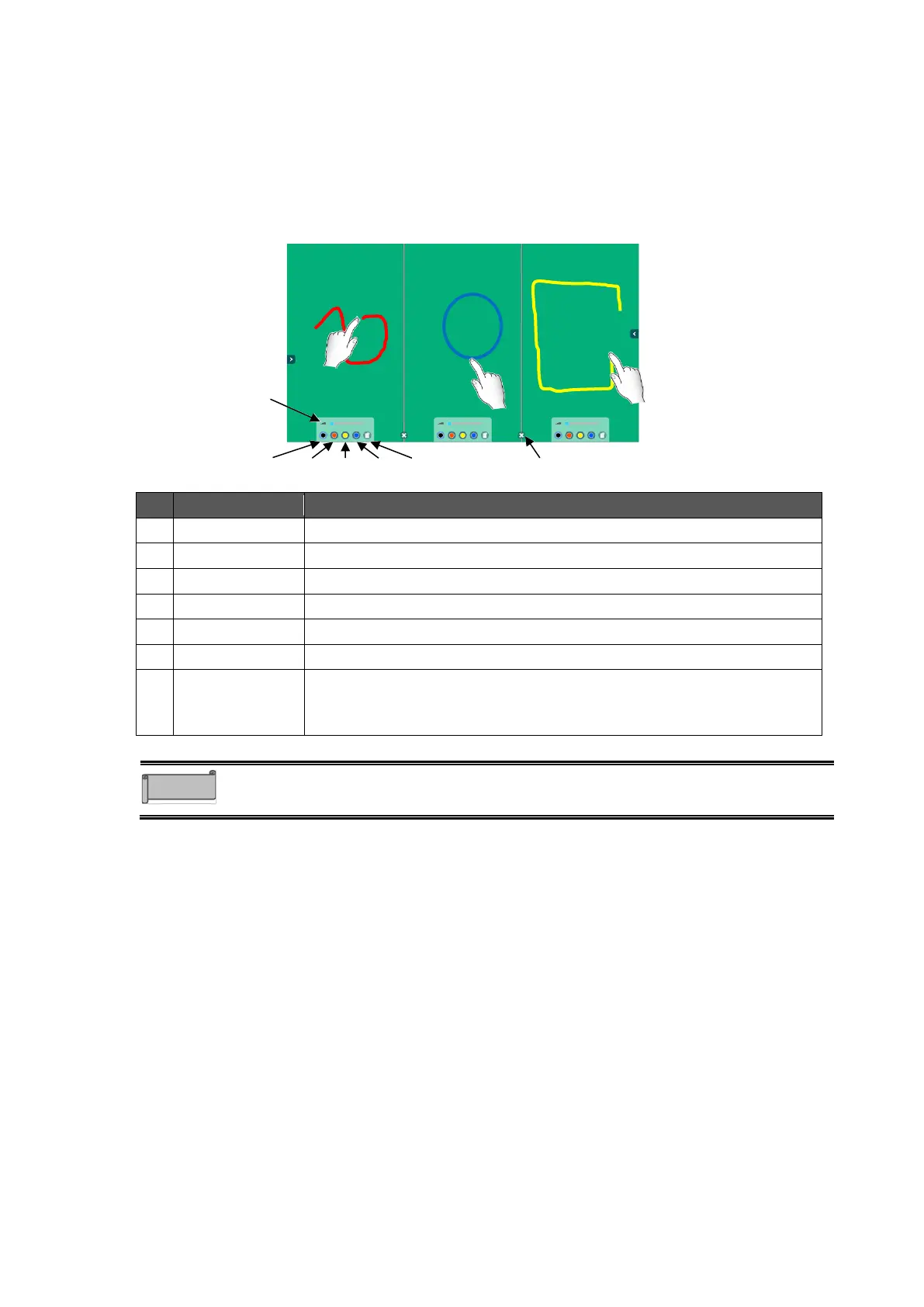
In the Split screen mode, two or three users can draw or delete lines at the same time.
1 Tap the Split screen icon in the menu.
2 A dialog box will appear. Select Two split screen or Three split screen and tap
OK.
The screen will be split as selected.
No.
Name
Function
1
Black pen
To select Black pen.
2
Red pen
To select Red pen.
3
Yellow pen
To select Yellow pen.
4
Blue pen
To select Blue pen.
5
Delete screen
To delete all drawings on your split screen only.
6
Pen thickness
To adjust the thickness of the line.
7
Exit
To end the Split screen mode.
All drawings made will be put together before ending the Split screen
mode.
The drawings can be deleted using the palm of your hand or the supplied Eraser.
Multiple uses can perform the deleting operation at the same time.
Note
1
6
7
2
3
4
5

Table of Contents

Related product manuals