74
◼
Configuring the HotSpot Settings
You can use the product as a hotspot to connect wireless devices.
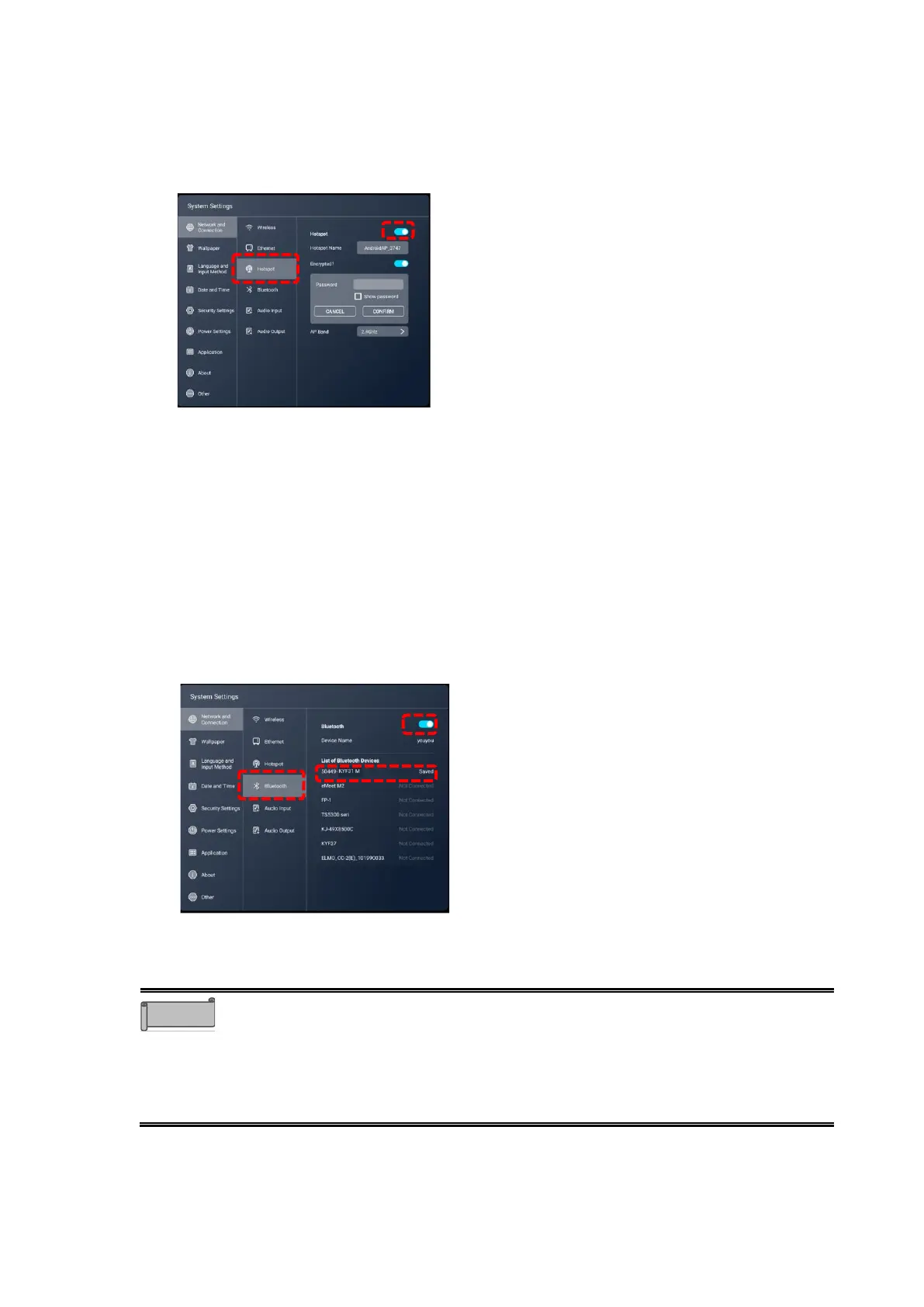
1 Tap “Network and Connection” and tap “Hotspot”. Set the slide switch to ON.
2 Configure the settings of the device to be connected.
Select “Wi-Fi” in the settings menu of the connected device.
Look for the access point with the name indicated in “Hotspot Name” of the product, and
then connect to it. The device is now connected to the product.
◼
Configuring the Bluetooth Settings
Using the built-in Bluetooth feature, you can connect Bluetooth-compatible devices such as a
keyboard, mouse, or computer to the product.
1 Tap “Network and Connection” and tap “Bluetooth”. Set the slide switch to ON.
2 Select the Bluetooth device to be connected.
The device is now connected to the product.
⚫ The maximum connectable distance for Wi-Fi and Bluetooth is 10m when
there are no obstacles such as walls.
⚫ For details about Wi-Fi settings and Bluetooth settings for the connected
device, refer to the instruction manual of the connected device.
⚫ Up to 10 devices can be connected to the hotspot at the same time. However,
it may vary depending on the communication environment.



 To Next Page