154
Combining Letters
There are 2 font styles:
Block letters (300 stitch numbers)
Script or Monogram letters (500 stitch numbers)
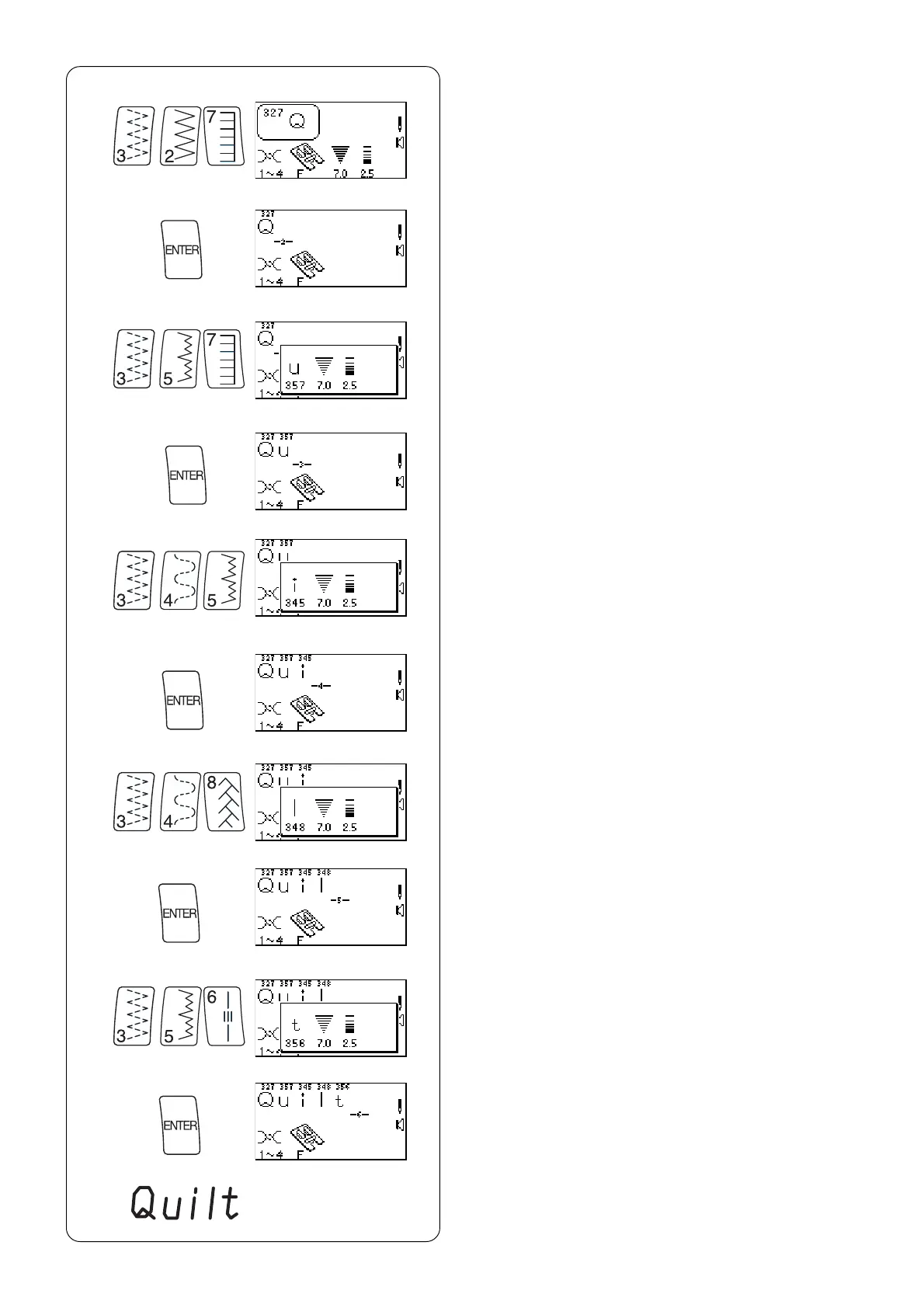
z Select 327.
x Press “ENTER” key.
z
x
c
v
b
n
m
,
.
⁄0
c Select 357.
v Press “ENTER” key.
b Select 345.
n Press “ENTER” key.
m Select 348.
, Press “ENTER” key.
⁄1 Place fabric and stabilizer under foot and sew.
Cut connecting threads.
NOTE: Total capacity of one sequence is 50.
If you want to reduce letter height to 2/3 size, press
“–” side of “Stitch Width/Needle Position” key before
pressing “ENTER” key.
If letters overlap or are too spread out, use the fine
adjustment screw. See page 40.
. Select 356.
⁄0 Press “ENTER” key.
⁄1



 To Next Page