158
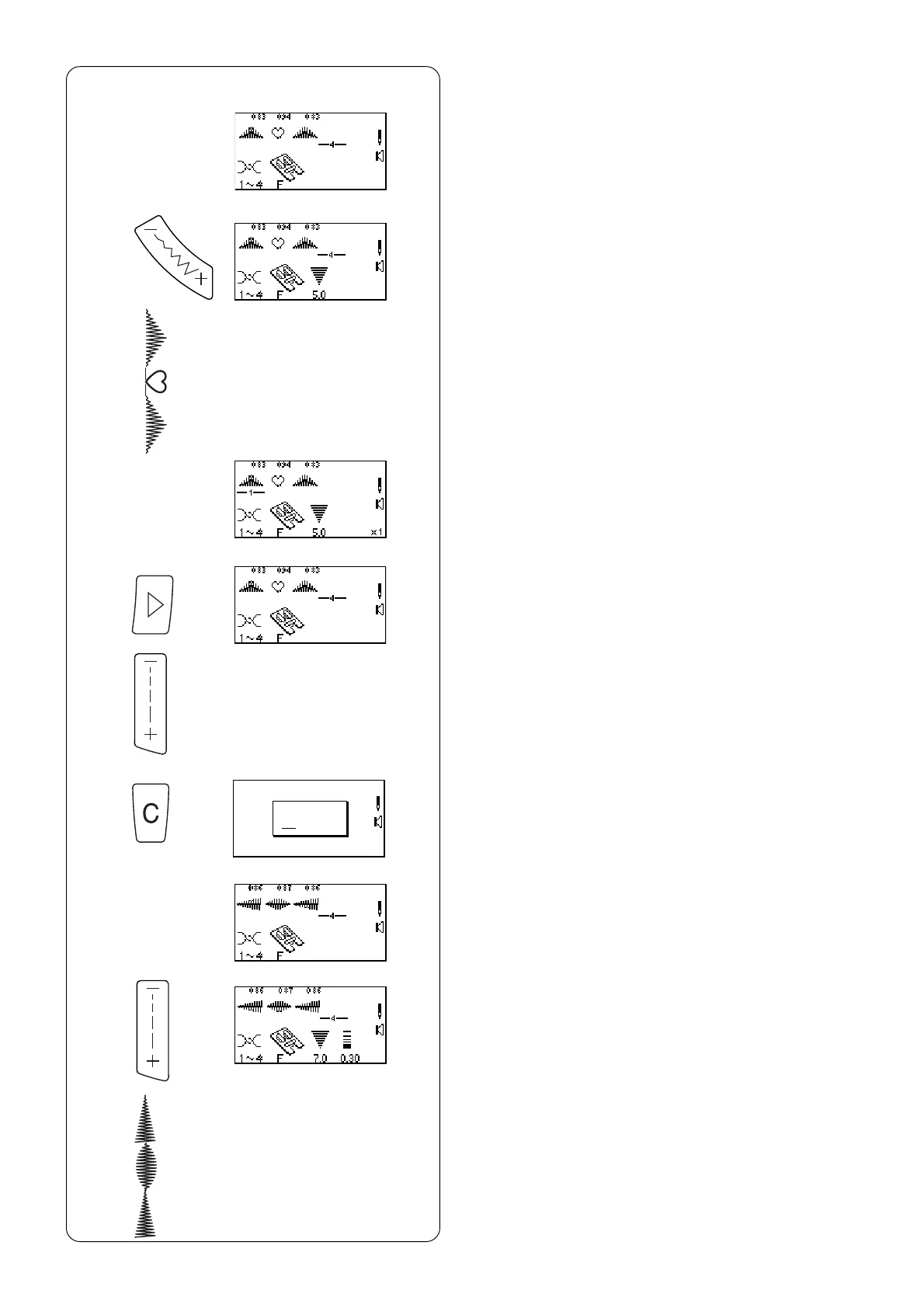
Uniformly Adjusting Stitch Width or
Length
If the cursor is positioned to the right of the last
stitch in the programmed sequence, the stitch width
or length adjustment is applied to the entire
sequence.
Stitch Width:
z Program 083, 094 and 083. (Cursor must be to the
right of last stitch in sequence.)
x Press “–” on “Stitch Width/Needle Position” key.
c Place fabric and stabilizer under foot and sew.
All stitches within the sequence will have the same
stitch width.
z
x
c
v
b
n
m
,
.
Stitch Length:
v Press “Review Memory Right” key to move cursor
after last stitch in sequence.
b Press “–” on “Stitch Length” key. (BEEP will sound.)
NOTE: It is not possible to uniformly adjust stitch
length within a sequence if it contains different
styles of stitches (satin stitches vs. decorative or
utility stitches).
n Press and hold “C” key.
m Program 086, 087 and 086. (Cursor must be to
the right of last stitch in sequence.)
, Press “–” on “Stitch Length” key.
. Place fabric and stabilizer under foot and sew.
All stitches within the sequence will have the
same stitch length.



 To Next Page