100
Appendix
IND100077-219
Additional features overview/details
Trusted Platform Module (TPM)
TPM 2.0 module with support for TPM 1.2 is included.
This is a security device designed to secure the system using integrated cryptographic keys.
Support and requirements:
- Only supported for OS installed as UEFI boot. Legacy boot is not supported.
- Secure Boot must be congured and enabled for full TPM functionality to be available.
- TPM 2.0 is not natively supported by Windows 7, but hotx to add support for Bitlocker Drive
Encryption with TPM 2.0 is available here:
https://support.microsoft.com/en-us/help/2920188/update-to-add-support-for-tpm-2-0-in-windows-7-and-windows-server-2008
Alternatively search for KB2920188 to nd the hotx using your preferred search engine.
BIOS settings:
TPM settings can be managed in BIOS.
- Enter BIOS by pressing Del key during boot
- Go to Advanced tab and select Trusted Computing
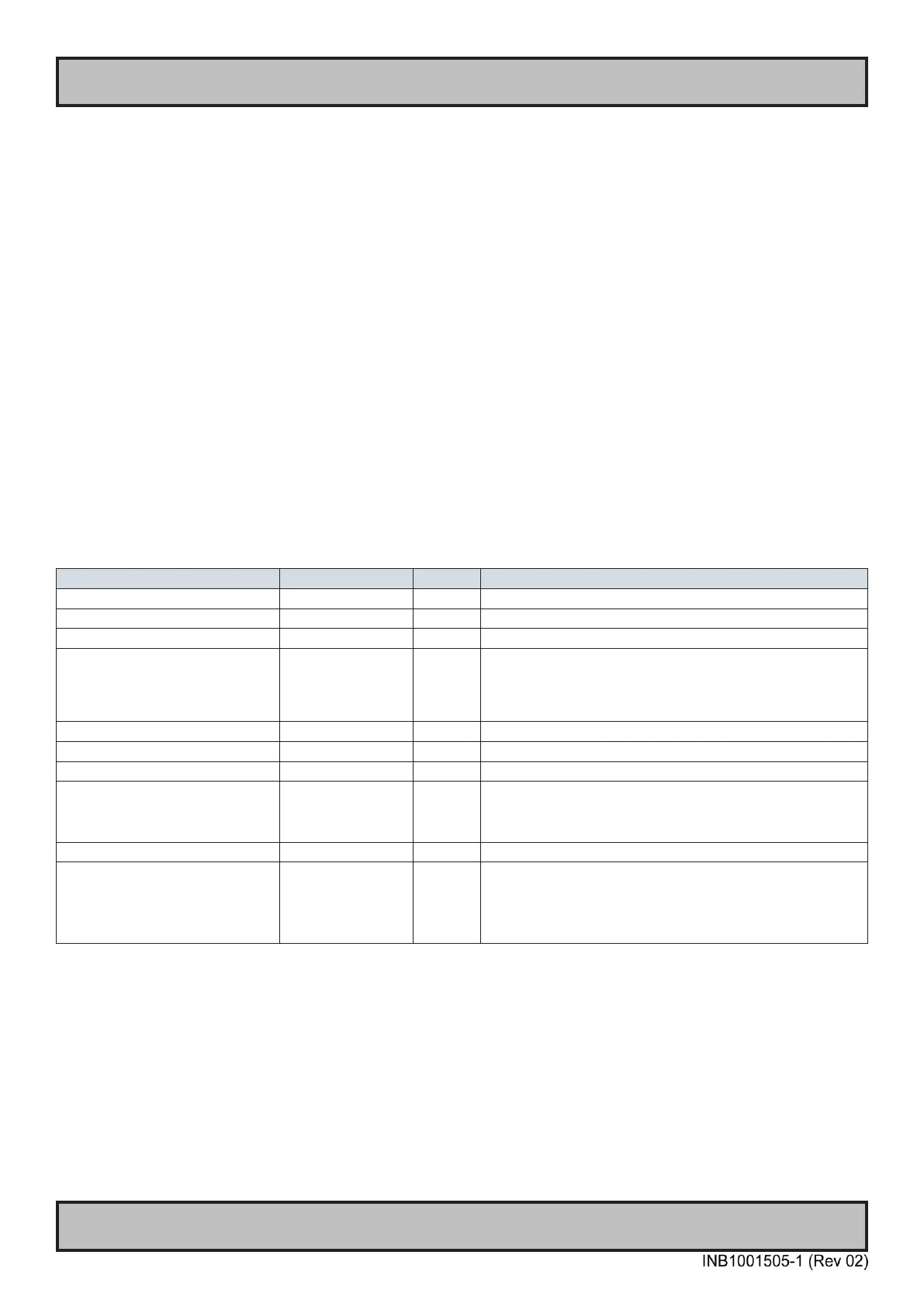
Available options:
BIOS Seng Opons Default Descripon
Security Device Support Disable/Enable Enable Enable/disable TPM Security Device
SHA-1 PCR Bank Disabled/Enabled Enabled
SHA256 PCR Bank Disabled/Enabled Enabled
Pending operaon None/TPM Clear None Opon to schedule an operaon.
TPM Clear will clear all informaon stored on the
Security Device
Plaorm Hierarchy Disabled/Enabled Enabled
Storage Hierarchy Disabled/Enabled Enabled
Endorsement Hierarchy Disabled/Enabled Enabled
TPM2.0 UEFI Spec Version TCG_1_2/TCG_2 TCG_2 TCG_1_2: Compable mode for Win8/Win10
TCG_2: Support new TCG2 protocol and event format
for Win10 or later
Physical Presence Spec Version 1.2/1.3 1.3 Select PPI Spec Version supported by OS.
Device Select TPM 1.2/TPM
1.3/Auto
Auto TPM 1.2 will restrict support to 1.2 devices
TPM 2.0 will restrict support to 2.0 devices
Auto will support both with default set to 2.0.
TPM 1.2 devices will be enumerated-
To save any changes made and exit BIOS, press F4 button.
For detailed usage info please refer to ofcial documentation for your selected operating system.



 To Next Page