110
IND101744-8
Appendix
Recovery Image - Quick Start
IND101744-7 rev 01 - 17 Sep 2018 - 6923/363
Hatteland Technology AS | www.hattelandtechnology.com | Enterprise no: NO974533146
RECOVERY IMAGE - QUICK START
The Recovery Kit (USB Flash) will restore the HDD/SSD partition back to factory default overwriting all current data
available on the HDD/SSD device. The recovery image is located either on a hidden partition image located on the
computer unit (depending on product) or it is included as a image on the USB Flash Kit supporting all
Computers and Maritime Panel Computers (MMC) models from Hatteland Technology. The recovery image le is not
accessible from any Operating System (OS), only by the Recovery Kit (USB Flash). The USB Flash will not rescue or
recover any deleted or lost data on device, it will overwrite the entire device with the factory OS image, thus you must
ensure to create backups of current data (if needed) on device and/or re-install any custom software after the process
below was performed. For more information, visit
https://www.hattelandtechnology.com/options-for-downgrade-up-
grade-change-or-add-of-microsoft-windows
Note that all les created after initial factory boot will be DELETED - make sure you do backup
!
Restore from external USB recovery image:
1: Insert the USB Flash media into the computer usb connector.
2: Restart the computer.
3: On the rst screen that appear, press “F7” on the keyboard to open Boot Manager Menu.
4: Select the USB Flash Media device from the list and press enter on keyboard to boot from it.
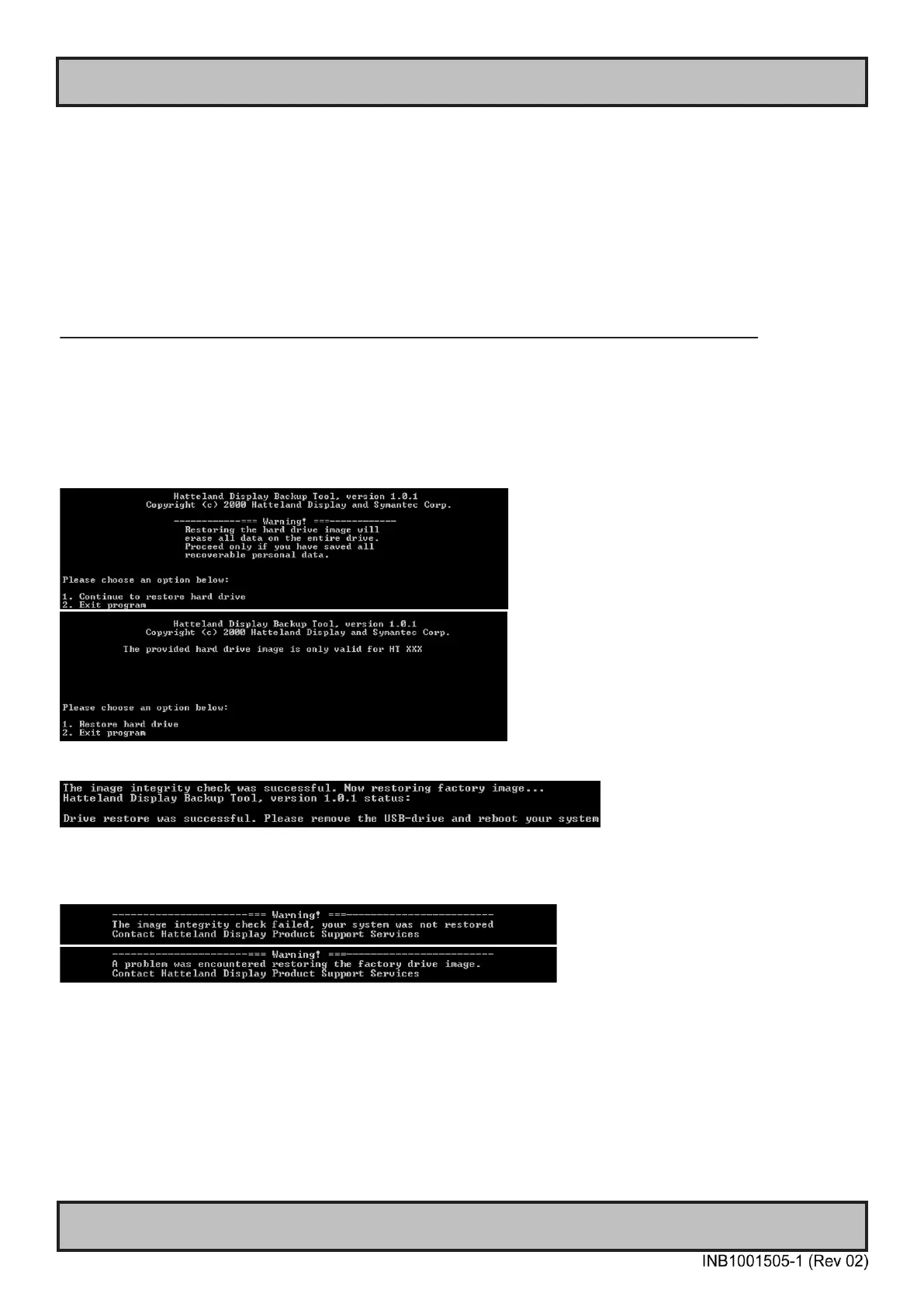
5: Follow the on screen instructions that will be executed from the USB Flash media, such as;
6: After the restore operation is complete, remove the USB Flash Media and restart.
7: The computer is now restored to its original factory state.
8: If rescue failed, an error message will be displayed.



 To Next Page