25
General Installation Recommendations
Installation
IND100210-42
Conguring Housing / Terminal Block connectors
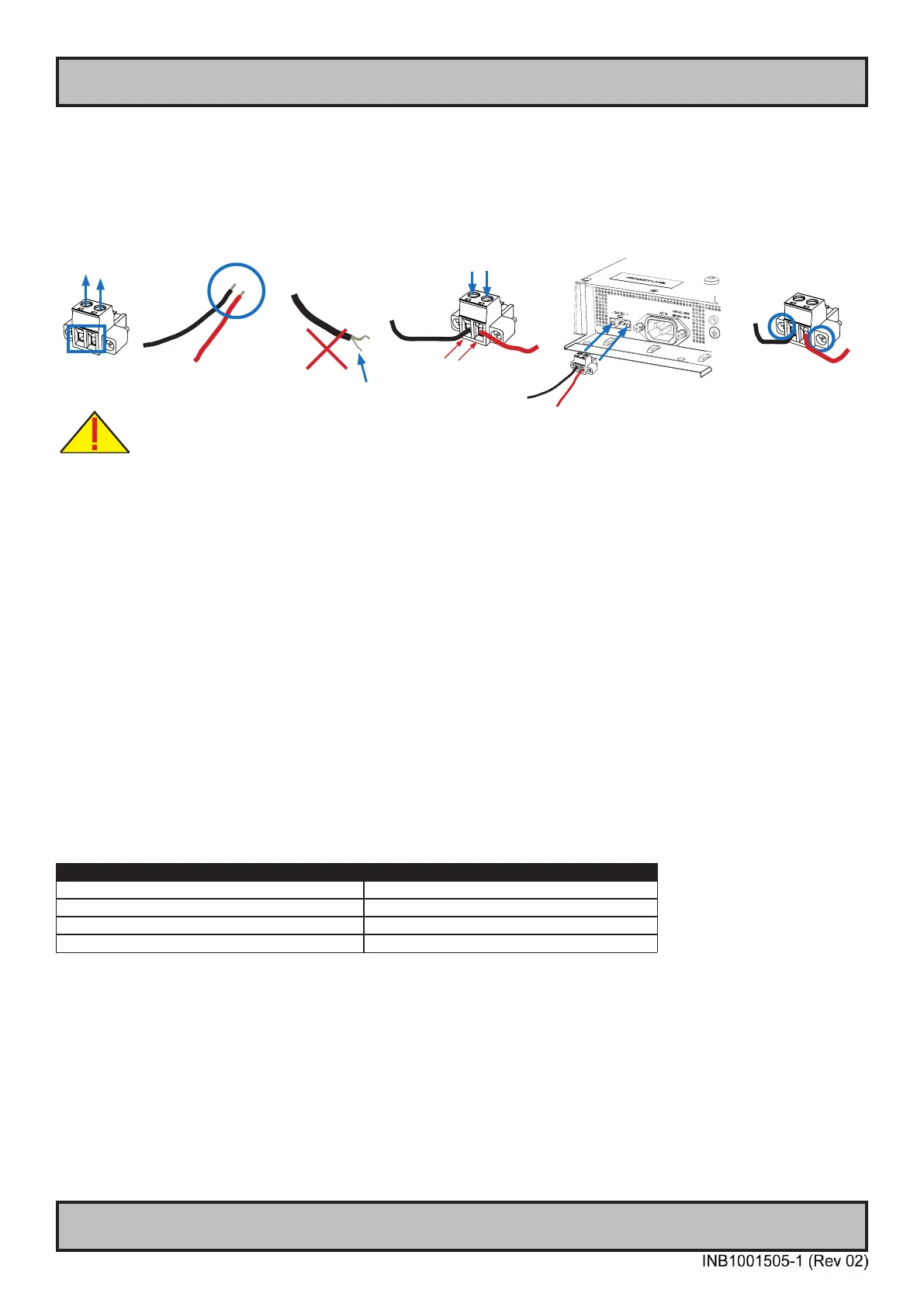
Below is a brief illustration that might be useful during conguration and installation of such connectors. You will need
suitable pre-congured cable(s) and tools to congure the connector(s) and cable(s) that are present in your
installation environment. Below is a sample procedure for a 2-pin DC power connector. The procedure is the same for
other connectors of this type as listed in table above. Unit used as illustration below is for reference only.
FIG 5
FIG 1
FIG 4
FIG 6
FIG 2
FIG 3
Requires assembly. It is expected that the technician has experience in electronics and
assembling cables and connectors.
Warning: Do not connect or disconnect cables/connectors to the unit’s connector while the unit is powered on. Failure to do so may result in
damaged electronics.
FIG 1: Unscrew (from top) or make sure that the screw terminal is fully open, so you can secure the inserted cables
correctly to the loose housing connector (it may already be plugged into the unit as per factory installation).
FIG 2: Strip carefully the insulation from the cable to expose the wire(s) inside.
FIG 3: Ensure that the wire(s) is without any loose threads to ensure good connection.
FIG 4: Insert cables* (from front) and screw / secure the cables by turning the screw on top of the housing to secure
the cables properly. Check that the cables are rmly in place and do not appear loose or fall out when pulling gently.
*Note: Required polarization verication (for instance -/+ for DC power input) should conform with the markings on
the connector area of the unit. Ignoring the markings on the unit or its add-on modules might damage the unit and/or
external equipment in which end, warranty will be void.
FIG 5: Plug the housing into the appropriate connector area of the unit (glass should be facing down) and check again
that the cables secured conform with the markings on the connector area of the unit. Finalize the installation by
fastening the screws located in front on each side of the housing connector (FIG 6).
Connector / Function Recommended Cable Thickness
2-pin DC Power Input (Terminal Block 5.08) Minimum 20 AWG - Maximum 18 AWG
4-pin CAN (Terminal Block 3.81) Minimum 22 AWG - Maximum 20 AWG
5-pin NMEA COM (Terminal Block 3.81) Minimum 22 AWG - Maximum 18 AWG
5-pin DIO (Terminal Block 3.81) Minimum 22 AWG - Maximum 18 AWG



 To Next Page