Installation and Operation Manual
E2K-405-0218 Rev. 2
February 2018
Section 5: Customizing Actuator Settings
Customizing Actuator Settings
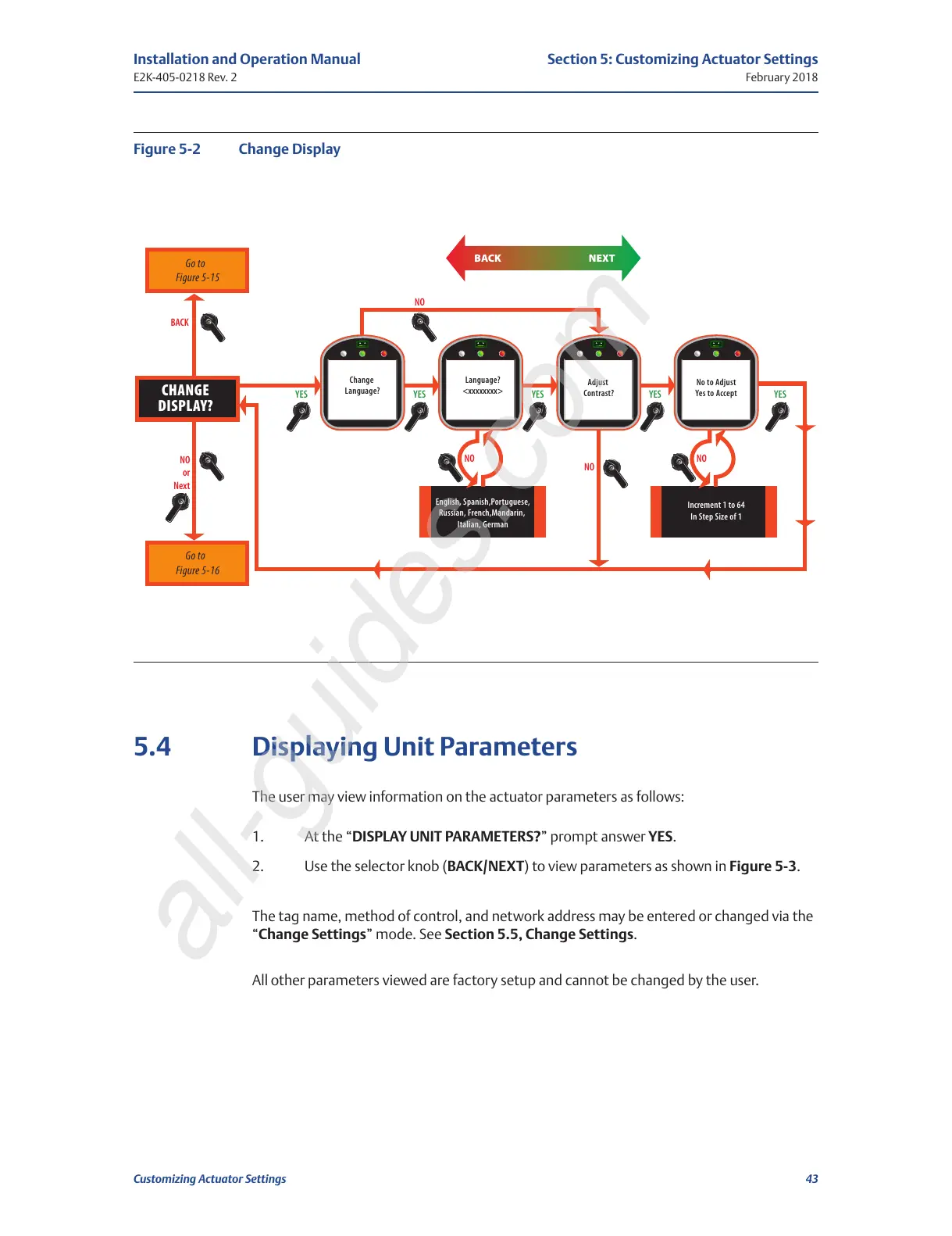
Figure 5-2 Change Display
5.4 Displaying Unit Parameters
The user may view information on the actuator parameters as follows:
1. At the “DISPLAY UNIT PARAMETERS?” prompt answer YES.
2. Use the selector knob (BACK/NEXT) to view parameters as shown in Figure 5-3.
The tag name, method of control, and network address may be entered or changed via the
“Change Settings” mode. See Section 5.5, Change Settings.
All other parameters viewed are factory setup and cannot be changed by the user.
NO
Figure 5-2 Change Display
Go to
Figure 5-15
Go to
Figure 5-16
YES YES
Change
Language?
Language?
<xxxxxxxx>
English, Spanish,Portuguese,
Russian, French,Mandarin,
Italian, German
YES YES
Adjust
Contrast?
YES
No to Adjust
Yes to Accept
Increment 1 to 64
In Step Size of 1
NO
NO
NO
NO
or
Next
BACK NEXT
BACK
CHANGE
DISPLAY?
All manuals and user guides at all-guides.com
all-guides.com






 To Next Page