EasyManua.ls Logo

Emerson Bettis TEC2 - Display Diagnostics; Figure 6-1 Display Diagnostic

Emerson Bettis TEC2
102 pages
Print Icon
To Next Page IconTo Next Page
To Previous Page IconTo Previous Page
Loading...
Installation and Operation Manual
E2K-405-0218 Rev. 2
February 2018
73
Section 6: Troubleshooting
Troubleshooting
6.2 Display Diagnostics
Displaying diagnostics retrieves historical data that is stored in the actuator’s memory.
This aids in troubleshooting.
1. At the “DISPLAY DIAGNOSTICS?” prompt, answer “YES.
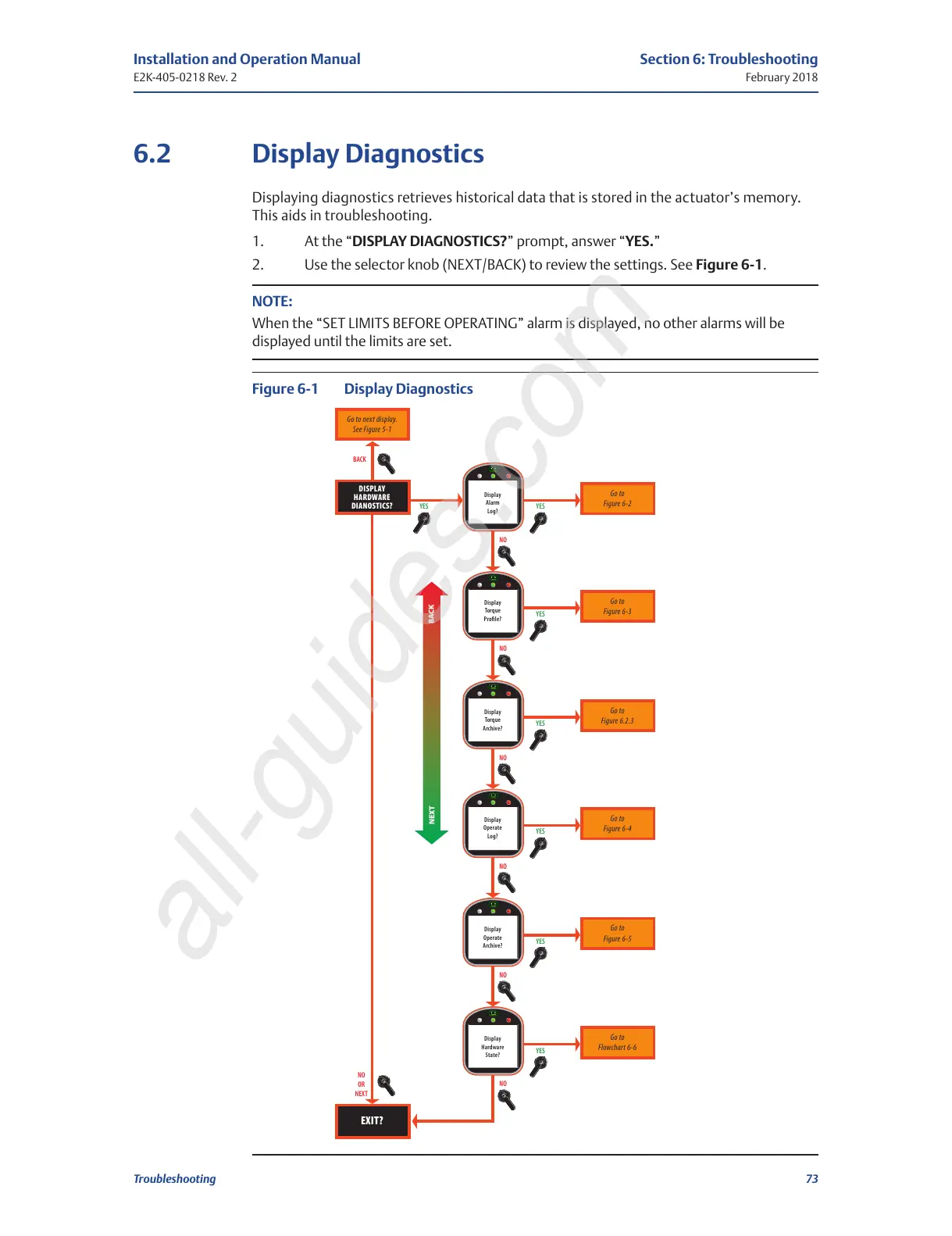
2. Use the selector knob (NEXT/BACK) to review the settings. See Figure 6-1.
NOTE:
When the “SET LIMITS BEFORE OPERATING” alarm is displayed, no other alarms will be
displayed until the limits are set.
Figure 6-1 Display Diagnostics
YES
BACK

Figure 6-1Display
Diagnostic
Display
Alarm
Log?
YES
BACK
NEXT
DISPLAY
HARDWARE
DIANOSTICS?
EXIT?
Go to
Figure 6-2
Go to next display.
See Figure 5-1
NO
OR
NEXT
NO
NO
NO
NO
NO
NO
YES
Display
Torque
Profile?
Go to
Figure 6-3
YES
Display
Torque
Archive?
Go to
Figure 6.2.3
YES
Display
Operate
Log?
Go to
Figure 6-4
YES
Display
Operate
Archive?
Go to
Figure 6-5
YES
Display
Hardware
State?
Go to
Flowchart 6-6
All manuals and user guides at all-guides.com
all-guides.com

Table of Contents

Related product manuals