User Menu Parameters
Liebert
®
iCOM
®
for Liebert DSE
™
102
7.6 User-Total Run Hours Menu Screens
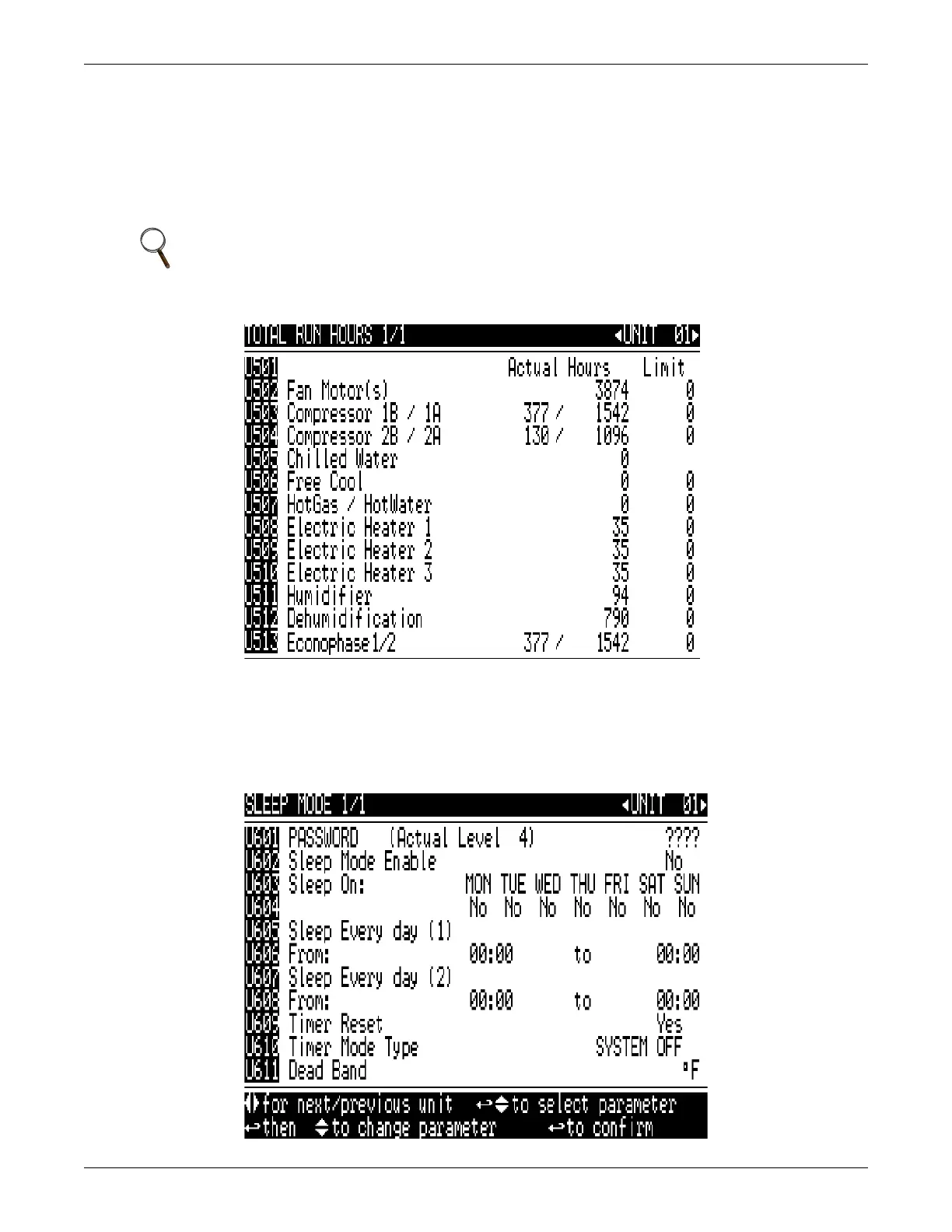
Total Run Hours displays the cumulative hours a particular component has been operating and the
limit placed on the hours the component may operate.
Each main component of the unit has its own run hours counter and a threshold. The actual run
hours can be reset to 0 by selecting the counter by pressing Enter, and then pressing the Down arrow
key. The thresholds can be set the same way.
Figure 77 Total run hours screen
7.7 User-Sleep Mode Menu Screen
The Sleep Mode menu contains parameters to set back or allow unit to turn Off during non-peak
hours. Sleep Mode may be interrupted if the temperature rises above threshold set in the Set Alarms
menu.
Figure 78 Sleep mode screen
NOTE
The password must be entered in any other screen because this screen does not contain a
password entry line.



 To Next Page