EasyManua.ls Logo

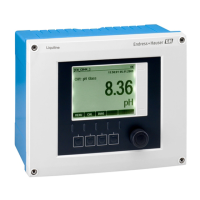
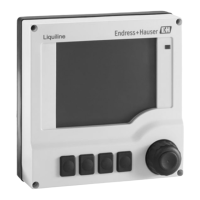
Endress+Hauser Liquiline CM442R - User Manual

Endress+Hauser Liquiline CM442R
172 pages
Print Icon
To Next Page IconTo Next Page
Loading...
Products Solutions Services
BA01225C/07/EN/05.15
71296082
Valid as of:
Softwareversion 01.05.02
Operating Instructions
Liquiline
CM442R/CM444R/CM448R
Universal four-wire multichannel controller for
cabinet installation

Table of Contents

Other manuals for Endress+Hauser Liquiline CM442R

Questions and Answers

  • T
    Tonya CostaAug 20, 2025
    How to check incorrect current output value on Endress+Hauser Controller?
    • F
      Frank CarrAug 20, 2025
      If the current output shows an incorrect value on your Endress+Hauser Controller, the issue might be due to incorrect adjustment. Verify this by using the integrated current simulation and connecting an mA meter directly to the current output.
  • S
    Shannon ThompsonAug 22, 2025
    Why is there no current output signal from my Endress+Hauser Liquiline CM442R?
    • Z
      Zachary GreeneAug 22, 2025
      If there's no current output signal from your Endress+Hauser Controller, it could be due to a defective base module. Verify this by using the integrated current simulation and connecting an mA meter directly to the current output.
  • E
    Erin DavisAug 25, 2025
    What to do if Endress+Hauser Liquiline CM442R Controller display doesn't change or device cannot be operated?
    • K
      Kimberly WilliamsAug 25, 2025
      If values appear on the display of your Endress+Hauser Controller, but the display isn't changing or the device is not operating, it could be due to: * Incorrectly wired module: Check the modules and wiring. * Impermissible operating system condition: Switch the device off and then on again.
  • M
    Mark HoltAug 26, 2025
    Why is the display dark on my Endress+Hauser Liquiline CM442R Controller?
    • L
      Laurie ThomasAug 26, 2025
      A dark display on your Endress+Hauser Controller (if equipped with the optional display) can be caused by: * No supply voltage: Check if supply voltage is applied. * Display connector plugged in incorrectly: Ensure it's in the RJ45 socket on the base module. * Defective base module: Replace the base module.
  • S
    Steven WilliamsAug 28, 2025
    What to do if Endress+Hauser Transmitter display does not change or the device cannot be operated?
    • Q
      qrichardsonAug 28, 2025
      If the display values are present, but the display doesn't change or the device is inoperable, there might be an issue with the module wiring. Check the modules and wiring to ensure they are correctly connected. Alternatively, the device might be in an impermissible operating system condition. To resolve this, switch off the device and then switch it on again.
  • R
    Richard CollinsAug 30, 2025
    What to do if Endress+Hauser Transmitter display is dark?
    • Y
      ybakerAug 30, 2025
      If the display is dark, it could be due to several reasons. First, check if the supply voltage is applied. Second, verify that the display connector is correctly plugged into the RJ45 socket on the base module. Finally, the base module itself might be defective, in which case, replace it.
  • T
    Thomas OconnellSep 1, 2025
    Why does the Endress+Hauser Liquiline CM442R display deviate from the reference measurement?
    • N
      Nathan WilliamsSep 1, 2025
      If the display on your Endress+Hauser Controller deviates from the reference measurement, first, repeat the calibration. If necessary, check and repeat the calibration with the reference device. Also, the sensor may be fouled, so cleaning the sensor is advisable. Check the temperature measured values of both devices and verify the settings for temperature compensation and adjustment for both devices.
  • M
    Mark WrightSep 2, 2025
    What to do if Endress+Hauser Liquiline CM442R shows a constant, incorrect measured value?
    • A
      Alan BridgesSep 2, 2025
      If you observe a constant, incorrect measured value on your Endress+Hauser Controller, check the installation position and remove the protection cap from the sensor if it's still on. Ensure there are no air pockets in the assembly by checking the assembly and orientation. Perform a test measurement in an isolated vessel, using a buffer solution if applicable, to rule out a ground fault. Also, inspect the sensor for a hair-line crack in the glass membrane and renew the sensor if necessary. Finally, try switching the device off and on again to resolve any impermissible operating conditions.
  • G
    gordonvirginiaSep 4, 2025
    Why is there no change or a subtle change in Endress+Hauser Liquiline CM442R Controller display?
    • J
      Jason GuzmanSep 4, 2025
      If there's no change or a subtle change in the display of your Endress+Hauser Controller, start by cleaning the sensor, as it might be fouled. If cleaning doesn't help, the sensor might be old and need replacement. Also, the sensor could be defective (reference lead), requiring a sensor replacement. Check the KCl supply, ensuring it's at 0.8 bar (12 psi) over medium pressure, in case the reference has a low level of KCl.
  • C
    Carol OrrSep 6, 2025
    What causes fluctuations in the measured value on Endress+Hauser Liquiline CM442R Controller?
    • R
      rodriguezlisaSep 6, 2025
      If you observe fluctuations in the measured value on your Endress+Hauser Controller, check the cable routing for any interference on the signal output cable, and route the cable separately if necessary. Additionally, there may be interference potential in the medium, so try to eliminate the source of interference or ground the medium as close as possible to the sensor.

Endress+Hauser Liquiline CM442R Specifications

General IconGeneral
BrandEndress+Hauser
ModelLiquiline CM442R
CategoryController
LanguageEnglish

Related product manuals