RMS 621 6 Commissioning
Endress+Hauser 29
6 Commissioning
6.1 Installation control
Make sure that all final installation checks have been made before starting to commission the unit:
• See Chap. 3.3 ’Installation control’
• Check list Chap. 4.3 ’Connection control’
6.2 Switch unit on
6.2.1 Basic unit
If there are no faults then the green LED illuminates once the power supply has been switched on.
• On initial commissioning of the unit the request "Please set up the unit using Set-up or Quick
Setup" appears in the display. Set up the unit as described in chap 6.4.
• When commissioning a unit that has already been set up, the unit immediately starts to take
measurements using the set-up configuration. The display indicates the values of the set-up
display group. Entry to the main menu is done by pressing any key (see chap. 6.4).
6.2.2 Expansion cards
Once the power supply has been connected, the unit automatically recognises any expansion cards
fitted. It is now possible to set up the application by configuring the new connections. Alternatively,
this can be set up at a later time.
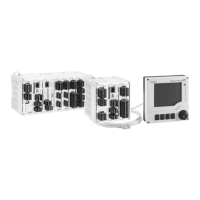
6.2.3 Remote display/operating module
The remote display/operating module is normally configured at the factory - Unit address 01,
Baudrate 56,7k, RS485 master. The display automatically sets up communication with the base unit
after the power supply has been switched on and a short initialisation time. Please make sure that
the unit address of the base unit is the same as that of the remote display.
Fig. 21: Start Set-up menu
In the set-up menu the parameters for communication Baudrate and unit address as well as the
contrast/viewing angle of the display can be set up. Simultaneous pushing of the left and right upper
push buttons for 5 seconds initiates the set-up menu for the display/operating module.
!
Note!
The set-up menu is only available in English. Operation of the DIN rail mounted unit is not possible
using the set-up menu. This is completely described in chapter 5.
Error messages
Should the error message "Communication problem" appear in the remote display/operating
module after power up or during operation first check the connection made to the base unit then
make sure that the baudrate and unit address set up corresponds with that in the base unit.




 To Next Page