RMS 621 6 Commissioning
Endress+Hauser 39
Setup → Application
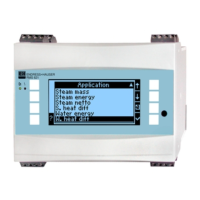
The energy manager can operate with the following application: Steam mass, steam heat
quantity, net steam heat quantity, steam heat differential, water heat quantity and water
heat differential. Up to three different applications can be run at the same time (this means
simultaneous operation of up to 3 complete measurement points).
Set-up of an application can be done independently of the applications running. Please note that
after successfully setting up a new application or changing values in an already existing application,
the new data is only accepted after the user has acknowledged the release of the data. After this
release the unit operates a new start.
Function (Menu
address)
Parameter set-up Description
Identifier Application 1-3 Identifies the preset application, e.g. ’Boiler house 1’.
Application Not used
Steam mass
Steam heat
Net. steam
S heat diff
Water heat
Water heat diff
Selects the required application. If an already existing
application is to be switched off select "Not used".
Steam type Super heat steam
Saturated steam
Select the steam type to be used in the application (only
required in steam applications).
Inputs Q + T
Q + P
Inputs on sat steam applications
Q + T: Flow and temperature
Q + P: Flow and pressure
Only two input signals are required when measuring saturated
steam, the missing value will be automatically calculated by
the unit using the built-in saturated steam curve (only on
steam type ’saturated steam’).
Input signals for flow, pressure and temperature are required
for measuring superheated steam.
!
Note!
Only on saturated steam applications.
Operating mode Heating
Cooling
Bi-directional
Heating
Steam production
Select the mode of the energy application (cooling) on energy
use or (heating) on energy distributed.
Bi-directional operation, describes a heat circuit that can be
used for both heating and cooling.
!
Note!
Only applicable for water heat differential applications.
Selection whether steam is used for heating purposes or
whether steam is being produced from water.
!
Note!
Only applicable for steam heat- heat differential applications.
Flow direction Constant
Changing
Selection if the heat circuit flow direction is in bi-directional
mode.
!
Note!
Only applicable on bi-directional operating mode
Direction terminal Terminal Terminal for connection to the direction signal of the
flowmeter.
!
Note!
Only applicable in bi-directional operating mode with changing
flow direction.
Flow Please select
Flow 1-3
Allocates the application to a particular flowmeter. Only the
flowmeters that have already been set up (see "Setup: Flow")
are available for selection.





 To Next Page