117
ENGLISH
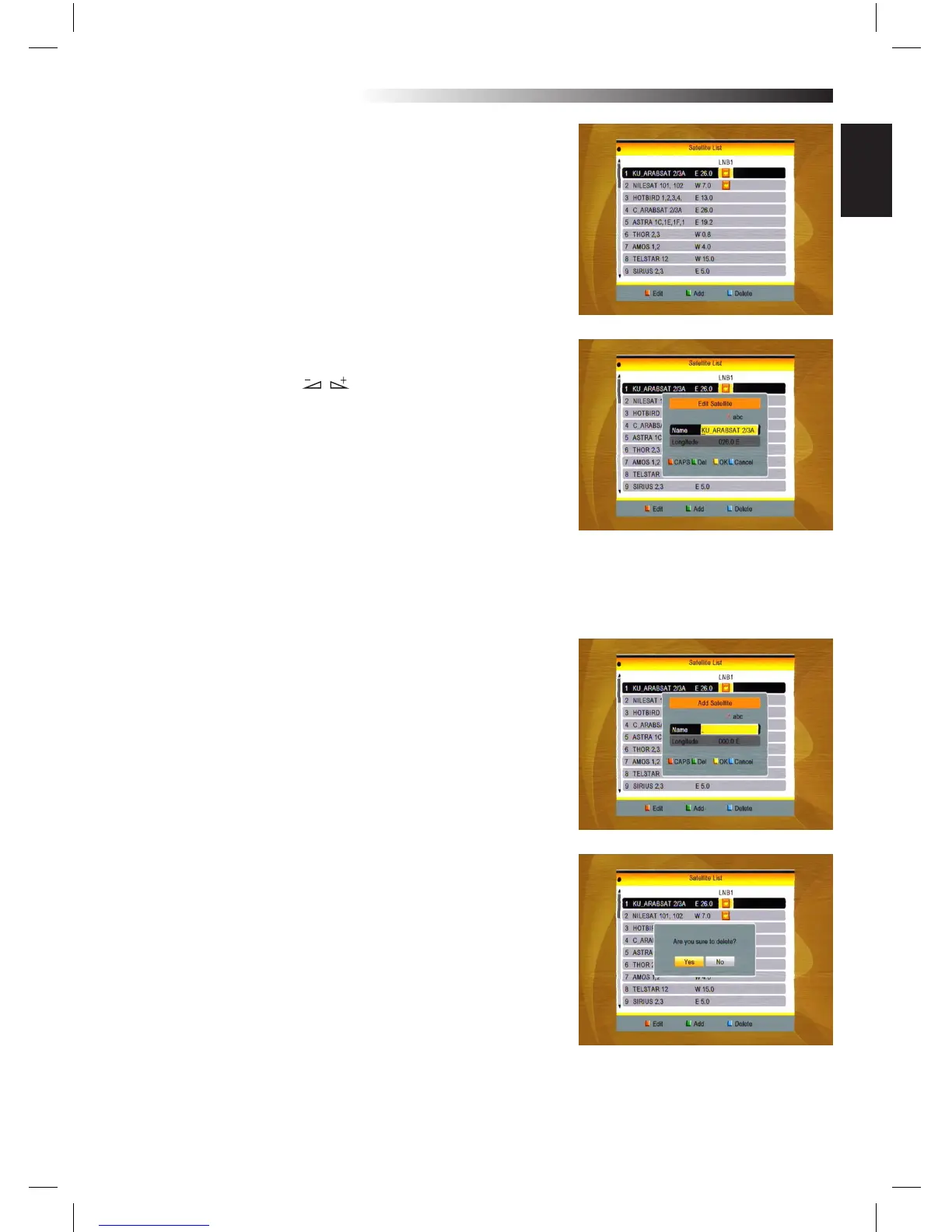
2.2 Satellite List
1. Press PR+, PR- keys to select the satellite up or down. Press OK
key to select and mark, and you can press OK key again to cancel
the selection and the mark.
2. If there is no satellite, the red colour and blue colour keys will
be invalid.
3. Press red colour key to pop up the Edit Satellite window. Press
PR+, PR- keys to move cursor up or down.
Name: User numeric keys to change the name of the satellite,
please refer to the Edit Channel Name.
Longitude: You can press keys to switch between east
longitude and west longitude. After pressing OK key, you can use
numeric keys to edit the longitude, press EXIT key or thePR+,
PR- keys to EXIT editing mode. The range of the longitude is from
1to 180 degree. If beyond this range, system will inform you “out
of range” when you press yellow colour key on the RCU.
After setting, press yellow colour key to save and EXIT, while
press blue colour key to EXIT without saving.
4. Press green colour key to pop up the Add Satellite window.
Since the same operation as the above Edit Satellite window,
here we don’t explain any more.
5. Press blue colour key to pop up the dialogue “Are you sure to
delete?”. Select Yes button and press OK key to delete the selec-
ted satellite. You can cancel this operation by pressing OK key at
the NO button.
MENU INFORMATION



 To Next Page