118
2.3 Antenna Setup
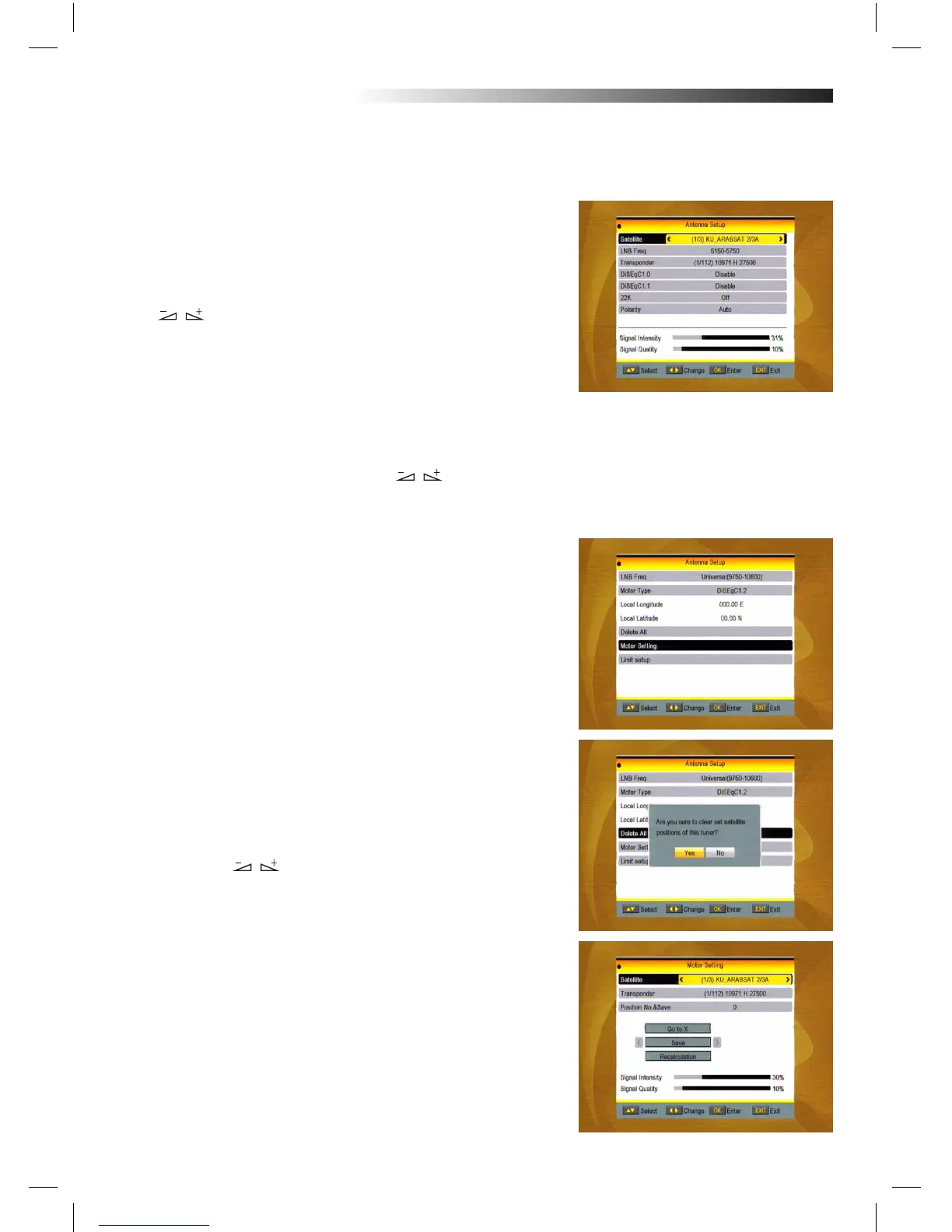
Part A: Fixed
Suppose that you have selected Fixed Antenna in the Antenna
Connection window.
1. Satellite: All selected satellites in the satellite list are displayed
in this item.
Press keys to select the satellite in circle. Or press OK key
to pop up the drop-down list, then select the desired satellite in
the list and press OK key to conrm.
2 . LNB Freq, Transponder, DiSEq C1.0 ,
DiSEqC1.1: The same operation as the above.
3. 22K, 0/12V, Polarity: You can press keys to select in
ircle.
Part B: Motor
Suppose that you have selected Motor Antenna in the Antenna
Connection window.
1. LNB Type: Select the proper LNB type.
2. Motor Type: Select between DiSEqC1.2 and USALS. If you se-
lect DiSEqC1.2, the following Local Longitude and Local Latitude
items will turn grey.
3. Delete All: Press OK key to pop up the dialogue “Are you sure to
clear set satellite position of this tuner?”. Press OK key at the Yes
button to clear all the memories about the position of the satelli-
tes that are connected to the current tuner.
4. Motor Setting: Press OK key to the Motor Setting window.
Satellite: Press keys to select the satellite in circle. Or
press OK key to pop up the drop-down list, then select the desired
satellite in the list and press OK key to conrm.
Transponder: The same operation as the above.
MENU INFORMATION



 To Next Page