39
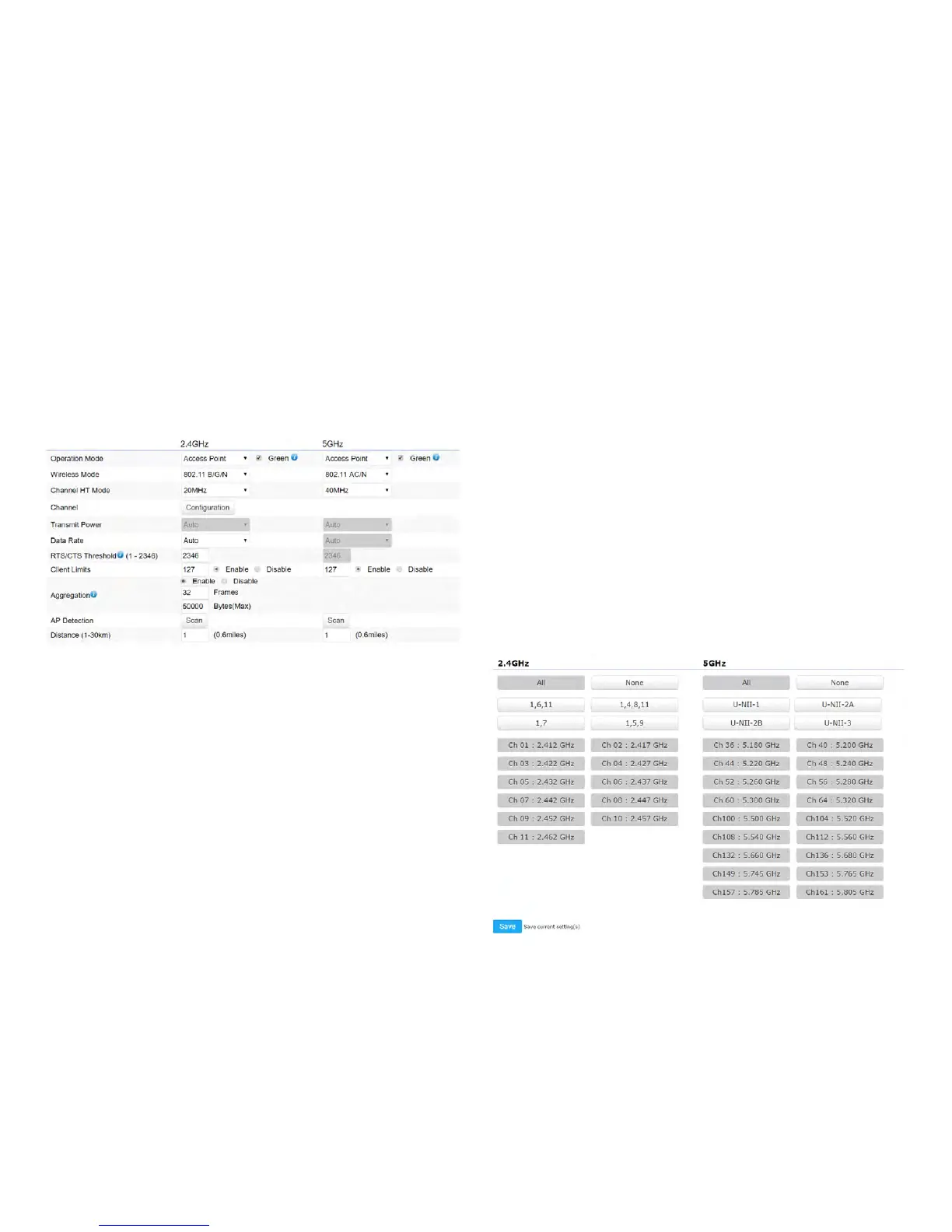
This page displays the current status of the Wireless
settings of this AP.
2.4 GHz/5 GHz Wireless Network
Operation Mode: Scrow down this list to select operation
modes for implementing on this radio. The default operation
mode is Access Point on base stations and Access Points
and is Client BridgeonClientPremiseEquipements(CPE).
Meanwhile, EnGenius outdoor devices also support WDS
modes for peer to peer or peer to multi-peer connections.
Wireless Mode: Scrow down this list to select wireless
broadcasting standard on 2.4GHz and 5GHz frequency
bands.
Channel HT Mode: Scrow down this list to select bandwidth
for operating under a frequency band. The default channel
bandwidth is 20 MHz on 2.4GHz frequency radio and 40
MHz on 5GHz frequency radio. Considering the different
applications, users can decide to implement a channel
bandwidthtofulllrealapplications.Thelargerthechannel,
the greater the transmission quality and speed.
Transmit Power (Tx Power):DefaultTxpowerisAuto
to obey regulartory power of each country.
Channel: Click Configuration button to open a new
windows to configure channels for performing wireless
service.



 To Next Page