46
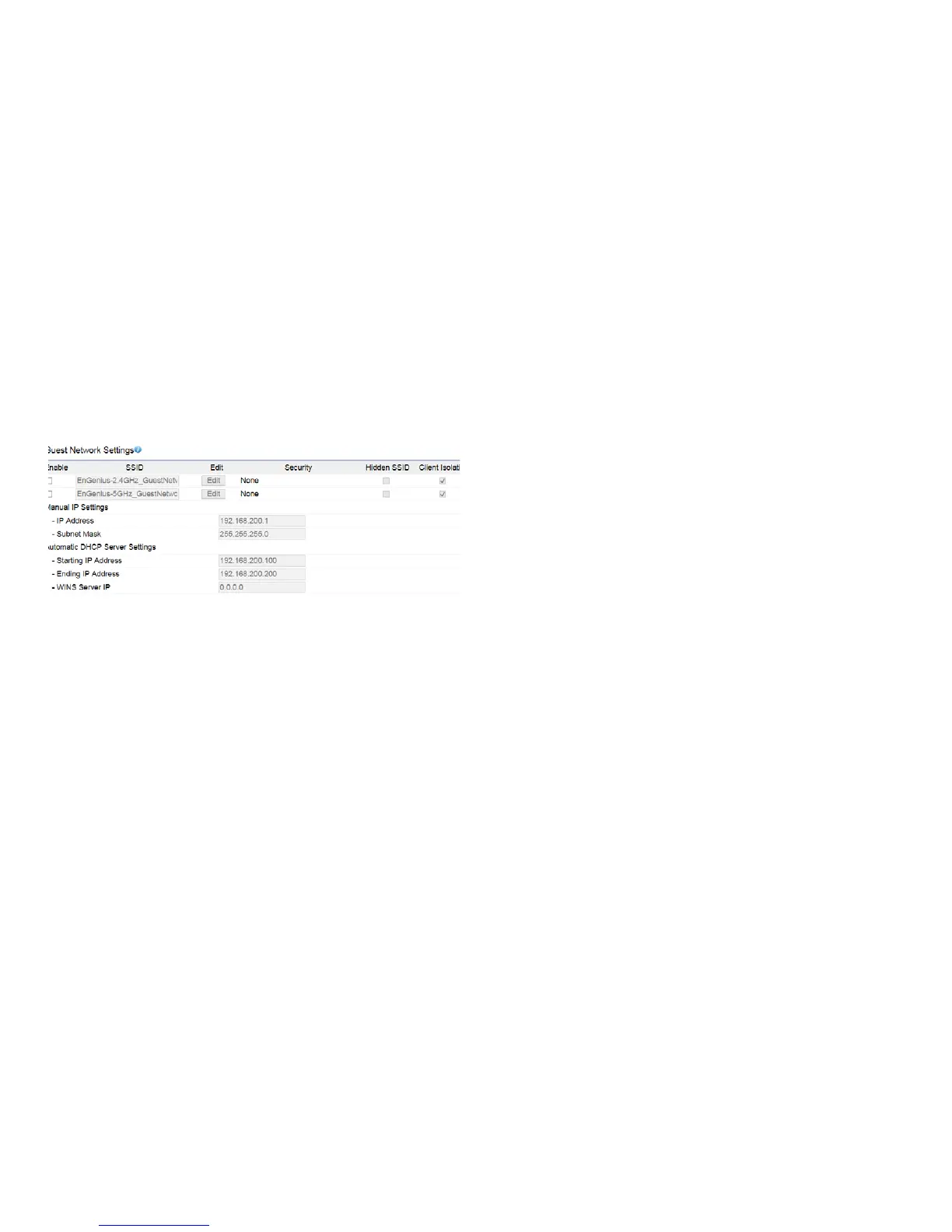
Adding a guest network to allow visitors to use the internet
withoutgivingoutyourofceorcompanywirelesssecurity.
You can add a guest network to each wireless network in
the 2.4GHz frequencies and 5GHz frequencies.
SSID: Specied the SSID for the current prole.. Choices
givenare:Disabled,DenyMACinthelist,orAllowMACin
the list.
Hidden SSID: CheckthisoptiontohideSSIDfromclients,If
checked,thisSSIDwillnotappearintheAPdetect.
Client Isolation: Click the appropriate radio button to allow
or prevent communication between client devices.
IP address: The IP Address of this device.
Subnet Mask: The IP Subnet mask of this device.
Starting IP Address: TherstIPAddressintherangeof
the addresses by the DHCP server.
Ending IP Address: The last IP Address in the range of
addresses assigned by the DHCP server.
Guest Network Settings



 To Next Page