12
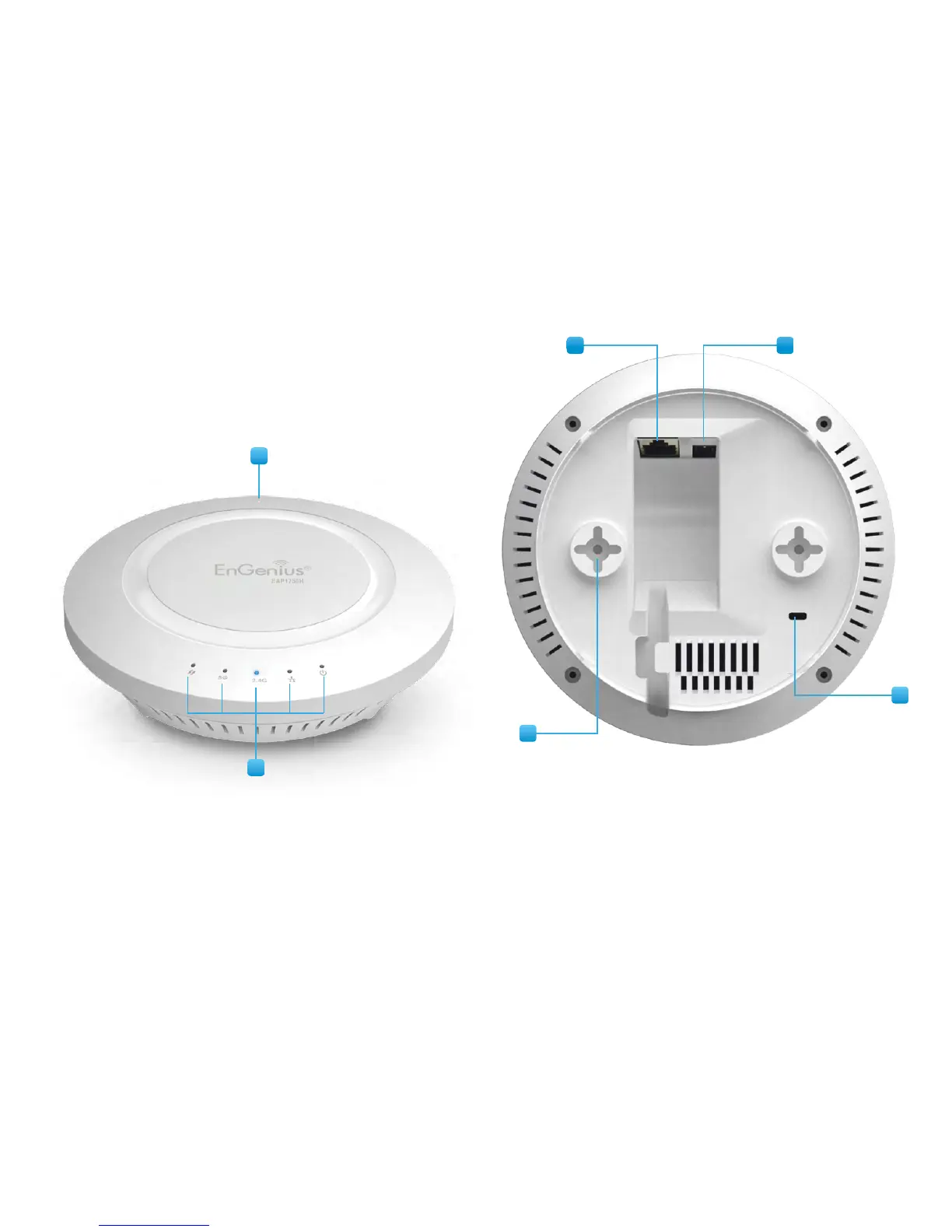
Physical Interface (EAP1750H/EAP1300(EXT))
Dimensions and Weights
Diameter:6.36”
Height:1.64”
Weight:0.65lbs.
1 Reset Button: Press and hold for over 10 seconds to reset to
factory default settings.
2 LED Indicators: LEDlightsforWPS,WLAN5GHz,WLAN2.4GHz,
Ethernetport,andPower
3 LAN Port (PoE): EthernetportforRJ-45cable.
4 Power Connector: 12V DC IN for Power.
5 Ceiling (Wall) Mount Hole: Using the provided hardware, the
EAP AP can be attached to a ceiling or wall.
6 Kensington Security Slot: ToprotectyourEAP1750H,usethe
Kensington Security Slot to attach a cable lock*. (EAP1750H
Only)
*cable lock not included
3 4
1
2
5
6



 To Next Page