16
RAK111_ENG / © Ensto 2019
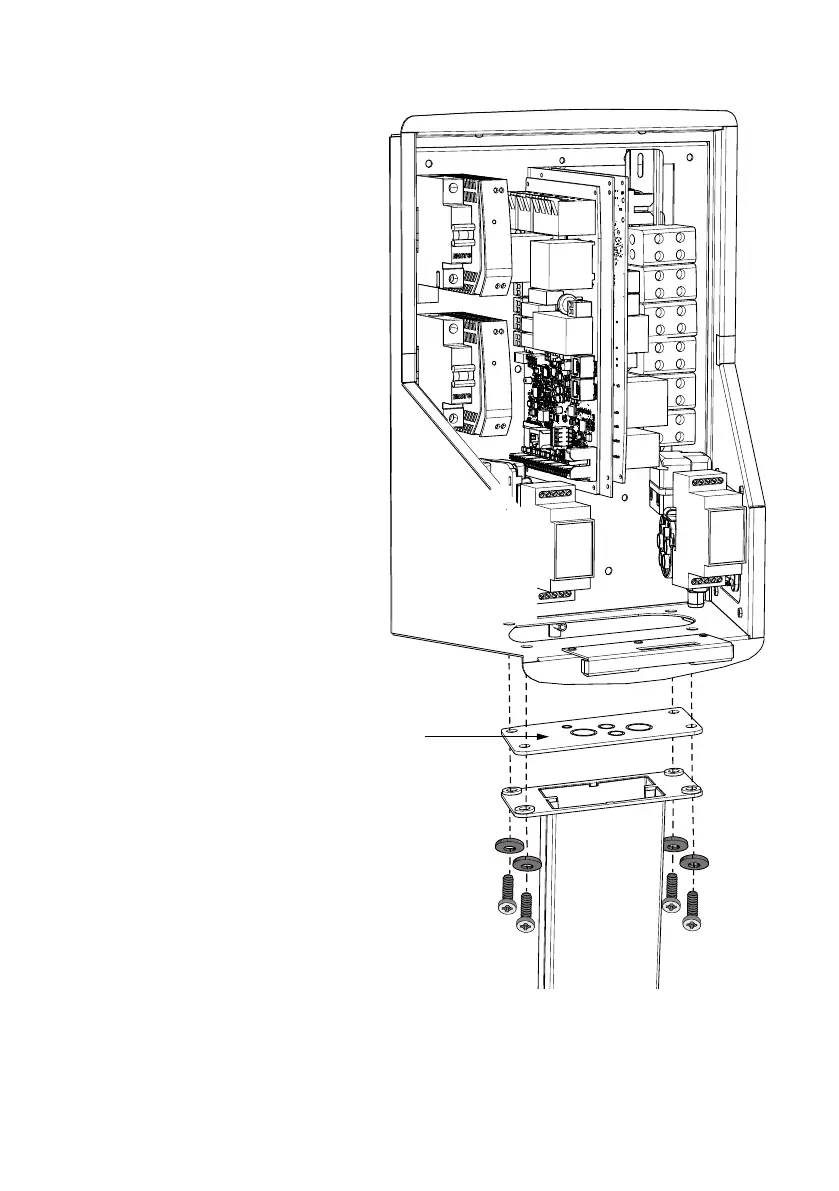
5.7. Fixing Wallbox on Mounting Poles EVTL43.00 and EVTL48.00
Installation steps
1. Open the front cover lock and remove the
front cover.
Note! RFID, LED module and antenna cables
are attached to the front cover. Be careful not
to break any components when you remove the
front cover.
2. Remove the ange at the bottom of the Wall-
box frame.
3. Open the knock-outs and insert the cable
glands needed for electrical cables on ange
KOT21715.
4. Pull the electrical cables through the gable
glands.
5. Fix the Wallbox and ange KOT21715 on the
mounting pole using the screws included in
the delivery.
KOT21715


 To Next Page