17
RAK111_ENG / © Ensto 2019
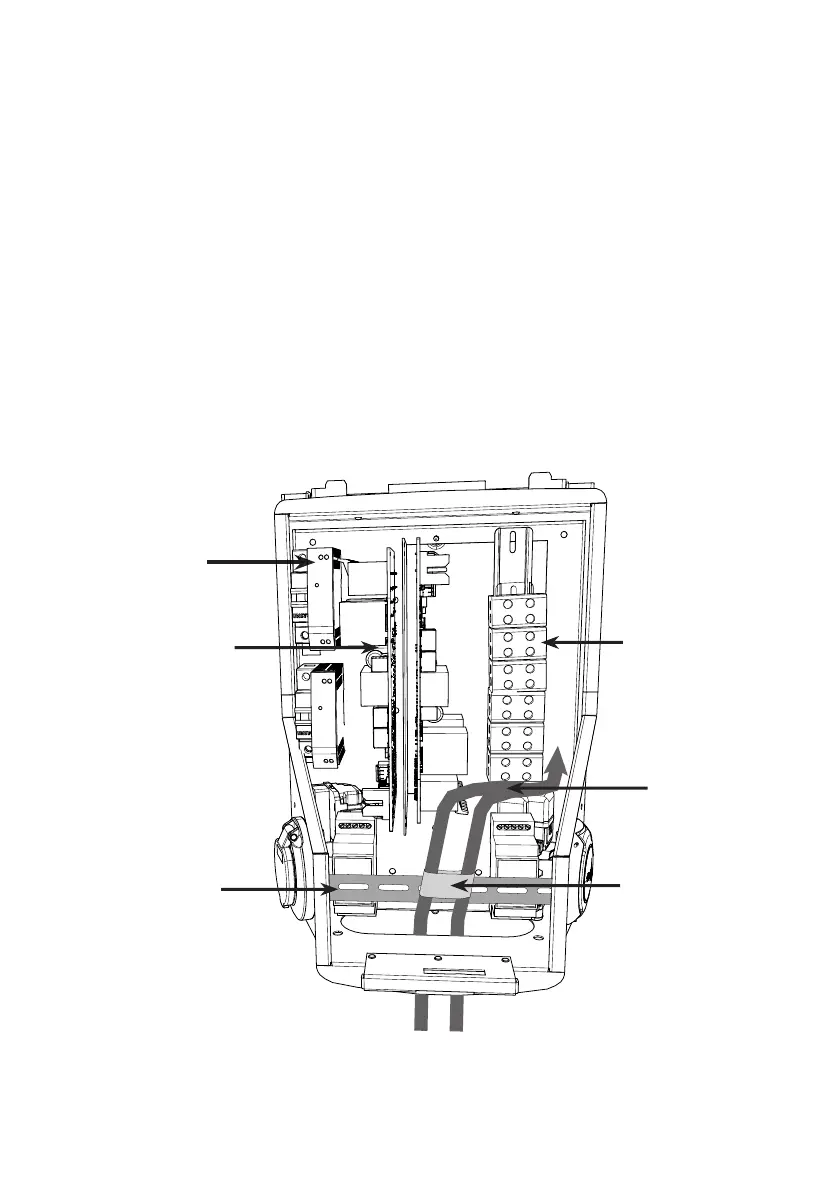
Front DIN rail
Cable route
Plastic guide
Electrical cables
Controller
board / boards
Supply
connectors
DC power supply
6. Electrical Connections
6.1. Wiring Instructions
1. Remove the front DIN rail if needed to make more space for the installation work.
2. Pull the supply cable through the cable gland approx. 600 mm measured from the cable
gland exit.
3. Remove the cable sheath approx. 200 mm.
4. Secure the front DIN rail in place.
5. Pull the supply cable through the plastic guide included in the delivery.
6. Run the supply wiring above the DIN rail in such a manner that the socket outlet locking
system is not damaging the supply wires.
7. Cut the supply cable leads in dierent lengths. Leave the ground lead long enough so that
if a fault occurs it is the last one that comes loose.
8. Strip the leads 25 mm and connect to the supply connectors.
9. Ensure that the RFID, LED module and antenna cables are routed correctly.
10. Close the front cover.


 To Next Page