Connecting to Console Port for Local Management
SecureStack B2 Installation Guide 3-19
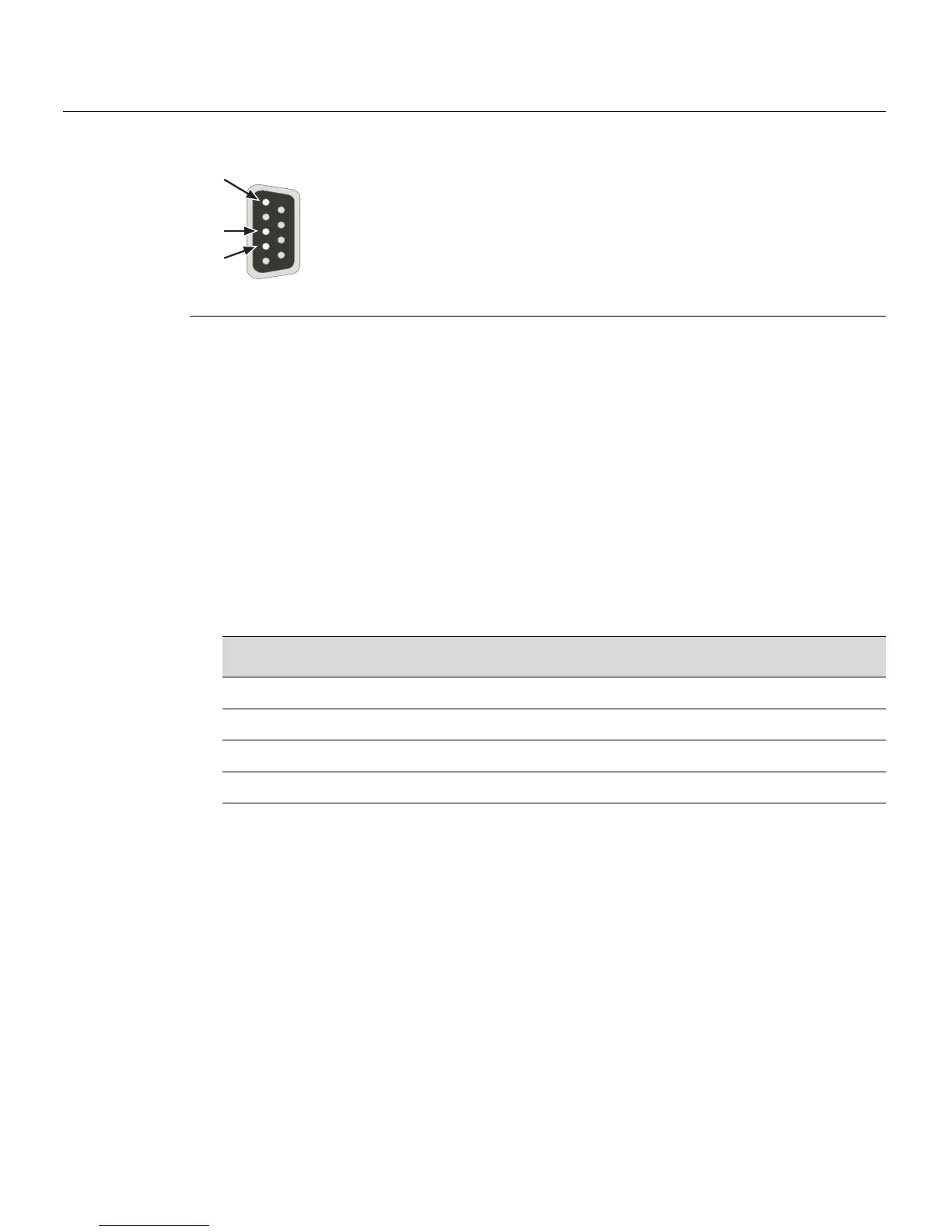
Figure 3-9 DB9 Male Console Port Pinout Assignments
Connecting to an IBM or Compatible Device
ToconnectanIBMPCorcompatibledevice,runningtheVTterminalemulation,toan
EnterasysswitchConsoleport(Figure 3‐10),proceedasfollows:
1. ConnecttheDB9femaleconnectoratoneendofthecable(notsupplied)tothe
ConsoleportontheEnterasysswitch.(Ifthereisaswitch
designatedastheManager,
connecttoitsConsoleport.)
2. PlugtheDB9femaleconnectorattheotherendofcableintothecommunicationsport
onthePC.
3. TurnonthePCandconfigureyourVTemulationpackagewiththe following
parameters:
Whentheseparametersare set,theStartupscreenwilldisplay.Proceed
to“Connectingto
theNetwork”onpage 3‐22.
1 Pin 2, Received Data (input)
2 Pin 3, Transmitted Data (output)
3 Pin 5, Signal Ground
All other pins not connected.
Â
À
Á
5
1
9
6
Parameter Setting
Mode 7 Bit Control
Transmit Transmit=9600
Bits Parity 8 Bits, No Parity
Stop Bit 1 Stop Bit














 To Next Page