POWER FACTOR CONTROLLER
RG3-12C/CS
13
In this menu, voltage transformer ratio can be set between 1-2000.
For example: For a 34,5 kV / 100 V transformer, VT ratio must be set as
345.
Note : Be aware that this value is entered as a ratio, not VT primary or
secondary value.
3.7.b Voltage Transformer Ratio Setting
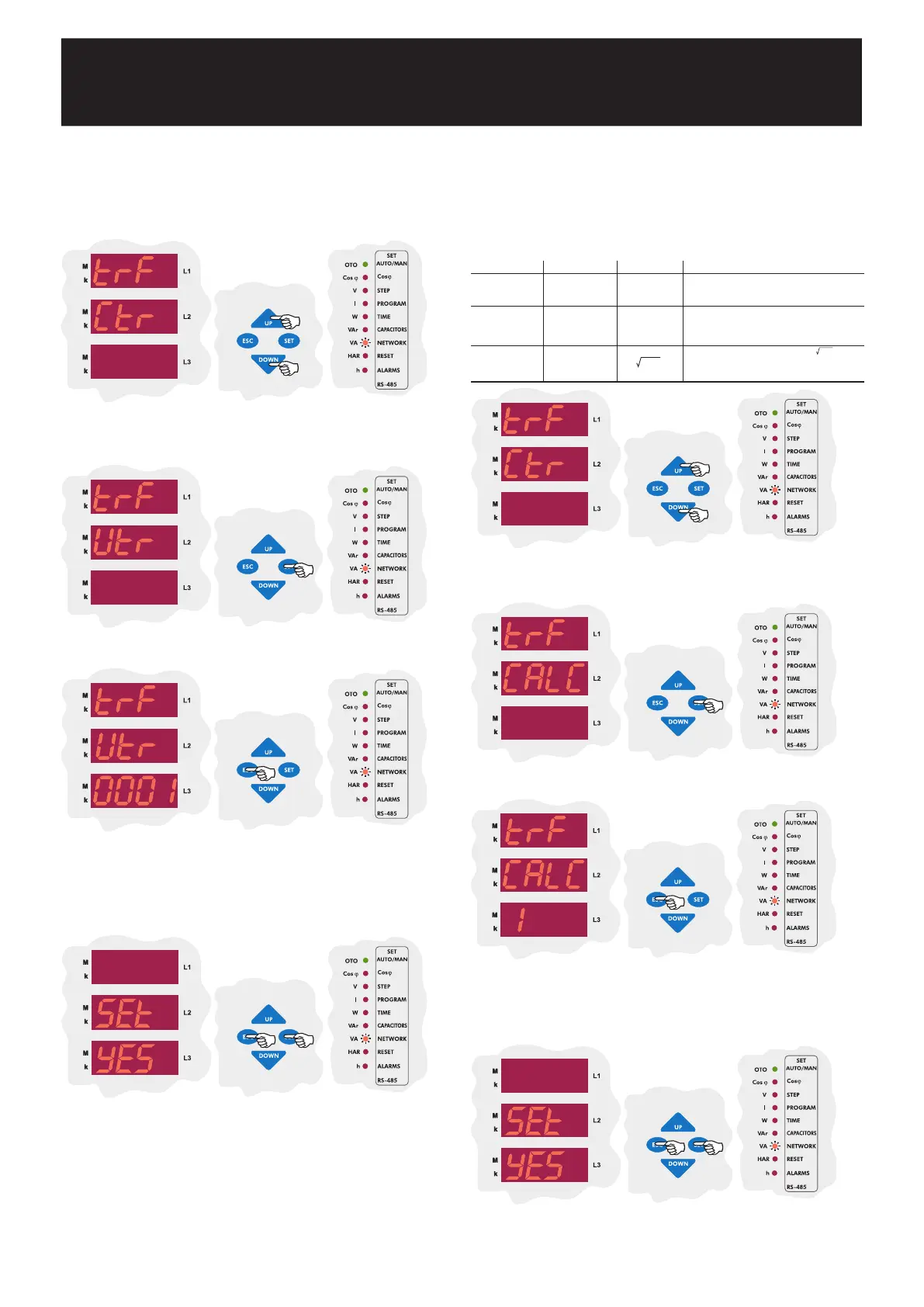
Using the UP/DOWN buttons, enter the voltage transformer ratio (Vtr)
menu which is the second menu in CT and VT ratio settings.
Press the SET button to set VT ratio.
Enter VT ratio between 1-2000 and press the SET button. If you are going
to change another setting, enter to that setting menu using the UP/DOWN
buttons.
If you do not want to set another parameter, press the ESC
button.
SAUE
If you want to leave the setup menu without making any other changes,
press the ESC button until SAVE SEt yES shows on the screen. If
you want to save the changes, press the SET button. If not, press the
ESC button.
3.7.c Reactive Energy Calculation Method Setting
Three different methods exist for reactive energy calculation in RG3-12C/CS.
Brief informations about these methods are explained in below table.
Related values which must be entered in the menu are also indicated in
the table in order to select reactive power calculation methode for mechanical
and digital energymeters.
Using the UP/DOWN buttons, find the reactive energy calculation method
menu(CALC).
Press the SET button to select the calculation method.
In order to select reactive energy calculation method (for mechanical and
digital energymeter), enter a value between 0-5 and press the SET
button.
If you are going to change another setting, enter to that setting menu
using the UP/DOWN buttons.
If you do not want to set another parameter,
press the ESC button.
SAUE
If you want to leave the setup menu without making any other changes,
press the ESC button until SAVE SEt yES shows on the screen. If
you want to save the changes, press the SET button. If not, press the
ESC button.
0
2
4
1
3
5
Description
It is the most preferred reactive power calculation
method.
Total value of the multiplication of V
n
and I
n
values up
to 19 th harmonics. This calculation method is mostly
preferred for network analysers.
S
Vn.In.sin(jn)
n=1
¥
Reactive Energy
(Q)
Digital Energymeter
(Separately for each phase)
Mechanical Energymeter
(Total sum of the three phases)
Rotate the voltage
vector by 90° and
multiply with current
S
2
-P
2
S
2
-P
2
Power Triangle Method : In this method; Q =
(Q : Reactive power, P : Active power, S : Apparent power)
It is a less preferred method compared to the other methods.


 To Next Page