POWER FACTOR CONTROLLER
RG3-12C/CS
14
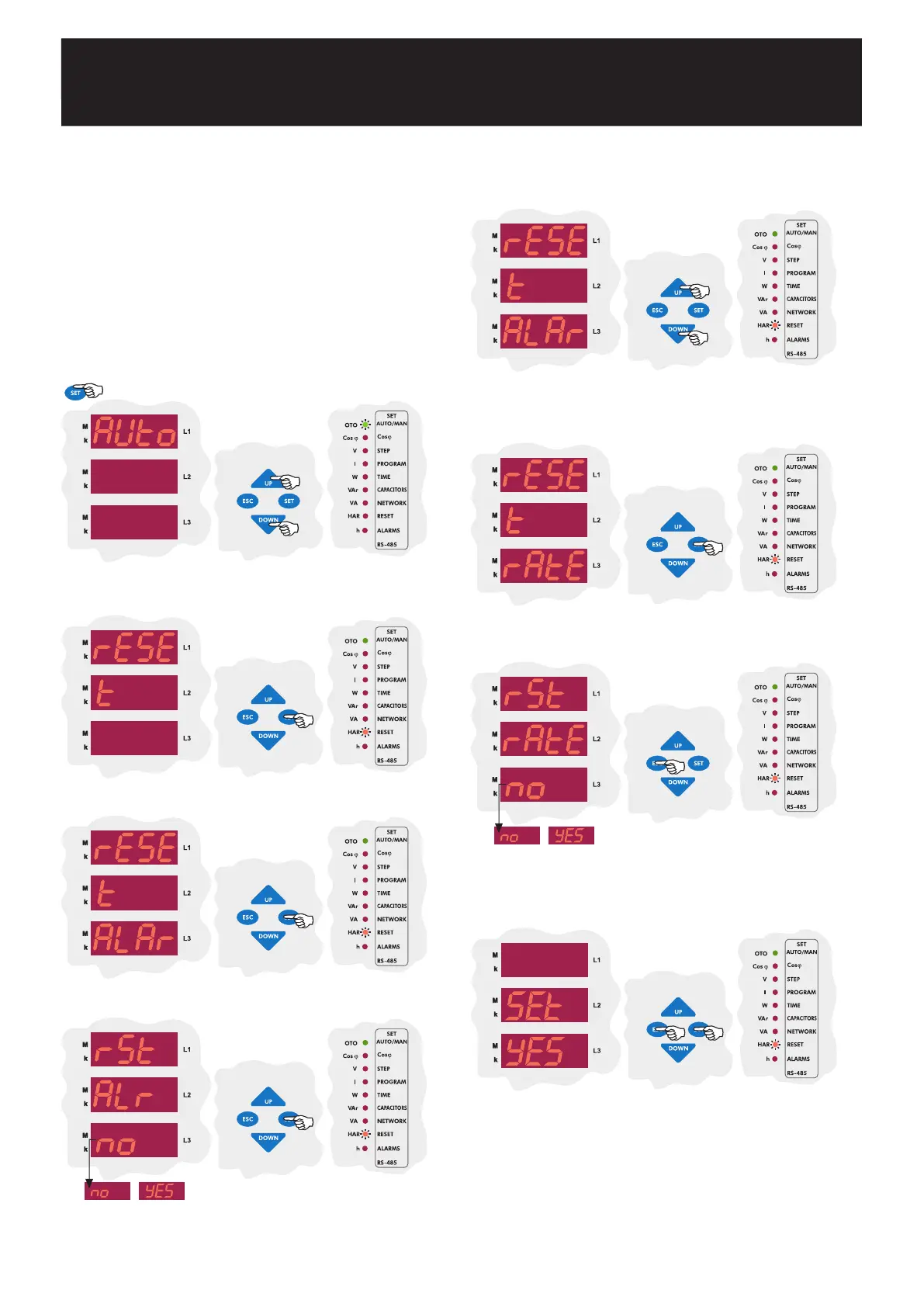
In this menu; alarms and ratios(reactive/active ratios) are reset.
The alarms which occur when the device operates are reset in this menu.
To reset the alarms, yES option must be selected.
Note : When an alarm occurs, the alarm relay switches on and the
related alarms LED turns on and the alarm code is displayed. Even if
alarm conditions disappear, the alarm relay will stay switched on. By
using the reset menu, alarms are reset and alarm relay is switched off.
If alarm conditions still exist, even if alarms are reset in the reset
menu, alarm relay switches on again. If alarm conditions disappeared,
alarm relay continues to its normal operation.
3.8.a Alarm Reset Setting
3.8 Reset Settings
Using the UP/DOWN buttons, find the reset menu option(rESEt). When
reset menu is selected, reset LED turns on.
Press the SET button to enter reset(rESEt) setting options.
Press the SET button to set the alarm(ALAr) setting which is the first
setting in the reset(rESEt) menu.
Using the UP/DOWN buttons, select yES to delete alarm values or
no to cancel the delete process and then press SET button.
3.8.b Reactive/Active Ratio Reset Setting
Reactive/active ratio, which is calculated by the device, is reset in this
menu.
SAUE
If you want to leave the setup menu without making any other changes,
press the ESC button until SAVE SEt yES shows on the screen. If
you want to save the changes, press the SET button. If not, press the
ESC button.
Using the UP/DOWN buttons, find reactive/active ratio reset menu(rAtE)
which is the second setting in the reset(rESEt) menu.
Press the SET button to enter the reactive/active ratio reset settings.
Using the UP/DOWN buttons, select yES to delete reactive/active ratio
or no to cancel the delete process and then press SET button.
Press the SET button for 3 sec. in order to enter to the menu.
3 sec.


 To Next Page