53
IP1967EN - 2016-08-01
Display Description
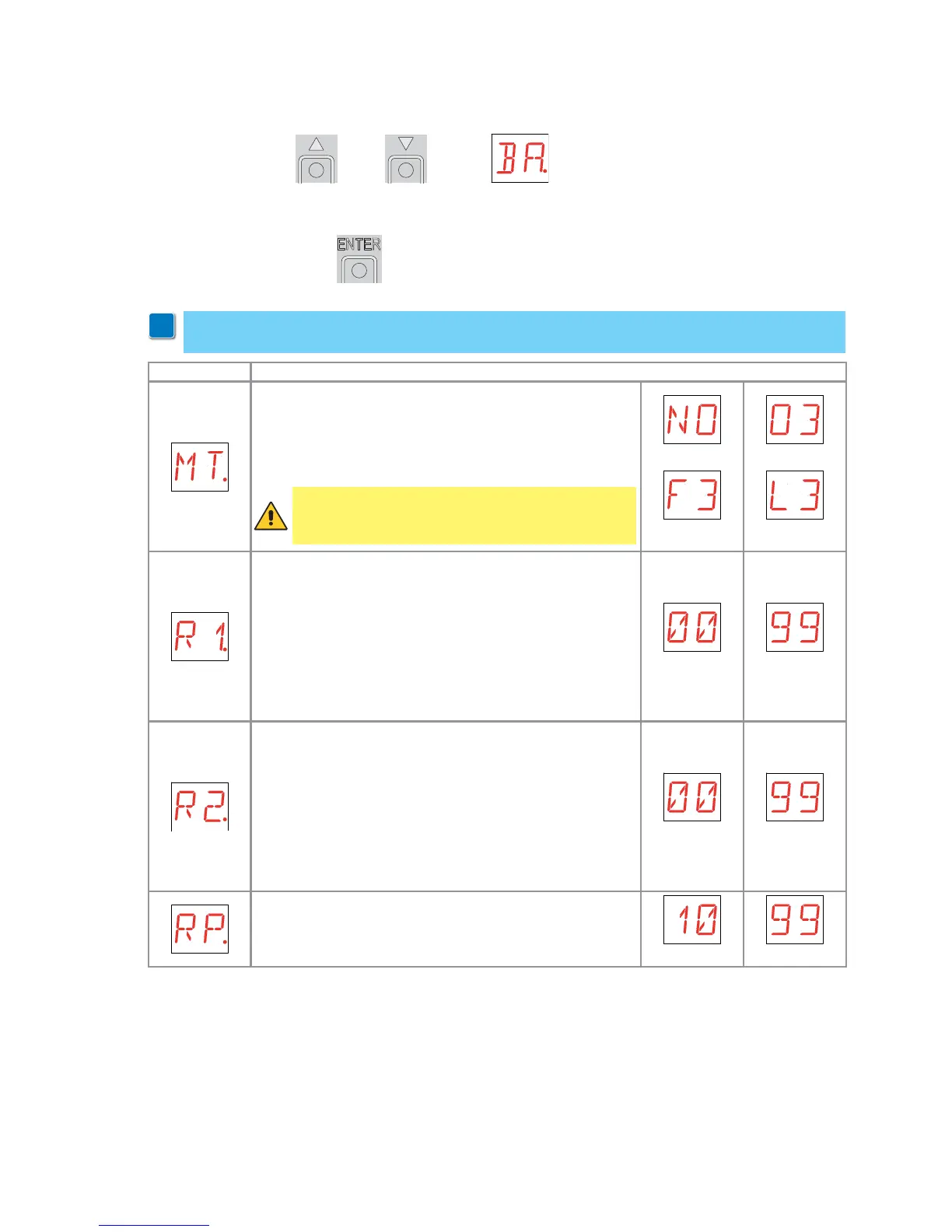
MT - Selection of automation type.
NO - None
O3 - OBBI-ARC
F3 - FACIL
L3 - LUXO
NONE
FACIL
OBBI-ARC
LUXO
R1 - Adjustment of motor 1 thrust on obstacles. [%]
The control panel is fitted with a safety device which, when
it detects an obstacle:
- in opening, stops the movement with a disengagement
operation;
- in closing, before the deceleration, inverts the move-
ment;
- in closing, during the deceleration, stops or inverts the
movement according to the type of limit switch installed.
0% 99%
R2 - Adjustment of motor 2 thrust on obstacles. [%]
The control panel is fitted with a safety device which, when
it detects an obstacle:
- in opening, stops the movement with a disengagement
operation;
- in closing, before the deceleration, inverts the move-
ment;
- in closing, during the deceleration, stops or inverts the
movement according to the type of limit switch installed.
0% 99%
RP - Adjustment of the partial opening measurement. [%]
Adjusts the percentage of operation in relation to the total
opening of the automation.
10% 99%
9.6 Second level menu - BA (Basic Adjustments)
- use the keys S and T to select the required function
- press the ENTER key to confirm
i
WARNING: the gap between the adjustment values of the parameters may vary according
to the type of automation.
WARNING: it is essential to set the type of automation
before making the adjustments.


 To Next Page