Page 13
HOW DO I CONNECT EVERYTHING UP?
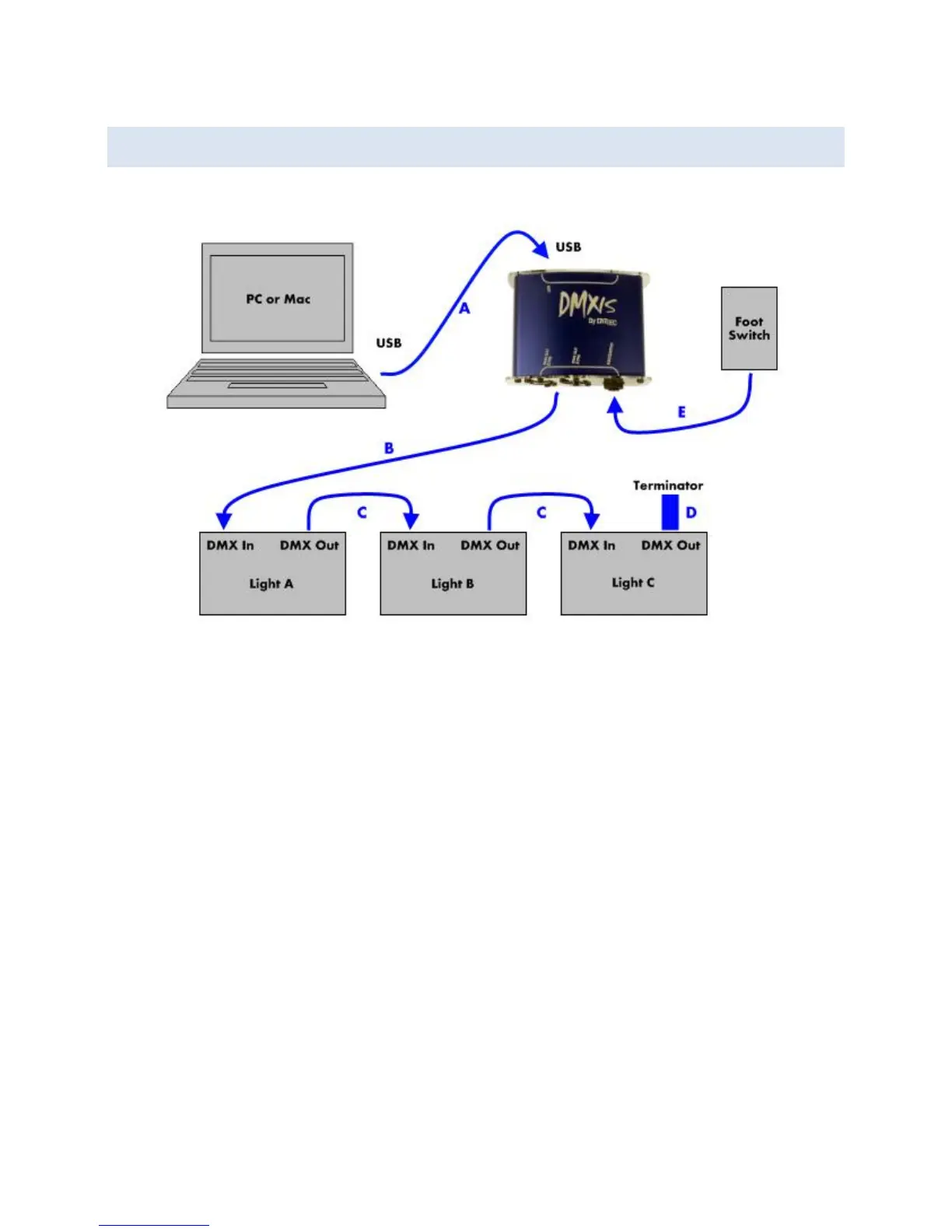
A: Connect the DMXIS hardware interface box to your computer with a USB cable.
B: Connect the DMX output (either 3 pin or 5 pin) of the interface box to the “DMX IN”
XLR socket on your first light fixture (Light A in the diagram).
C: Connect “DMX OUT” of the first fixture to “DMX IN” of the next fixture. Continue
connecting all remaining light fixtures together in a daisy-chain fashion.
D: Connect a DMX terminator plug to the DMX OUT of the last fixture.
E: Optionally connect a footswitch to the ¼” jack input on the DMXIS interface.
For reliable operation, use data-grade DMX cables to connect your lighting rig, not
microphone cable. Mic cable is not designed to carry digital signals, and if you run very
long cables around a stage, you could find that mic cables cause random problems with
your lights.


 To Next Page