Page 17
DMX OUTPUT CONNECTIONS
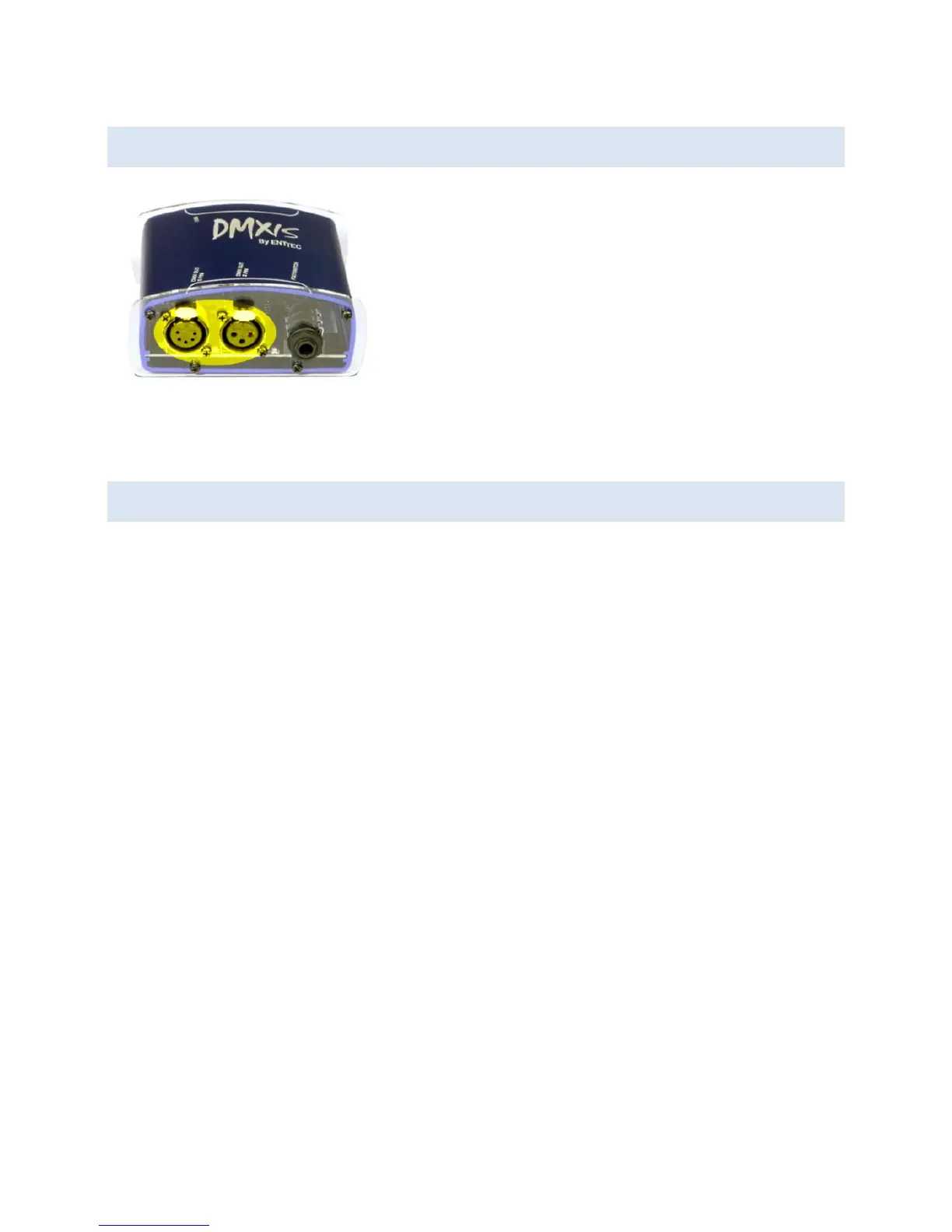
For your convenience the interface has two DMX
output sockets, a 3-pin XLR and a 5-pin XLR. This
allows you to connect your lighting rig using either 5-
pin or 3-pin XLR cables. (Although the official DMX
standard specifies 5-pin connections, many lighting
manufacturers routinely use 3-pin connections on
their most popular lighting fixtures).
Important: do not attempt to connect lights to BOTH the 3-pin and 5-pin output sockets
simultaneously. Use EITHER the 3-pin OR the 5-pin output.
LED STATES
There are four LEDs on the interface.
The two LEDs on the USB connector side should always be on. These indicate that the
interface is receiving power from the USB connection, and that the isolation circuit within
the interface is working correctly.
On the other side of the box, the LED between the XLR sockets should blink at a constant
rate whenever the DMXIS software (standalone or plug-in) is running. This indicates that
the interface is being controlled successfully by the software.
The remaining LED, next to the footswitch socket, gives you visual confirmation whenever
a footswitch press is detected.


 To Next Page