USER GUIDE - v1.0
ID: 5928937
9 |
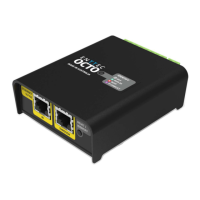
OCTO – 71521
Visit the ENTTEC website for
the latest version
Hardware features
Electrically insulated ABS plastic housing.
Forward facing LED status indicator.
Identify / Reset button.
Pluggable terminal blocks.
Link & Activity LED indicator built into each RJ45 port.
Easily extendable network – daisy chain up to 8 units if the output is in direct mode to ensure
sync between pixels. If using in Standalone mode, a maximum of 50 devices can be linked per
chain.
Surface mount or TS35 DIN mount (using provided DIN Clip accessory).
Flexible wiring configuration.
35mm DIN rail accessory (included in packaging).
LED status indicator
The LED status indicator can be used to determine the OCTO’s current state. Each state is as
follows:
Identify / Reset button
As the name suggests, this button can be used to either:
Identify pixels connected to a specific OCTO without the need to provide control data.
When the button is pressed in standard operation, all 8 output universes are set to output
the highest value (255) for 10 seconds before resuming their previous state. This is a good
test to ensure all outputs are connected and working as intended.
Node:
The timer will not restart when pressed consecutively.
Reset the OCTO (Refer to the Reset OCTO section).
LED Color OCTO Status
White (static) Idle
Green over White Direct mode data receiving
Black over White Standalone mode
Red over Green Multiple merge sources
Purple (static) IP conflict
Red Device in boot / error


 To Next Page
 Loading...