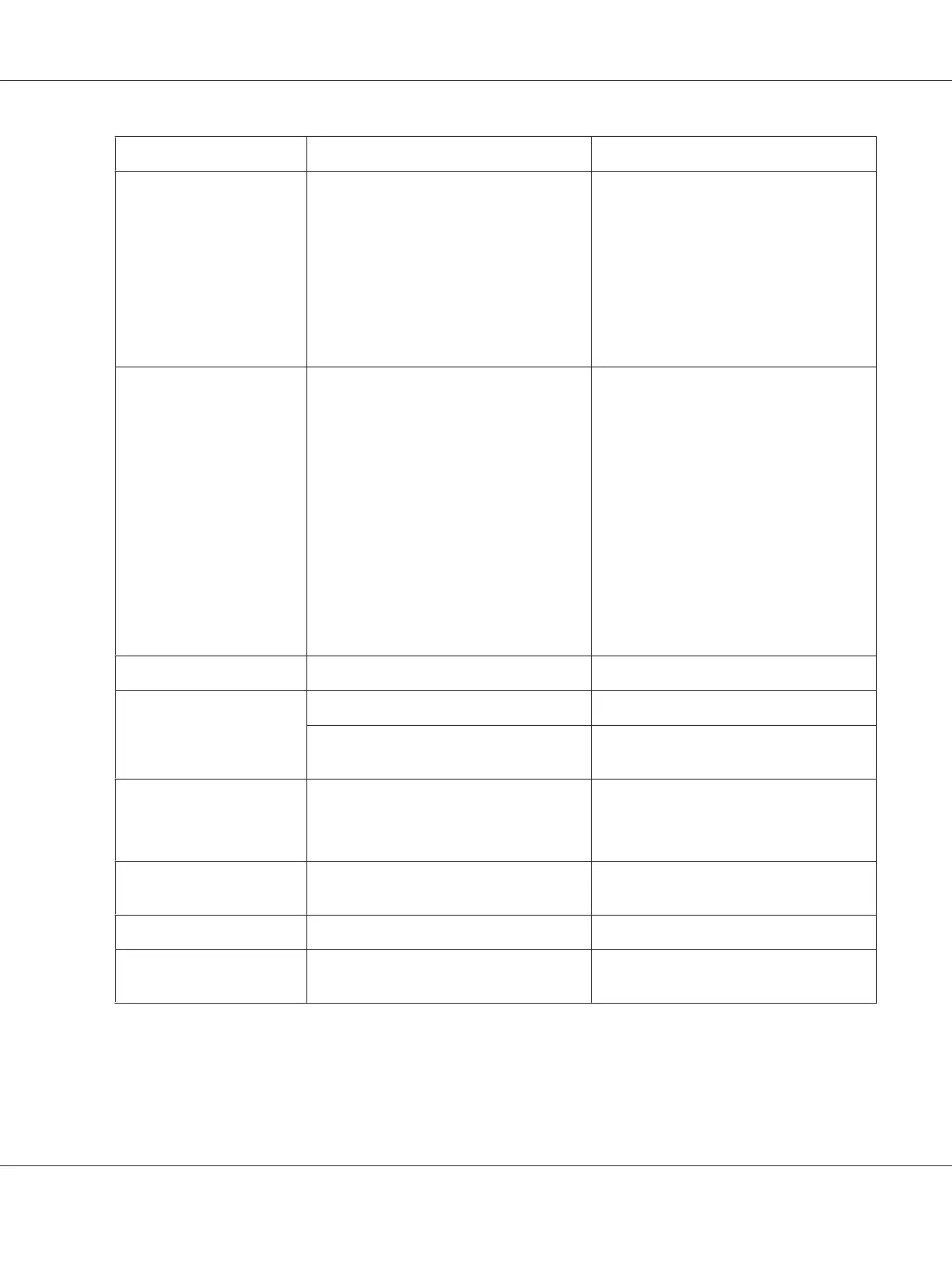
Message Problem Solutions
Nozzle maint error see
guide
Print head nozzles are clogged or
misaligned.
Perform the nozzle check and print head
cleaning.
& See “Checking the Print Head Nozzles”
on page 151.
& See “Cleaning the Print Head” on page
153.
Press the OK button to recover from error
status.
Printer error restart printer Printer error occurs. Note the error code and turn off the
printer.
If the error code is 0x01, 0x03, 0x04, 0x05,
0x08, or 0x0A, make sure no paper is
jammed in the printer.
& See “The Paper Jams” on page 173.
Then turn back on the printer.
If the error does not clear again, turn off the
printer again and contact Epson Service
Center.
& See “Contacting Epson Support” on
page 191.
Close maint box cover The maintenance box cover is open. Close the maintenance box cover.
Set maint box The maintenance box is not installed. Install the maintenance box.
The maintenance box is not correctly
recognized by the printer.
Reinstall the maintenance box or replace
it.
Replace maint box The maintenance box is at the end of its
service life.
Replace the maintenance box.
& See “Replacing a maintenance box” on
page 149.
Move ink lever down The cartridge lever is in the unlocked
position.
Move the cartridge lever to the locked
position.
Set ink cartridge The ink cartridge is not installed. Install the ink cartridge.
Set ink then move ink lever
down
The ink cartridge is not installed. Install the ink cartridge and move the
cartridge lever to the locked position.
B-310N/B-510DN User’s Guide
Using the Control Panel 131



 To Next Page