EasyManua.ls Logo

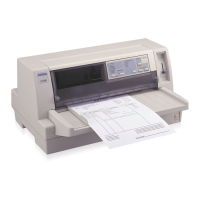
Epson LQ-670 - User Manual

Epson LQ-670
188 pages
Print Icon
To Next Page IconTo Next Page
Loading...
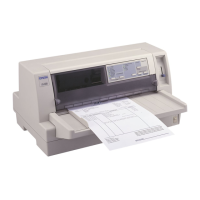
24-Pin Dot Ma trix Printe r
All rights reserved. No part of this publication may be reproduced, stored in a retrieval
system, or transmitted in any form or by any means, electronic, mechanical, photocopying,
recording, or otherwise, without the prior written permission of SEIKO EPSON
CORPORATION. The information contained herein is designed only for use with this
EPSON printer. EPSON is not responsible for any use of this information as applied to
other printers.
Neither SEIKO EPSON CORPORATION nor its affiliates shall be liable to the purchaser of
this product or third parties for damages, losses, costs, or expenses incurred by the
purchaser or third parties as a result of: accident, misuse, or abuse of this product or
unauthorized modifications, repairs, or alterations to this product, or (excluding the U.S.)
failure to strictly comply with SEIKO EPSON CORPORATIONs operating and
maintenance instructions.
SEIKO EPSON CORPORATION shall not be liable for any damages or problems arising
from the use of any options or any consumable products other than those designated as
Original EPSON Products or EPSON Approved Products by SEIKO EPSON
CORPORATION.
EPSON and EPSON ESC/ P are registered trademarks and EPSON ESC/ P 2 is a trademark
of SEIKO EPSON CORPORATION.
Microsoft and Windows are registered trademarks of Microsoft Corporation.
IBM is a registered trademark of International Business Machines Corporation.
General Notice: Other product names used herein are for identification purposes only and may be
trademarks of their respective owners. EPSON disclaims any and all rights in those marks.
Copyright © 1996 by SEIKO EPSON CORPORATION, Nagano, Japan.
Users Guid e
Proof Si
g
n-off:
Ya n o _______
Kim u ra _______
G ra d y _______
No rum _______
®
f-r01
LQ-670
R
Adonis Rev.C
A5 size Front
96/12/ 19 pass 5

Table of Contents

Other manuals for Epson LQ-670

Questions and Answers

  • P
    Pamela CookeJul 29, 2025
    How to fix no paper loaded error on my Epson LQ-670?
    • M
      Maria RobertsonJul 29, 2025
      If no paper is loaded for the selected paper source on your Epson printer, you can try: * Loading paper into the printer, which should turn off the Paper Out and Pause lights, allowing printing to resume. * Removing and reloading the paper correctly. * Setting the paper release lever to match the type of paper loaded.
  • J
    Jennifer WatkinsAug 2, 2025
    What to do if Epson Printer has an unknown error?
    • A
      Anthony BaileyAug 2, 2025
      If your Epson printer displays an unknown error, turn it off and leave it off for several minutes. Then, turn the printer back on. If the error happens again, you should contact your dealer.
  • S
    shaunhuertaAug 6, 2025
    What to do if single-sheet paper is not fully ejected from my Epson printer?
    • R
      rhondariddleAug 6, 2025
      If single-sheet paper is not fully ejected from your Epson printer, remove the paper by hand. This action should turn off the Paper Out light.
  • C
    castanedastefanieAug 10, 2025
    Why does my Epson LQ-670 say no paper is loaded?
    • W
      William RivasAug 11, 2025
      The printer indicates that no paper is loaded because there is no paper available for the selected paper source. To resolve this, load paper into the Epson printer. The Paper Out and Pause lights should then turn off, and the printer will resume printing.
  • M
    Mary CurtisAug 15, 2025
    What to do if Epson LQ-670 Printer paper is not loaded correctly?
    • D
      Desiree KaiserAug 15, 2025
      If the paper is not loaded correctly, remove and reload your paper correctly.
  • M
    Miranda BowersAug 19, 2025
    What to do if Epson LQ-670 single-sheet paper is not fully ejected?
    • H
      hedwardsAug 20, 2025
      If single-sheet paper is not fully ejected from your Epson printer, remove the paper by hand. The Paper Out light should then turn off.
  • M
    Michael Mclaughlin Jr.Aug 23, 2025
    What to do if an unknown printer error has occurred on my Epson LQ-670 Printer?
    • E
      elliottashleeAug 25, 2025
      If your Epson printer displays an unknown error, try turning it off, waiting a few minutes, and then turning it back on. If the error continues, no other solution is available.

Summary

Declaration of Conformity

Safety Information

Important Safety Instructions

Essential guidelines to prevent injury, electric shock, and damage to the printer.

Chapter 1: Setting Up the Printer

Unpacking the Printer

Instructions on how to carefully unbox the printer and identify included items.

Chapter 2: Setting Up Your Software

For Windows 95 Users

Guide for installing printer drivers and software on Windows 95 systems.

For Windows 3.1 Users

Guide for installing printer drivers and software on Windows 3.1 systems.

For DOS Program Users

Instructions for installing printer drivers for DOS applications.

Chapter 3: Paper Handling

Chapter 4: Using the Control Panel

Basic Control Panel Functions

Overview of primary control panel features, including lights and buttons.

Advanced Control Panel Functions

Details on accessing advanced modes and features via the control panel.

Default-Setting Mode

Guide for accessing and changing printer default settings.

Chapter 5: Using Printer Options

Chapter 6: Maintenance and Transportation

Replacing the Ribbon Cartridge

Step-by-step guide for replacing the printer's ribbon cartridge.

Chapter 7: Troubleshooting

Using the Error Indicators

How to interpret control panel lights and beep patterns for error diagnosis.

Problems and Solutions

Categorized solutions for common issues like power, paper, and print quality.

Clearing a Paper Jam

Detailed instructions for safely removing jammed paper from the printer.

Appendix A: Specifications

Appendix B: Command Lists and Character Tables

Epson LQ-670 Specifications

General IconGeneral
TypeDot Matrix Printer
Print MethodImpact dot matrix
Number of Pins24
Print Resolution360 x 360 dpi
Noise Level55 dB(A)
Paper Handlingenvelopes, labels
InterfaceParallel
EmulationEpson ESC/P
Paper PathFriction feed (front or rear), push tractor (rear)
Paper Width4 inches to 13.6 inches (101.6 mm to 345 mm)

Related product manuals