Netball Options
Stop Clock at 1:00 ? Y/N
If Yes, the clock will stop as soon as it counts down to 1:00 minute remaining. Since the
clock is stopped there will be no siren and the display will show 1:00.
Clear Clock at 1:00 ? Y/N
If Yes, then at 1:00 the display will go blank and the clock will keep running. The siren will
or will not sound depending on the siren setting.
Sound siren at 0:00 ? Y/N
If Yes, the siren will sound when the clock reaches 0:00, regardless of the previous
setting.
NBL Mode
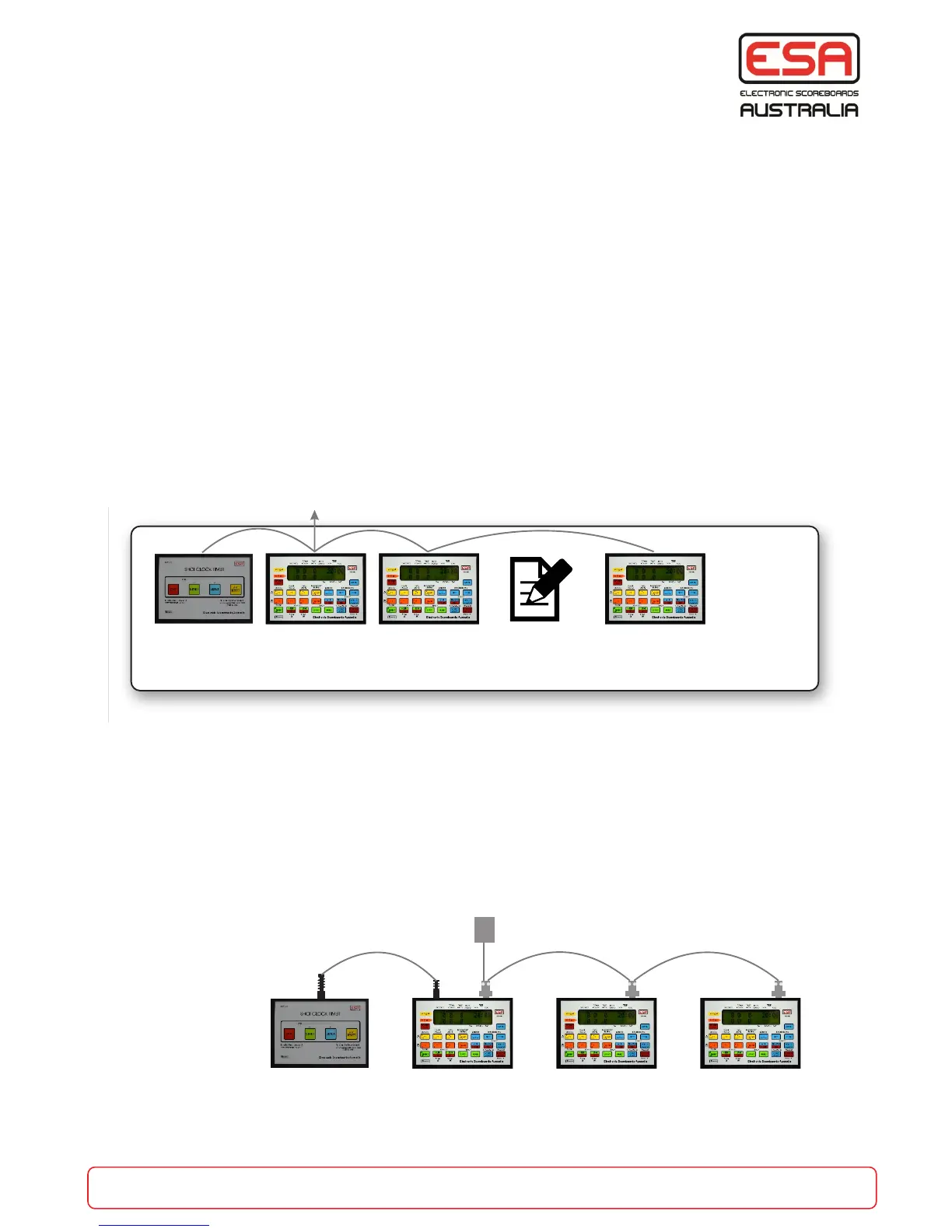
When required by FIBA or NBL regulations, 3 CC-10 Control Consoles can be connected
together to become a multi-person score bench.
Regulation layout for a 6 person score bench.
Using the supplied cable (CCC-NBL-x cable) connect the CC-10s as follows:
1. CC-10 is the ‘Master’ console and is programmed in standard ‘Basketball’ game.
2 & 3. CC-10s are the ‘Extra’ consoles and are programmed to ‘NBL Extra’ game type.
4. Is the Shot Clock controller and plugs into the Master console.
See instructions for programming on page 12 & 13. (NBL Extra game type enabled and function
selected).
Connection of CC-10 and Shot Clock
The CC-10s MUST be connected as
shown below with the supplied cable.
part of the game
esa.com.au 16
Netball and NBL Extra
Master
Time Keeper
Set to
Basketball
Chairperson
Set to NBL
Extra
Visual Scorer
Set to NBL
Extra
Shot Clock
Operator
To wall or bench socket (score board)
21 34
Time Keeper Chairperson
(Time Outs,
Subs, etc)
Paper Scorer Visual Scorer Additional
Scorer
Shot Clock
Operator
To Score Boards
2
3
4
1


 To Next Page