part of the game
esa.com.au 34
Radio Scoreboard Accessories
BP-7, BC-7, CCC-1, CC-10-R, CC-10-PS
Battery Bag (BP-7):
Black zippered bag with 5 pin male “XLR” connector in side pouch, containing a 12V 7AH gel-cell type
battery.
Internally, wiring to battery red/black wires, red wire coupled with fuse holder containing 5A glass barrel
fuse.
Internally, connecting lugs on red/black wires to suit battery terminals.
Battery Charger (BC-7):
12V 600mA Sealed lead acid automatic battery charger with 5 pin female “XLR” connector, corresponding
to the male “XLR” connector on the battery bag.
DO NOT plug this into a scoreboard wall plate.
Connects easily to a standard power outlet.
Control Console Cable (CCC-x):
Grey lead (1 or 3 metres) connects battery bag to control console for wireless use.
Female “XLR” connector one end, DB9 male connector other end.
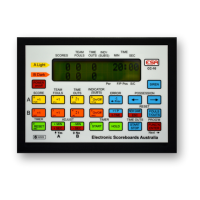
Control Console (CC-10-R):
Model ESA-CC10, IA-CC10, LGE CC6 or Ledtronix CC6.
Scoreboard control console with wireless functionality.
Power Pack (CC-10-PS):
12V Power Supply, connects easily to a standard power outlet.
Using the battery charger:
1. Unplug the female “XLR” connector from the battery bag.
2. Plug the female “XLR” connector on the battery charger into the male “XLR” connector on the battery
bag.
3. Connect the 240V plug to a standard powerpoint and switch on the powerpoint.
The RED light on the battery charger will glow when charging battery.
The GREEN light on the battery charger will glow when the battery is fully charged, and the
automatic battery charger will regulate the charging power to maintain the battery in a charged state.
When the battery is not in use, please keep it charged and connected to the powered on battery charger.
The battery will suffer damage if it is stored for extended periods of time while in a “discharged” state.
Using the battery bag with a Control Console:
1. Unplug the female “XLR” connector on the battery charger from the male “XLR” on the battery bag.
2. Plug the female “XLR” connector on the control console cable into the male “XLR” connector on the
battery bag.
3. Connect the Control Console Cable DB9 male connector to the Control Console and fasten screws
to secure.
Using the CC-10-PS power pack with a Control Console:
1. Connect the DB9 male connector on the CC-10-PS to the Control Console and fasten screws to
secure. Plug the power pack into a standard powerpoint.


 To Next Page