DOKP4M4060 3.0 -11- © ESAB/TBi 2021
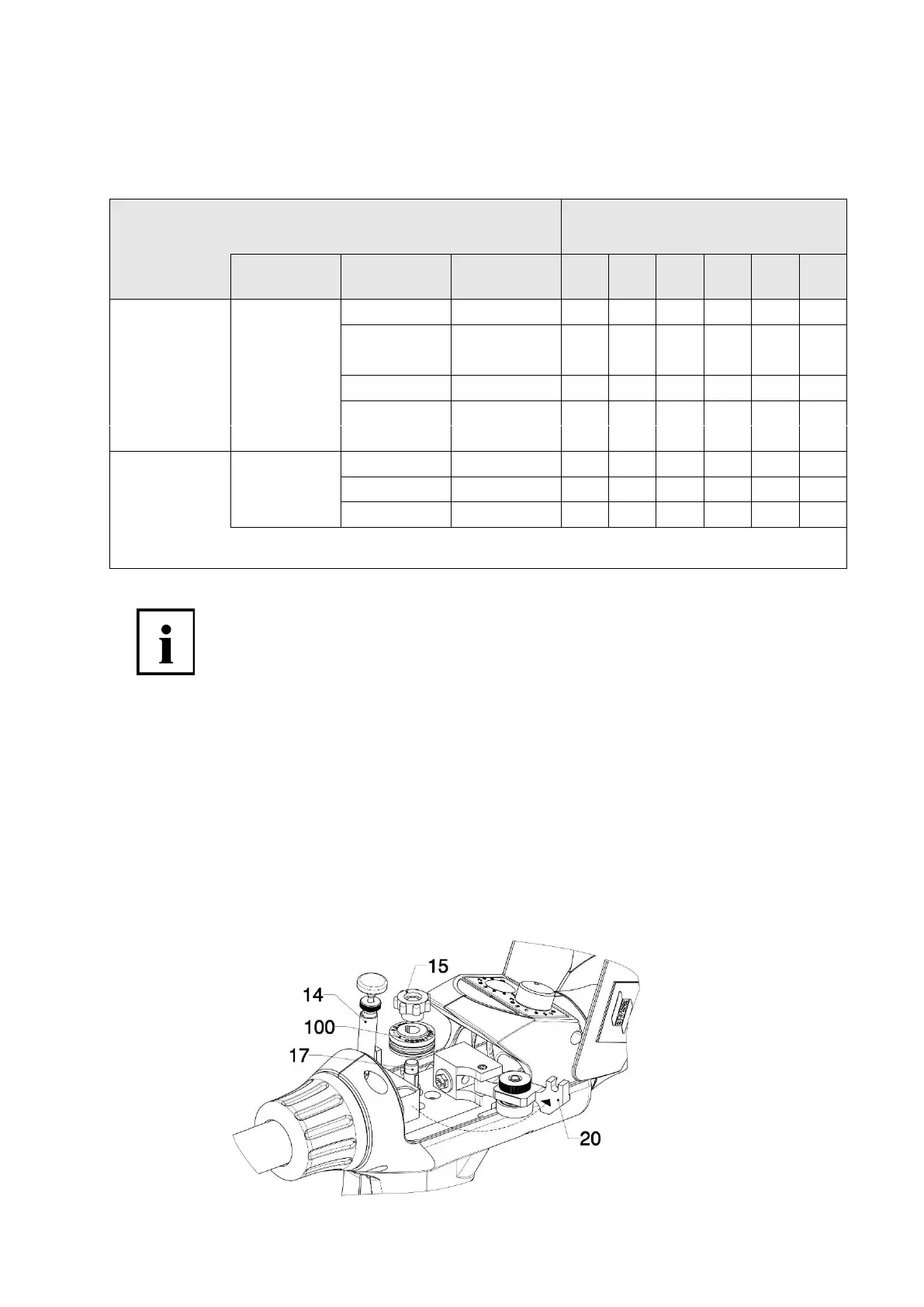
3.3.2 Installing and changing the drive roll
The wire feed will only function properly if the right drive roll is used. The drive roll must be selected according to
the wire material used and the wire diameter in accordance with Table 1. Please refer to our current list of spare
parts, if necessary. (see section 6)
Table 1: Drive rolls for ESAB MXH PP
Drive roll in bold = standard version
Note:
To ensure that the torch functions correctly, only
original drive rolls specified for the ESAB MXH PP should be used!
Perform the following steps to change the drive roll.
1. Open cover (4), loosen tension spring holder (14) from locking device and flip up to open.
2. Open pressure roll holder (20) and fold to the side.
3. Loosen and unscrew knurled nut (15). If necessary, carefully remove the existing drive roll (100) from
the drive shaft (do not use any tools!)
4. Push the new drive roll (100) on to the shaft (17); in doing so the marking with the required wire
diameter must be facing upward.
5. Then put the knurled nut (15) back on and tighten by hand.









 To Next Page