6
2.2MenuOptions
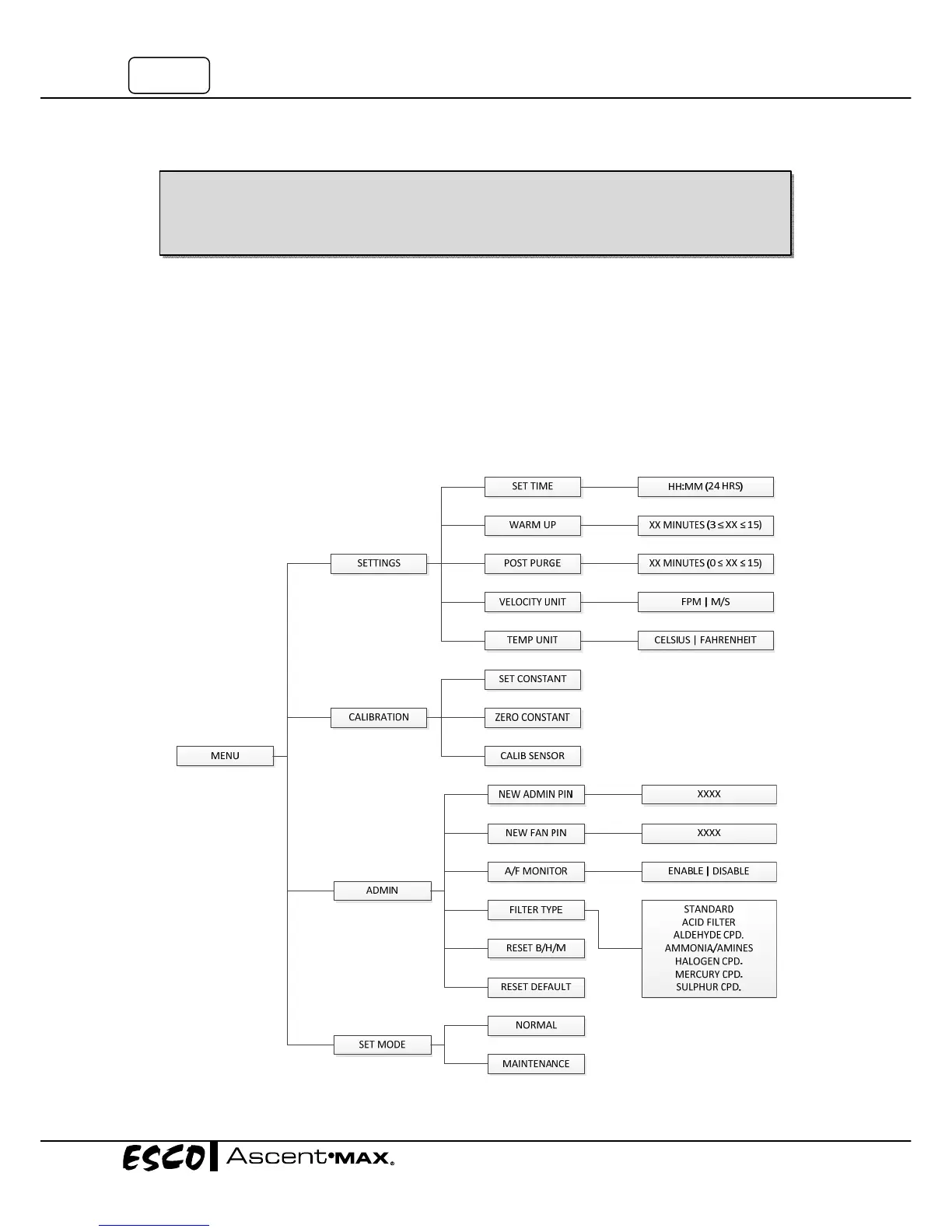
Pleaserefertothefollowingdiagramforcompletereferencetoallmenuoptionsavailable.
PressMENUbuttonandentertheADMINPINtoenterthemenu.
Inthemenuoptions:
• PressUPorDOWNbuttontomovethroughthemenuoptions.
• PressSETbuttontochoose
andproceedtothenextstep.
• PressMENUbuttontocancelandreturntothepreviousstep.
Exitmenuoptionsaftermakinganychangesinordertopreventunauthorizedaccesstothemenu.
Whenyouareenteringmenuoptions,thealarmwillsoundtoindicatethatthemicroprocessoris
notmonitoringtheoperationofthehoodandassuchwillnotgiveairflowalarms.Nofurther
warningswillbegiven.Therefore,itishighlyrecommendedthattheusersettheADMINPIN,which
will
restrictunauthorizedaccesstothemenu.ThedefaultADMINPINfromthefactoryis0009.


 To Next Page