18
DVD (DVD/CD-Player)
The DVD player supports the following formats: DVD, DVD-R/RW, DVD+R/RW, VCD, CD, CD-R/RW, MP3.
Open the DVD application by tapping „ “ in the main menu or by pressing the „DVD“ button on the
device.
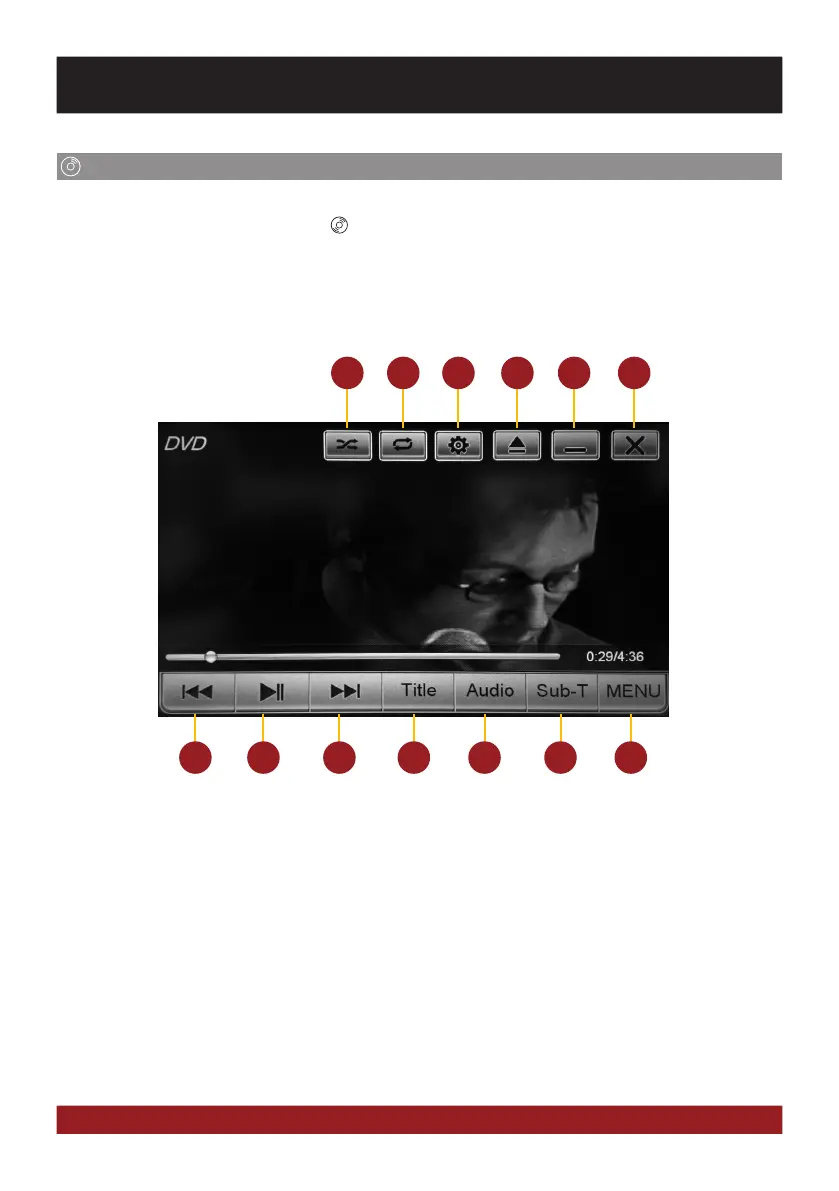
Tap during DVD playback on any spot on the display to open the DVD menu. When you playback a
CD or MP3-CD, the user interface is different.
7
1
8
2
9
3
10
4
11
5
12
6
13
1. Shuffle
2. Repeat (chapter, track, all tracks, Off)
3. video settings
4. Eject inserted adisk
5. Minimize, playback resumes
6. End DVD Playback
7. Previous chapter
8. Play / Pause
9. Next chapter
10. Title menu of the DVD
11. Change language (if available)
12. Change subtitles (if available)
13. DVD menu of the DVD
BASIC FUNCTIONS



 To Next Page