14
BLUETOOTH™
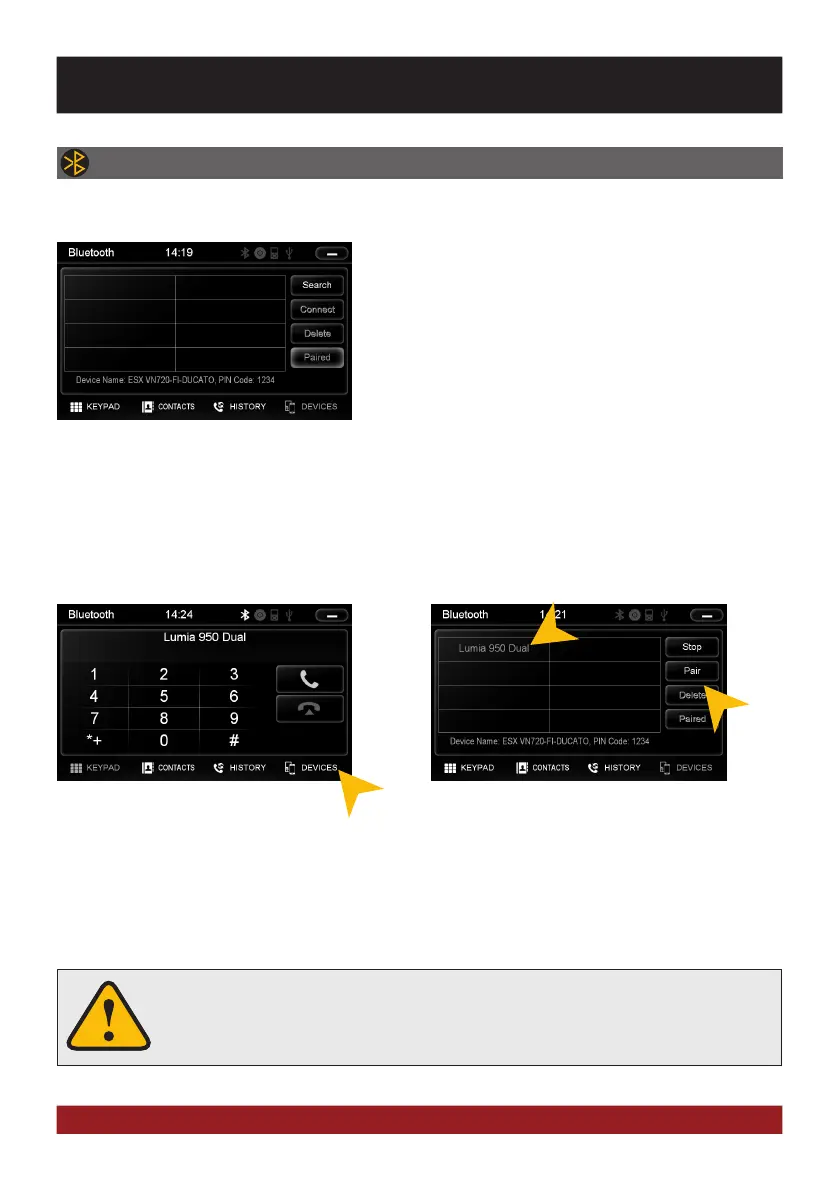
Open the Bluetooth™ application by tapping on „Bluetooth™“ in the main menu.
PAIRING
Select your device from the device list in the phone and enter the PIN code 1234. Alternatively, you can also
search your mobile phone under „Devices“ and connect to the device. Once you have connected your phone
to the device, the pairing starts automatically as soon as the two devices are within range. Leave Bluetooth
activated on the mobile phone. If a mobile phone has already been added to the list of Bluetooth devices, you
can also manually pair the devices. The range for a satisfactory connection is about 10 m.
At first pair the devices, if necessary refer to the manual of your
mobile phone. Open the „Settings“ menu on your mobile phone
and open the Bluetooth settings.
Turn on Bluetooth and then search for compatible devices. The
Bluetooth name of the device will be displayed.
To disconnect the two Bluetooth devices,
tap on „Devices“.
Choose the mobile phone from the list and
tap „Disconnect“ or quit the Bluetooth con-
nection on your phone.
Alternatively, the phone can also be deleted from the list, but after that, the automatic pairing is disabled and
the mobile phone must be re-paired with the device. To delete the mobile phone from the list, select the name
and press „Delete“. This is only possible if the devices are not currently paired.
DISCONNECT
The paired mobile phone has always priority and a phone call mutes always the cur-
rently playback of media (navigation, radio, audio, DVD, etc.). This applies both for
incoming calls as well as outgoing calls.
BASIC FUNCTIONS



 To Next Page