39
6
7
8
2
3
4
5
1
9
10
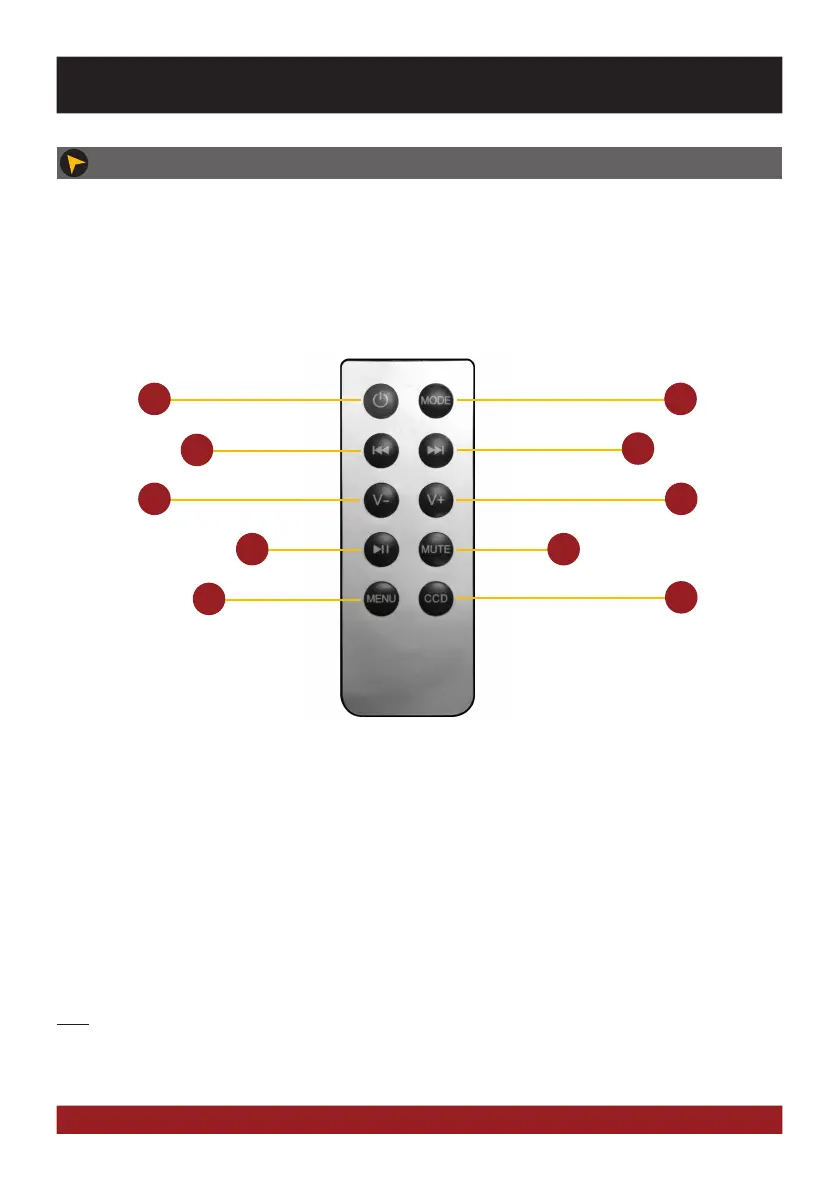
INFRARED REMOTE
The included remote control allows you to control some basic functions on the device. Point directly with the
front of the remote control to the screen of the device. The distance should not be more than 3 meters. If you
use the remote control for the first time, you have to remove the safety foil in the battery compartment on the
back.
Here is an overview of the basic functions of the remote control, which can be different depending on the cur-
rently running application.
Note: If the battery (button cell) is discharged, replace it only with a new one of the same type (CR2025).
Please do not throw used batteries into household waste, bring them to a dealer that offers a proper dis-
posal, when you purchase a new one.
1. Standby. The playback stops and the screen
gets dark
2. Skip to previous title
3. Volume down
4. Play / Pause
5. Open the main menu
6. Switch manually between the sources:
AV / DAB+ / Radio / Audio Player / TV
7. Skip to next title
8. Volume up
9. Mute On/Off
10. Switch manually to the rear view camera. Press
CCD to go back to the previous screen again
ADVANCED OPERATIONS



 To Next Page